Comparison · 11 min read
The best YouTube tools for business owners
The best YouTube tools for a business owner are PreFilm, vidIQ and 1of10, in that order. I ranked them on whether each tool helps YouTube bring in customers, leads and booked sales calls rather than just views, and PreFilm came first because it starts from what you sell. vidIQ has the best analytics, and 1of10 pioneered outlier research.
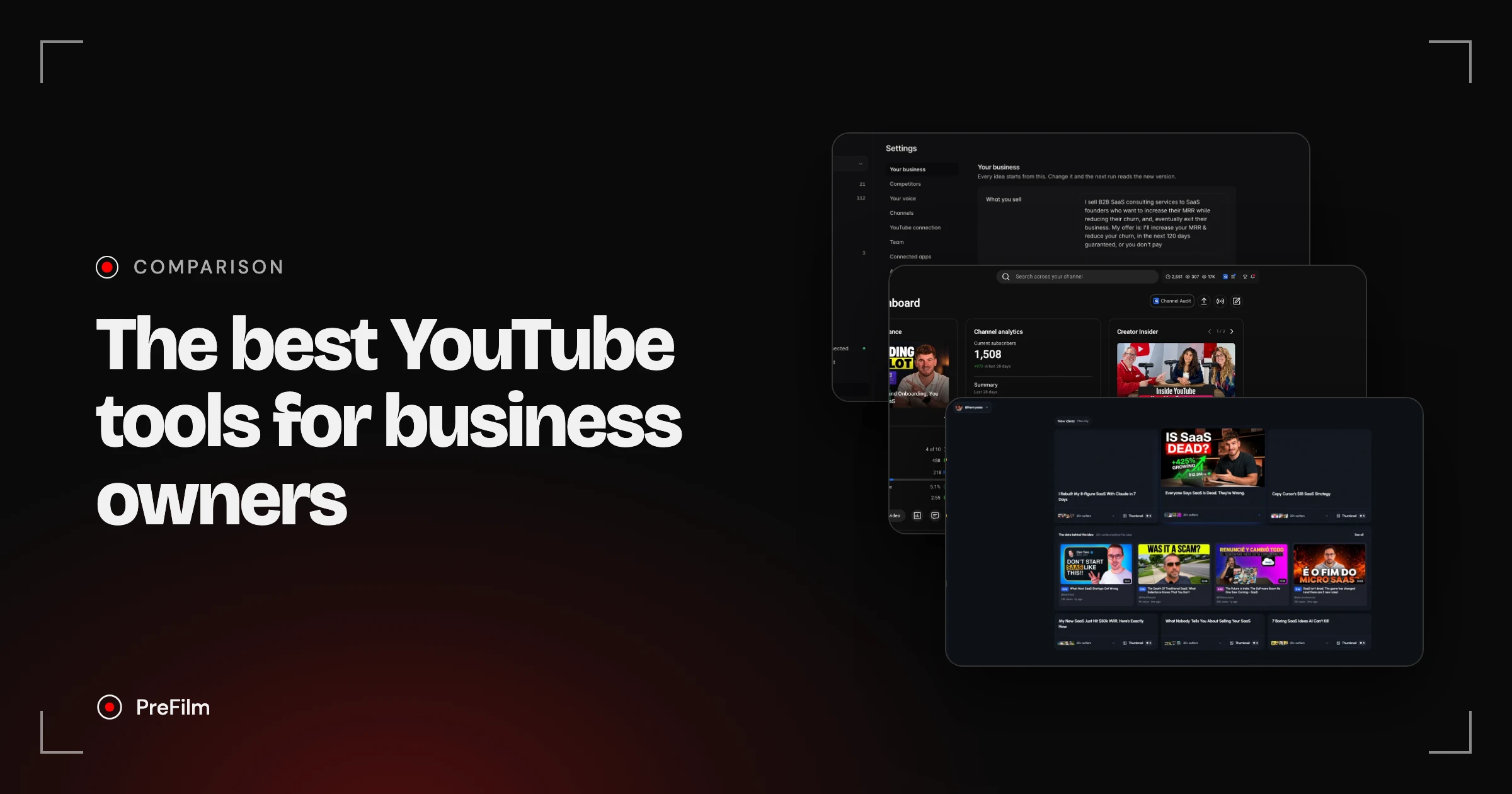
Most lists of YouTube tools for creators are about getting more views. That's not how I use YouTube. I use it to get customers, and I did it on my second channel in September and October 2026, when four videos did 29K, 18K, 20K and 7K views on a channel with 1,500 subscribers. I'm Henry Purchase and I built PreFilm, the YouTube growth tool for business owners, so weigh my first pick with that in mind. Below is what I like and don't like about each tool, from testing all three on my own channel. Every price was checked on each tool's own site on 2 November 2026.
How I picked the best YouTube tools
I picked the best YouTube tools by asking whether each one helps a business owner turn videos into customers, not just views. A video can do 100K views and never bring in a single enquiry if the wrong people are watching. So I looked at five things:
- Does it understand your business? If I'm paying for software, I want it to know what I sell and who buys it.
- Does it hand you ideas, or make you dig? A list of outliers (videos that got far more views than their channel normally gets) is a start. Ideas built around your offer save hours.
- Is the data any good? Some decisions need numbers YouTube doesn't show you.
- Does the Chrome extension help? A lot of research happens while you're browsing YouTube itself.
- Can you use it in Claude or ChatGPT? An MCP (Model Context Protocol) server lets an AI assistant use a tool's features from the chat. I think our workflows are moving to chat, so this matters.
The best YouTube tools at a glance
Here's how the three compare on what matters to a business channel, from my testing and each tool's own pricing page.
| Tool | Built for | Best at | Weakest at | Starting price | Claude and ChatGPT |
|---|---|---|---|---|---|
| PreFilm | Customers for your business | Ideas built from what you sell | Fairly new | $1 for 7 days, then $49 a month | YouTube MCP on every plan |
| vidIQ | Views and subscribers | Analytics inside YouTube Studio | Doesn't understand your offer | Free plan; Boost $19 a month | MCP on every plan, using AI credits |
| 1of10 | Views | Outlier research and the Chrome extension | Outliers not tied to your business | Free plan; Basic $19 a month | MCP on Pro ($89 a month) and Ultra |
Find the videos your buyers already watch
Find my winning videos1. PreFilm: the tool that starts from what you sell
PreFilm is my first pick because everything in it is aimed at getting you customers from YouTube. Other tools are built to get you more views and subscribers. As a business owner, you don't necessarily care about either. You care about making money.
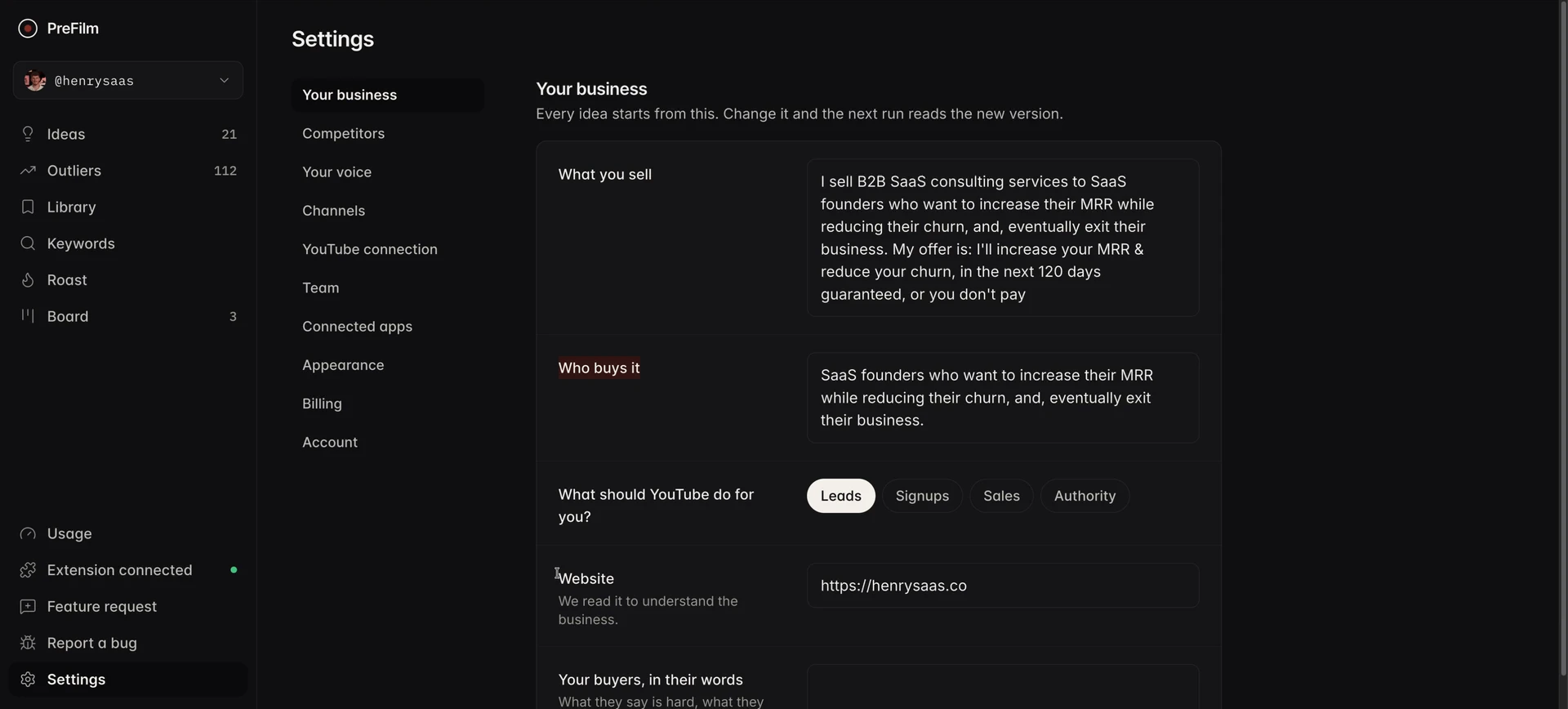
When you go through its onboarding, PreFilm learns your business: what you sell and who buys it. It reads your website, then goes through the transcripts of up to 20 of your past uploads, to understand what you do and don't say. Then it hands you video ideas it believes will get your business customers, split into ideas about to take off, ideas people are already searching for, and your own ideas. I really like this, because it hands me the ideas on a plate.
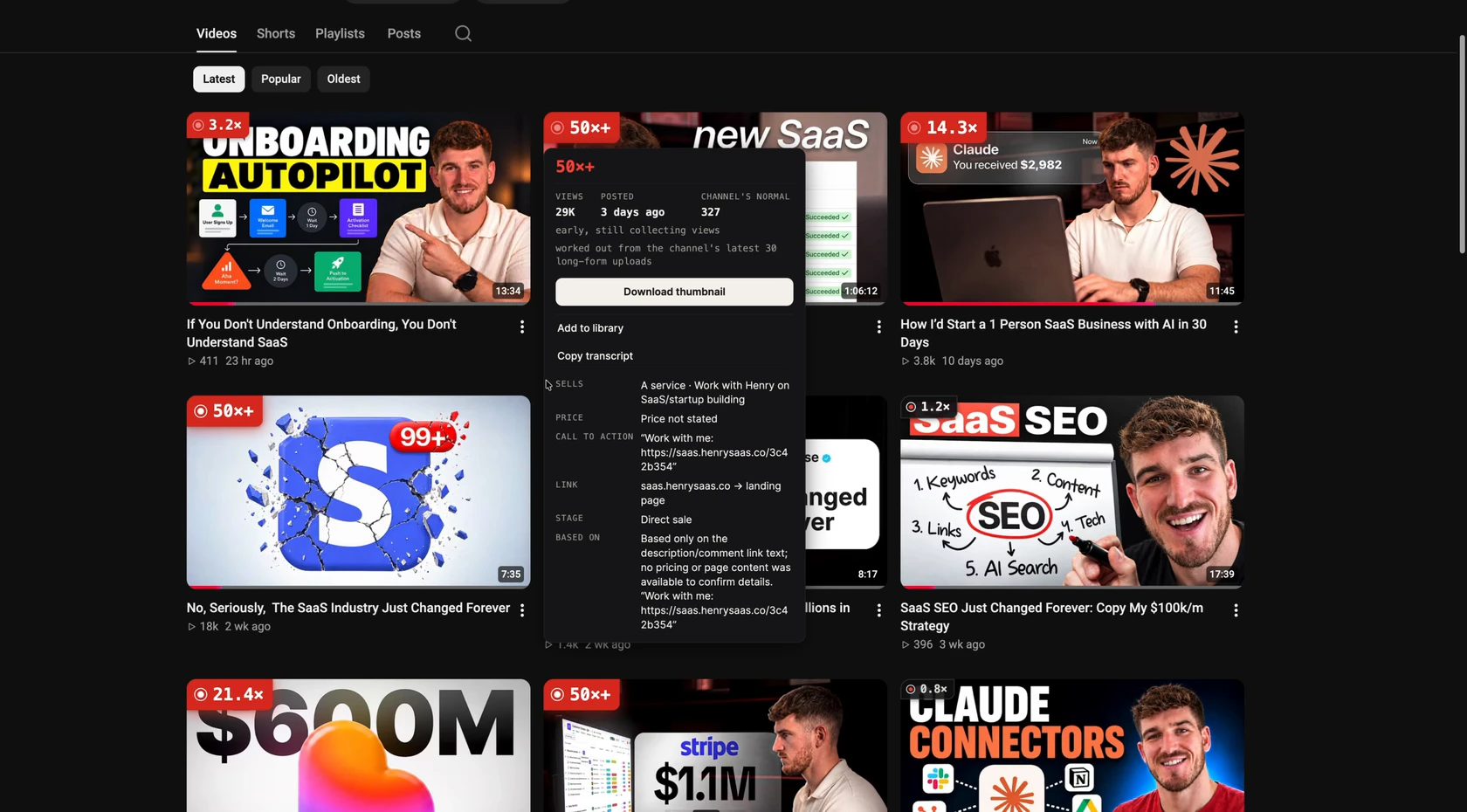
PreFilm also has a Chrome extension. On any channel's Videos tab, it shows which videos are outliers, so which ones beat that channel's normal. Other tools do that too. What's different is that it can read the offer a video is pushing: what the channel sells, the price if it's stated, the call to action and where the link goes. When I'm researching competitors, I want to know what they're selling, not just what kind of videos they make. On one of my own videos, it found a service, no stated price and a Work with me link going to a landing page.
The third part I use most is the YouTube MCP, which is included on every plan. From Claude, I can come up with ideas, see what's ranking on YouTube, pull a video's transcript, write a script or manage my channel. In my video, I asked Claude to tell me which videos rank for a keyword and then pull the script of the top one, and it did both from the chat.
What I don't like about PreFilm:
- It isn't the cheapest. Monthly plans start with $1 for 7 days, then Creator is $49 a month. There are definitely cheaper options out there, and everything's on the pricing page.
- It's fairly new. It moves fast, but you can tell.
- It's new. I do most of my own work through the MCP rather than the dashboard.
- It isn't for complete beginners. PreFilm works best once you've published a few videos and know who you're making them for. If you're brand new to YouTube, start with our free YouTube tools and the guides on the PreFilm blog, then come back.
2. vidIQ: the best analytics inside YouTube Studio
vidIQ is my second pick, and the one I'd point you to if you want detailed data. Its promise is getting more views and subscribers on YouTube, which isn't all about business. But it's a very good tool, and a lot of people use it: its Chrome extension has 4,000,000 users, according to its Chrome Web Store listing.
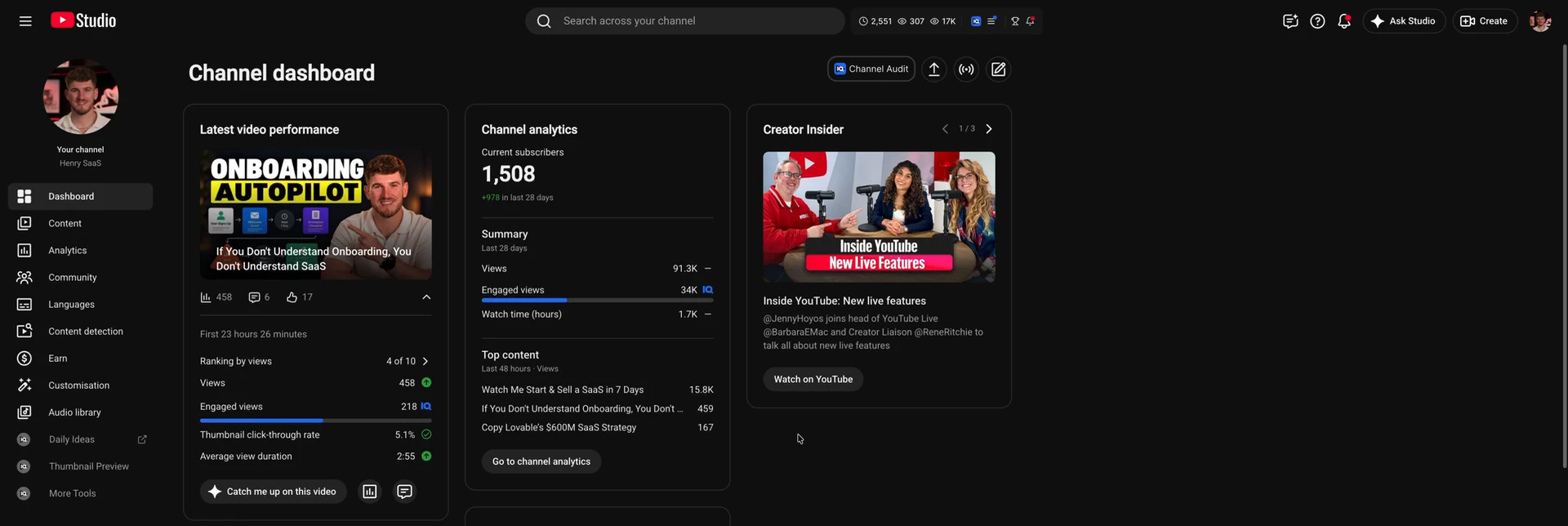
I love the vidIQ Chrome extension. When you go into YouTube Studio, it adds a lot more detail about your channel, including extra tabs in your analytics. I think the analytics YouTube Studio gives you on its own are quite poor, and there are things I want to know that I just can't get from YouTube. For data inside YouTube that you can use to make decisions, vidIQ is the best tool I've used. It even shows engaged views, which I'd never seen anywhere until vidIQ did it. On my second channel, it showed 34K engaged views out of 91.3K views in 28 days.
Inside vidIQ itself, my favourite part is a little hidden: the Research page. It suggests keywords and then finds outlier videos for them, and the ones it found for me were very relevant to what I do. Click one and you get quick actions, like remixing the title for your own channel. You can tell they've really thought through the workflow from finding an outlier to turning it into your next video. vidIQ is also pushing you more and more towards its chat. When I asked about my latest upload, it compared the video with the channel's median at the same age and read the comments before suggesting a next step.
What I don't like: vidIQ doesn't really understand your offer. Its ideas are good, but I'm not sure they'd lead to new business, and that's what would move it up my ranking. It's also a little complicated to get around.
On price, vidIQ is cheaper than PreFilm. Its plans page lists a Free plan with 150 AI credits a month, Boost at $19 a month or $199 a year, and MAX at $49 a month or $468 a year, at US list prices (local pricing may vary). Its MCP works on every plan, including Free. The catch is that tool calls use your AI credits, so if you use it a lot, you can run out of credits and rack up a bill quickly. For the full comparison, see PreFilm vs vidIQ.
See what your buyers already watch
Find my winning videos3. 1of10: the pioneer of outlier research
1of10 is third. Its homepage calls it the fastest way to get more views on YouTube, so again it isn't built for business. But they really were the pioneer of the whole 1-of-10 idea: finding the videos that massively beat their channel's normal. And they still do that very well.
The best part is the 1of10 Chrome extension. It puts outlier scores and rankings on every video as you browse YouTube, and it's super valuable for working out what's winning on YouTube right now.
The idea generator is the other part I rate. When I ran it for my second channel, the ideas were very, very good. Each one is backed by 20+ outliers and shows the videos behind it (the ones behind the idea I opened scored from 2.3× to 4.5×), I could download the thumbnail, and I could move an idea into a pipeline to make it.
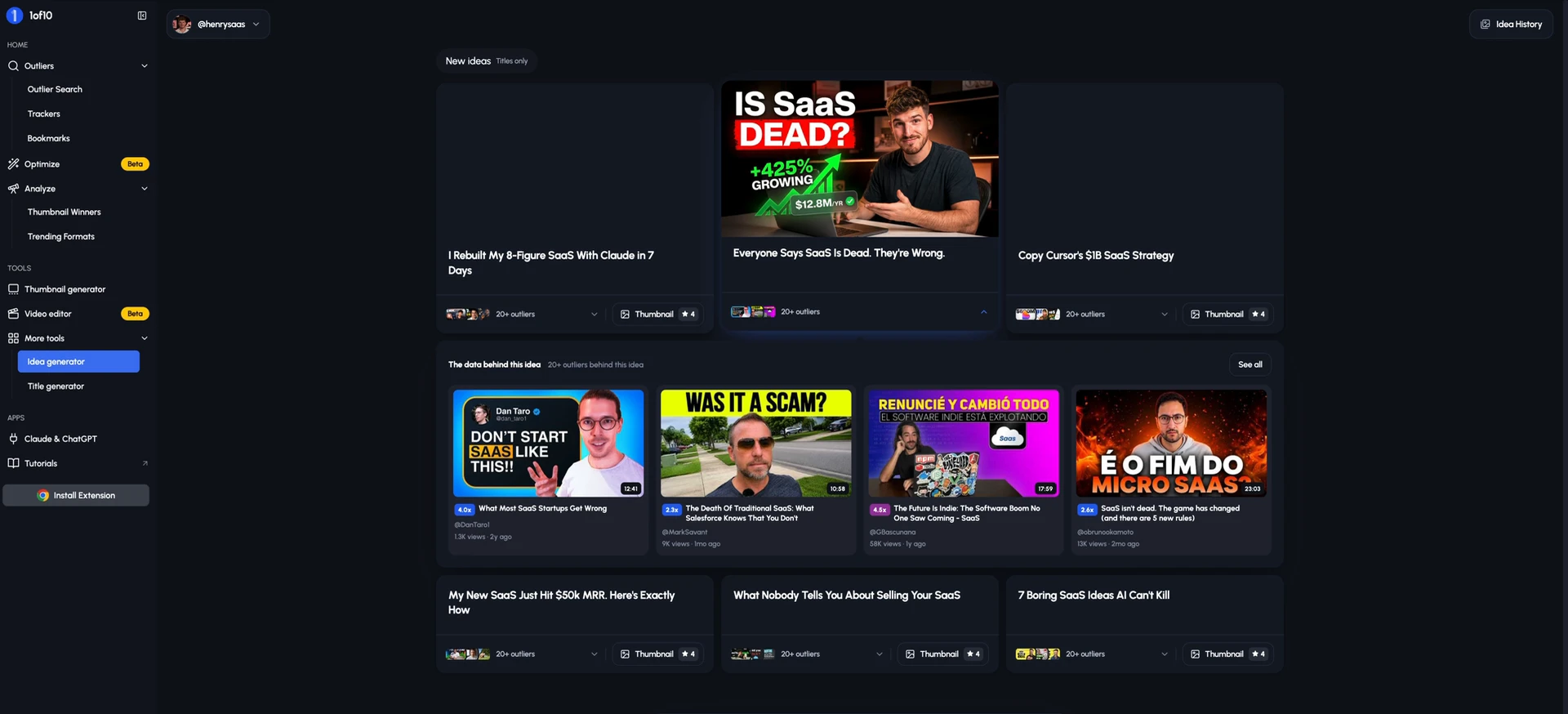
What I don't like about 1of10:
- Its home screen doesn't understand your business. With my channel connected, the outliers it showed me had nothing to do with my niche, or even an adjacent one. I want outliers I can use for inspiration, so it falls a little short here.
- The thumbnail generator isn't great. To be honest, the results weren't good, and every thumbnail costs credits. The pricing page puts it at four credits a thumbnail.
- The Claude and ChatGPT access is expensive. MCP and API access start on Pro, at $89 a month, or $69 a month billed yearly. If you use a lot of credits on top, it can get very expensive.
- It was a little buggy. I tried Optimize, its video repackaging feature, which finds videos whose title or thumbnail is holding them back and generates new packaging. I really like the idea, because packaging is one of the most important things on YouTube. But five minutes later, the new packages still hadn't appeared.
1of10 does have a free plan, with 60 AI credits a month and five results per outlier search, and its research tools never use credits. Basic is $19 a month, or $15 a month billed yearly. It's best for business owners who already have some YouTube experience and want a big set of research tools.
Other YouTube tools for creators worth knowing
Two more YouTube tools for creators are worth knowing about, even though they didn't make my top three.
A/B testing in YouTube Studio. It's free and built into YouTube. It lets you test up to three titles, thumbnails or title and thumbnail pairs on a video, from YouTube Studio on a computer. The winner is picked on watch time, not clicks, which is the right way round for a business: you want the packaging that keeps the right people watching.
TubeBuddy. TubeBuddy is the other big browser extension, with SEO, A/B testing and bulk tools for managing a channel. It has a free plan, A/B testing is on its Legend plan, and its prices vary by location. Read the small print if you're a business, though: TubeBuddy says its Pro, Star and Legend packages aren't available to businesses, so companies go to Enterprise. I compared it with vidIQ in vidIQ vs TubeBuddy.
If you're weighing up tools to replace vidIQ, I tested a different shortlist in the best vidIQ alternatives for business owners.
How to test a YouTube tool before you pay for it
You can test any YouTube tool in about ten minutes by checking whether it finds the videos your buyers already watch. Here's how I'd do it:
- Write down one question your buyers ask before they buy. For a kitchen remodelling business, that might be how much a kitchen remodel costs.
- Search it in the tool's outlier search or idea generator. You're looking for videos that beat their channel's normal, not just big channels.
- Check the evidence. A good tool shows you the video, how far it beat its channel's normal, and the channel's size.
- Ask whether the result points at your offer. A useful result is one a buyer would watch right before hiring someone like you.
- Only then look at the price. Work out which plan you'd actually need, including the credits you'd burn.
When I ran that kitchen remodel question through PreFilm's outlier search, this came out on top. InvestFourMore Real Estate, a channel with 130,000 subscribers, got 120,058 views on How Much Does it Cost to Remodel a Kitchen?, 14.6× its channel's normal. That's a buyer question with years of proof behind it, and any remodelling company could answer it better from their own jobs.

For more ways to find ideas like this one, read how to find YouTube video ideas that are already proven.
Which of these YouTube tools should you choose?
Choose the tool that matches how much YouTube experience you have and what you need it to do:
- PreFilm if you've published a few videos and want ideas built around what you sell, with the evidence behind each one, in the app or in Claude and ChatGPT.
- vidIQ if you want much better analytics inside YouTube Studio and a free plan to start with.
- 1of10 if you already know YouTube and want the deepest outlier research and a strong Chrome extension.
- Free tools first if you're brand new: YouTube Studio, its A/B testing and our free tools.
Whichever you pick, judge it on whether it understands your business. Views only matter when the right people are watching, and for the bigger plan behind that, read YouTube marketing for businesses.
Stop guessing what to film.
PreFilm finds the videos your buyers already watch and writes the script in your voice. $1 for 7 days.
Find my winning videosQuestions
Questions.
What are the best YouTube tools for business owners?
The best YouTube tools for business owners are PreFilm, vidIQ and 1of10, in my ranking. PreFilm builds video ideas around what you sell and who buys it. vidIQ has the best analytics inside YouTube Studio, and 1of10 is strong on outlier research. I built PreFilm, so weigh my first pick with that in mind.
Is vidIQ free?
Yes, vidIQ has a Free plan at $0 with 150 AI credits a month, and its MCP for Claude and ChatGPT works on it, using those credits. Paid plans are Boost at $19 a month or $199 a year, and MAX at $49 a month or $468 a year, at US list prices.
How much does 1of10 cost?
1of10 has a free plan with 60 AI credits a month and five results per outlier search. Basic is $19 a month, or $15 a month billed yearly. Pro is $89 a month, or $69 a month billed yearly, and it's the cheapest plan that lets you use 1of10 inside Claude and ChatGPT.
What are the best YouTube growth tools for beginners?
If you're brand new to YouTube, start with free tools. YouTube Studio shows how every video performs, and its A/B testing lets you test titles and thumbnails at no cost. Paid tools like PreFilm, vidIQ and 1of10 make more sense once you've published a few videos and know who you're making them for.
Can you grow a YouTube channel with only free YouTube tools for creators?
Yes, you can grow a channel with free tools, especially early on. YouTube Studio, YouTube search and the free plans from vidIQ and 1of10 cover the basics. What paid tools save you is time: they find the videos beating their channel's normal and turn them into ideas for you, instead of you digging by hand.
Which YouTube creator tools work with Claude or ChatGPT?
PreFilm, vidIQ and 1of10 all work with Claude and ChatGPT through an MCP server. PreFilm includes its YouTube MCP on every plan. vidIQ includes its MCP on every plan, including Free, and tool calls use AI credits. 1of10 includes MCP and API access on its Pro and Ultra plans only.