The best vidIQ alternative for a business owner is PreFilm, followed by 1of10 and then TubeLab. vidIQ is built to get you more views and subscribers. These three are the tools I'd use instead when what you need from YouTube is customers and booked calls.
Business owners who want YouTube videos that bring in customers, with ideas, evidence and scripts built around what they sell.
$49/mo (Creator)
Not included
2. 1of10
Creators who want to find outlier videos and generate data-backed ideas, titles and thumbnails.
$19/mo (Basic), or $15/mo billed annually ($180/yr)
Yes
3. TubeLab
Creators who want to find unsaturated niches and outlier videos, then turn them into ideas and scripts.
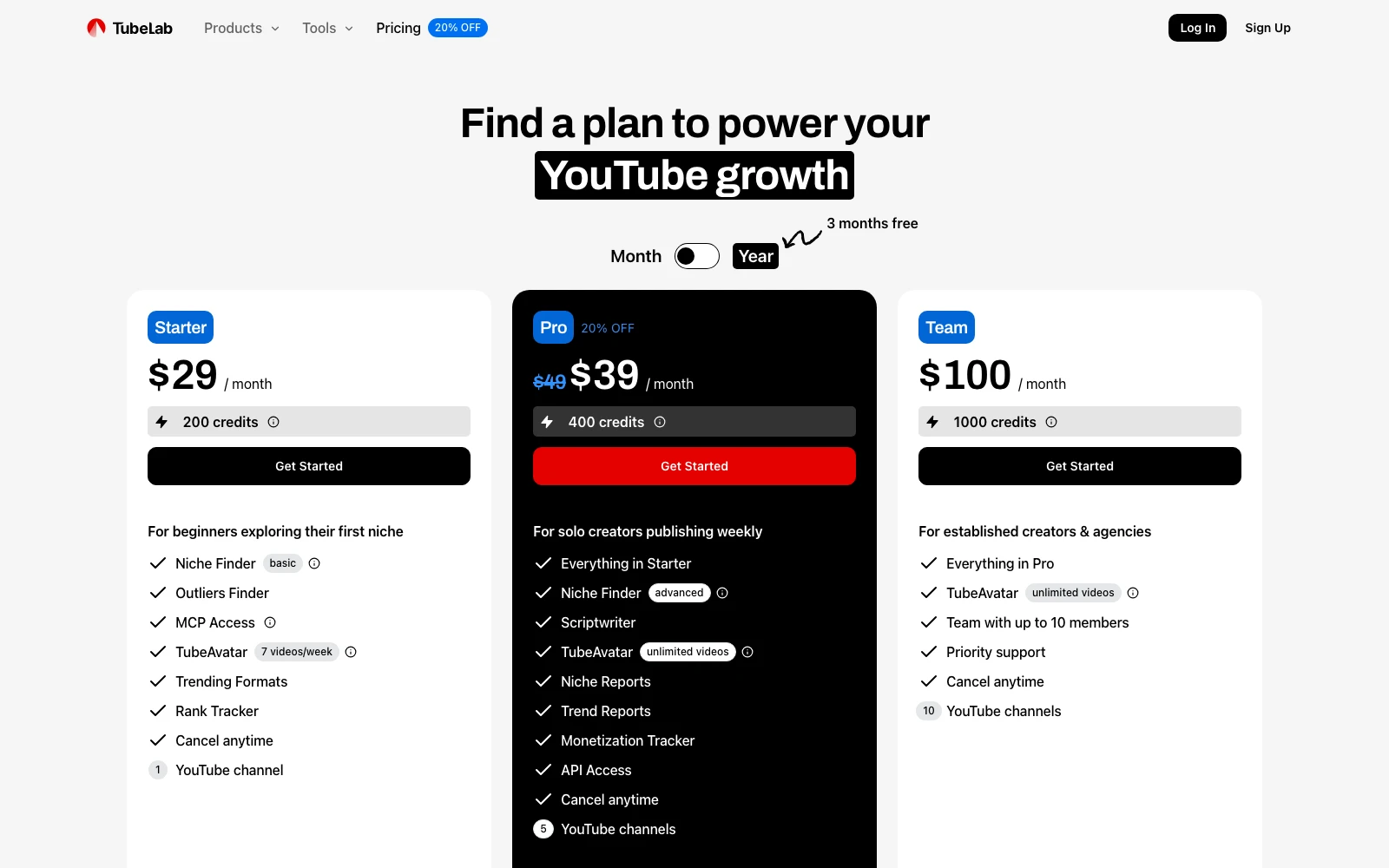
$29/mo (Starter), or $24/mo billed yearly; prices vary by location
Not included
Prices checked 2 November 2026 on each tool's own site.
The tools, ranked
#1
PreFilm
Best for
Business owners who want YouTube videos that bring in customers, with ideas, evidence and scripts built around what they sell.
Starting price
$49/mo (Creator)
What it does well
Built for customers, not views. Onboarding reads your website, what you sell and who buys it, then hands you video ideas with the evidence behind each one. Scripts learn from up to 20 of your past transcripts, the Chrome extension spots outliers and the offer a video is pushing, and the YouTube MCP for Claude and ChatGPT is on every plan.
Where it falls short
Relatively new, and it isn't the cheapest either. There's no free plan; monthly plans start with $1 for 7 days, then Creator is $49 a month.
Creators who want to find outlier videos and generate data-backed ideas, titles and thumbnails.
Starting price
$19/mo (Basic), or $15/mo billed annually ($180/yr)
What it does well
Feels polished and ships fast. The Chrome extension is the best of the three: outlier scores on YouTube itself, a thumbnail previewer, bookmarks, channel tracking, similar videos, thumbnail downloads and idea generation. Its idea generator gave me some very good ideas, and its research tools never use credits.
Where it falls short
The outliers on its home screen weren't tailored to my niche, so you do the work of applying them. The AI thumbnail generator was poor and spends credits, the idea generator is tucked away, and it was buggy when I tested it. MCP access starts on Pro: $89 a month, or $69 a month billed yearly.
Creators who want to find unsaturated niches and outlier videos, then turn them into ideas and scripts.
Starting price
$29/mo (Starter), or $24/mo billed yearly; prices vary by location
What it does well
The best channel setup of the three: it studies your channel and your competitors, then finds keywords and angles, which makes its recommendations better. Its feed of new viral videos from small channels surfaces fresh formats, and MCP access is included on Starter.
Where it falls short
Built for views and faceless channels, so the Niche Finder isn't much use to a business, and the home-screen ideas included irrelevant videos. The Scriptwriter, Niche Reports and Trend Reports need Pro, and there's no free plan or free trial.
I'll be upfront: I'm Henry Purchase and I built PreFilm, so weigh my first pick with that in mind. I tested all three on my own channels for a video ranking them, and below is what I liked, what I didn't, and what each one costs. Where I quote a price I read on screen, that's what the site showed me when I recorded. Every other price was checked on each tool's own site on 2 November 2026.
Why would a business owner want a vidIQ alternative?
Because vidIQ is built for views and subscribers, and a business channel is judged on customers. Its homepage leads with getting more views and subscribers on YouTube, and most of its tools are aimed at that.
What I care about is the money YouTube brings into my business, which for me means booked sales calls. Views from people who will never buy don't pay for anything, so the ideas a tool hands me have to start from what I sell.
Price is the other reason. vidIQ's plans page lists a Free plan with 150 AI credits a month, Boost at $19 a month and MAX at $49 a month, at US list prices. So vidIQ starts cheaper, though MAX costs the same as PreFilm's Creator plan each month. But a lot of vidIQ runs on AI credits, including its MCP, and in my experience those add up very quickly once you use the AI tools properly.
To be fair to vidIQ, it's still a very good tool. Its Chrome extension gives you far more detail inside YouTube Studio than YouTube's own analytics. It just doesn't understand your offer. If you're weighing it against its best-known rival, I compared the two in vidIQ vs TubeBuddy, and there's a straight head-to-head in PreFilm vs vidIQ.
I ranked them on one question: will this tool help a business owner turn YouTube into customers? To answer it, I looked at five things:
Does it understand your business? If I'm paying for software, I want it to know what I do. Ideas from a completely different niche are useless to me.
Does it hand you ideas, or make you dig? A list of outliers is a starting point. Ideas built for your offer save hours.
Can you use it from Claude or ChatGPT? An MCP (Model Context Protocol) server lets an AI assistant use a tool's features directly in the chat. I use Claude and ChatGPT every day, so this matters to me.
Is the Chrome extension any good? Some of your best ideas come from browsing YouTube itself, so the tool should work there.
What does it really cost? That means the plan you'd actually need, plus the credits you'd burn.
1. PreFilm: the best vidIQ alternative for getting customers
PreFilm is a YouTube growth tool built to get you more customers from YouTube, and it's my first pick for business owners. Instead of chasing viral videos, it gives you video ideas personalised to your business and backed by data.
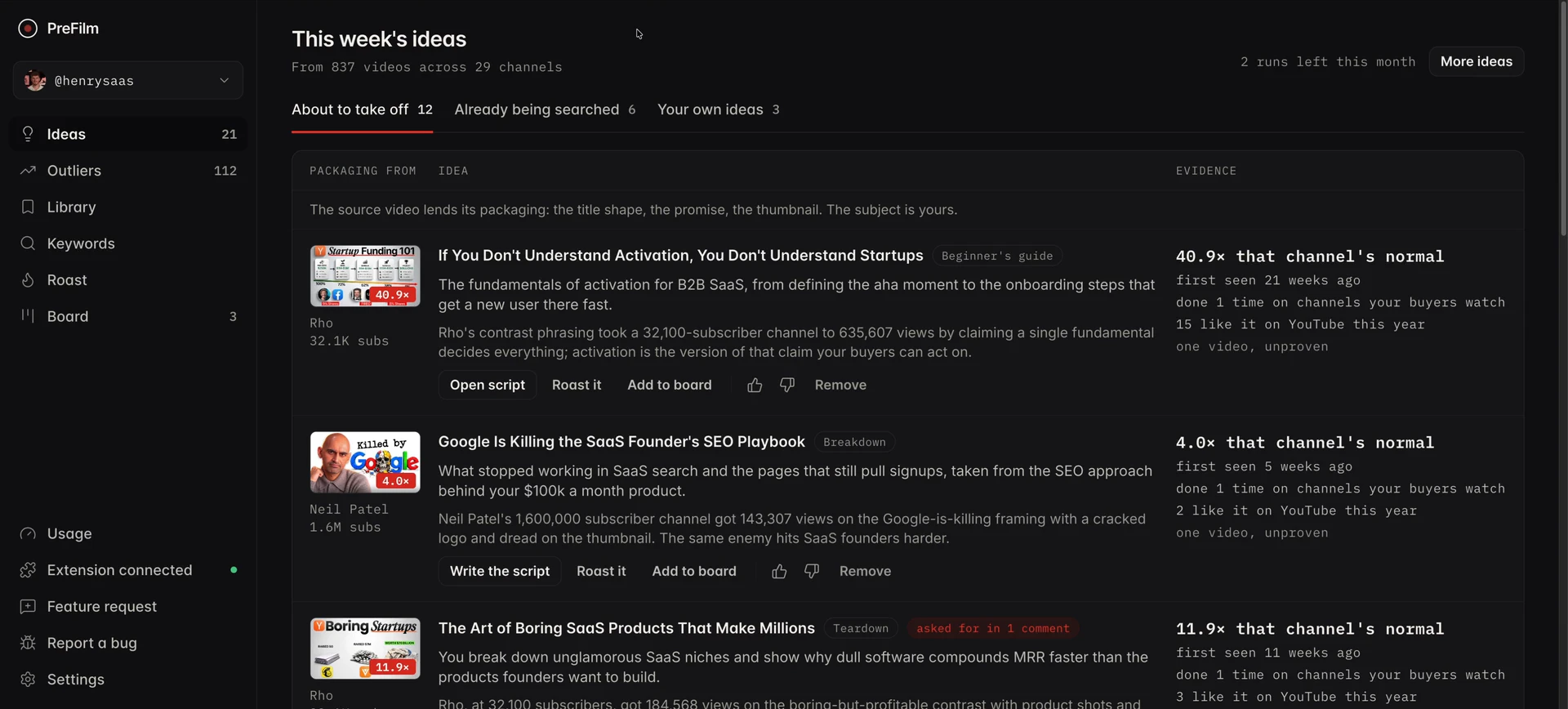
When you sign up, it asks for your website, what you sell, who buys it and what you're trying to achieve, and it reads your site to understand the business. Then it finds outlier videos in and around your niche (an outlier is a video that got far more views than its channel normally gets) and turns them into ideas it believes will bring you customers, not just views. Every idea shows its evidence: the video it came from, how far that video beat its channel's normal, and how many times the format has been done since. In my screen recording, the top idea borrowed its packaging from a video that did 40.9× its channel's normal, and the format had been done only once on channels my buyers watch.
What I like most is the YouTube MCP, which is included on every plan. In my video, I asked Claude to tell me the videos ranking for a keyword in my niche and then pull the script of the top one. Claude called PreFilm's tools, listed the ranking videos and broke down the top one, without me clicking through a dashboard. From the same chat it can suggest titles and thumbnails, search YouTube or write a script.
The script writer learns how you speak from up to 20 of your past transcripts, including what you do and don't say, so the script sounds like you.
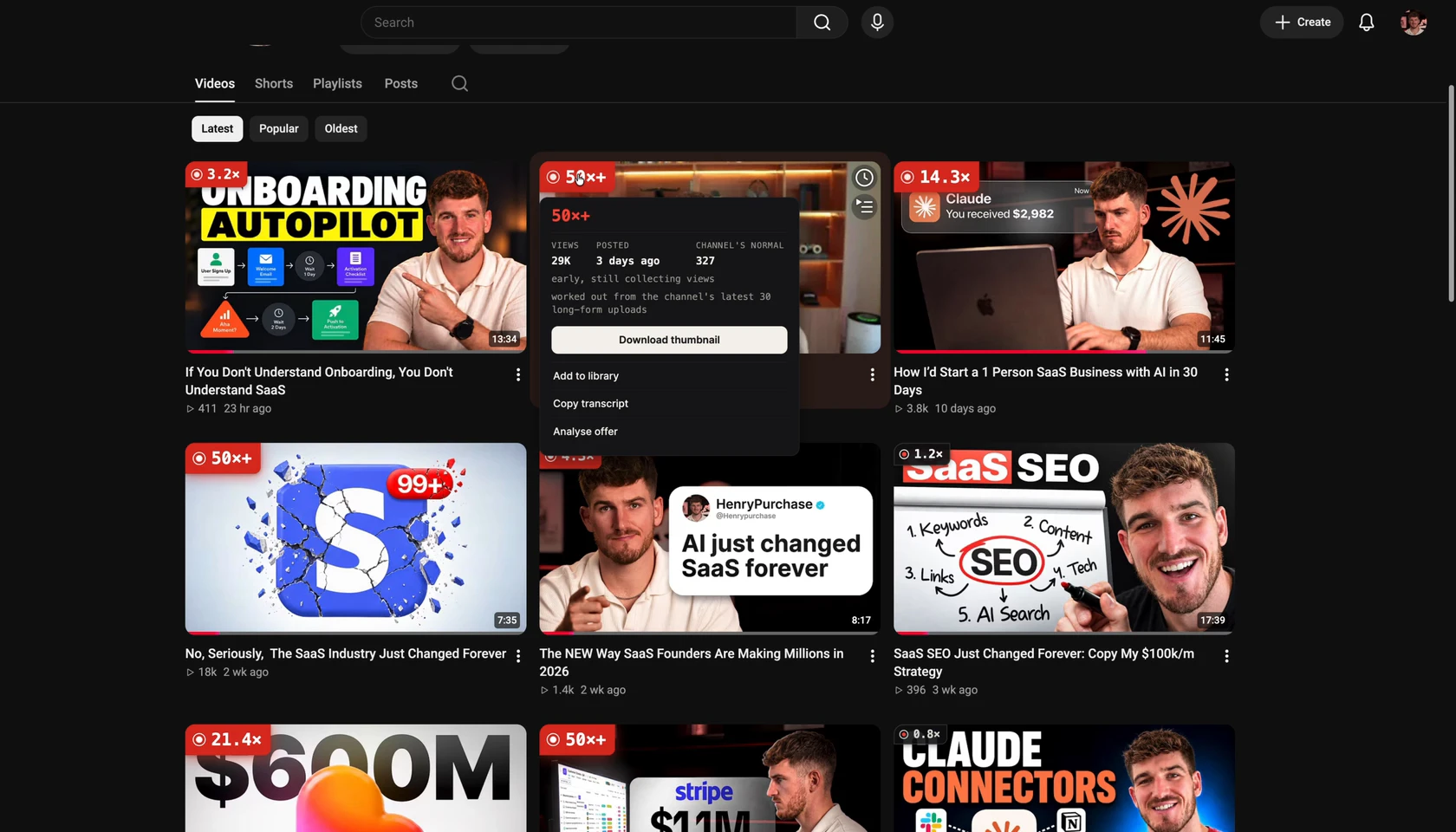
PreFilm also has a Chrome extension, which is one of the big things people use vidIQ for. It puts a multiplier on each video on a channel's page, so you can see which ones beat that channel's normal. Click one and you can download the thumbnail, copy the transcript or analyse the offer, i.e. see what the channel is selling. When I'm researching competitors, that's what I want to know. On my own channel page, a video with 29K views three days after posting shows as 50×+ against a channel normal of 327.
What I don't like about PreFilm: it's new, and I do most of my own work through the MCP rather than the dashboard. It also isn't the cheapest option here. There's no free plan; monthly plans start with $1 for 7 days, then Creator is $49 a month with the MCP included. Everything's on the pricing page.
2. 1of10: the strongest toolkit if you already know YouTube
1of10 is my second-best vidIQ alternative for business owners, and probably the best of the three if you already have some YouTube experience. It's one of the best-known vidIQ alternatives, and it feels very professional. They ship changes fast, and plenty of big creators use it.
Its promise, though, is the fastest way to get more views on YouTube. Views don't always translate into business, and that shows in how it works.
Where 1of10 wins is its Chrome extension. It overlays onto YouTube, and my favourite feature is the thumbnail previewer, which shows how your thumbnail and title would look on the YouTube homepage next to real videos. Packaging (your title and thumbnail) is one of the most important things for growth, so that's genuinely useful before you publish. From the same overlay I could bookmark a video, track a channel, see similar videos, download thumbnails and generate ideas. Once a video is live, YouTube's own A/B testing in YouTube Studio lets you test titles and thumbnails against each other for free.
Inside the app, Optimize, 1of10's video repackaging tool, finds videos on your channel whose title or thumbnail is holding them back and generates new packaging. I like the idea a lot. And the idea generator gave me some very good ideas for my second channel, although it's tucked away under More tools when I'd want it front and centre.
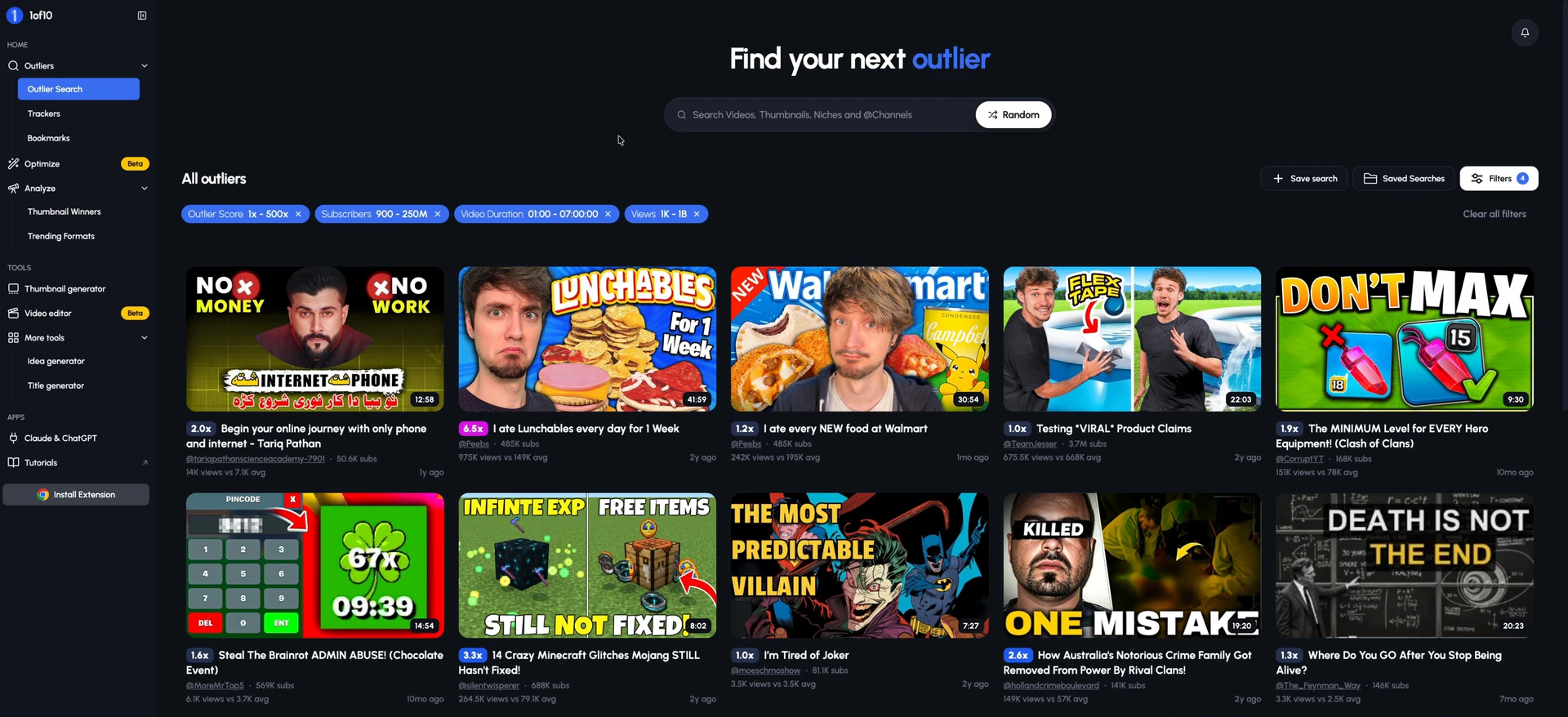
What I don't like: the home screen is outliers, and with my channel connected, they weren't personalised to my niche. The top results included a week of eating Lunchables and Clash of Clans gear. 1of10 doesn't really hand you ideas. You have to work out how to apply each outlier to your business yourself. The AI thumbnail generator was poor too. It spent credits, and the face it made didn't look like me. When I tested it, generated thumbnails and new packages still hadn't appeared minutes later, so it was a little buggy.
When I recorded, the pricing page showed me its Claude and ChatGPT option (the MCP) only on monthly plans from $89. On 1of10's pricing page now, MCP and API access come with Pro and Ultra. Pro is $89 a month, or $69 a month billed yearly ($828), and its monthly credits cover around 20 edited videos. There's a free plan with 60 AI credits a month and five results per outlier search, and Basic is $19 a month ($15 billed yearly), without the MCP.
My verdict: if you've done YouTube before, 1of10 has more breadth than anything else here. But it gives you outliers rather than ideas for your business, so you do more of the work.
3. TubeLab: the best setup, but built for views
TubeLab is third. Its homepage sells YouTube views made easy, and a lot of it is built for finding niches for faceless channels. But one thing it does better than 1of10 is understand your channel.
During setup, it fetches your channel, gets to know your content, asks for your competitors and asks you to tell it more about the channel. Then it finds keywords and angles. As a business owner, I love seeing that, because a tool that recommends football ideas for a business channel is no use to me. And it shows: that understanding comes through in its other tools.
The ideas on its account home were weaker. Its trending videos in my niche included one of my own videos, which was nice to see but doesn't help me grow. Others had nothing to do with my channel, like a hypercar shopping video. The Niche Finder isn't relevant to most businesses either. It's for faceless channels, or for people trying to earn purely from views.
One thing I do like is its list of new viral videos from small channels. An outlier from two years ago may have been copied over and over, so a fresh format from a small channel is often the better bet.
The catch is the paywall. On my paid plan, the trend report wanted me to pay more, and the script writer said upgrade required. TubeLab's pricing page, as displayed from the UAE on 2 November 2026, confirms the Scriptwriter, Niche Reports, Trend Reports and API access are on Pro and Team, not Starter. Its FAQ says you can set up a voice from your channel on Starter, but writing scripts needs Pro.
The good news is the MCP. When I recorded, TubeLab's pricing page showed me the plan with the MCP at €30 a month, which I guessed was around $35. Its prices vary by location: the US price on its site is $29 a month for Starter, or $24 a month billed yearly, and MCP access is included. Pro is $39 a month, shown as 20% off its full price, and Team is $100. Its FAQ says MCP tool calls spend credits from your plan. There's no free plan, and the FAQ says there's no free trial.
Realistically, the features you'll want are on Pro, so budget for Pro if you pick TubeLab. It's still a solid vidIQ alternative.
vidIQ alternatives side by side
Here's how the three compare with vidIQ on what matters to a business owner, from my testing and each tool's own site.
Tool
Built for
What I liked most
What I liked least
Use it in Claude or ChatGPT
PreFilm
Customers for your business
Ideas built from what you sell, with evidence
Relatively new
YouTube MCP on every plan
1of10
More views
Chrome extension and thumbnail previewer
Outliers not tailored to your niche
MCP and API on Pro and Ultra
TubeLab
YouTube views and niches
Setup that learns your channel and competitors
Key features need Pro
MCP on every plan, Starter included
vidIQ
Views and subscribers
Analytics inside YouTube Studio
Doesn't understand your offer
MCP on every plan, using AI credits
Which vidIQ alternative should you choose?
Choose the one that matches how much YouTube experience you have and how you like to work:
PreFilm if you want ideas handed to you, built around what you sell, and you already work in Claude or ChatGPT.
1of10 if you already have YouTube experience and want the widest set of tools and the best Chrome extension.
TubeLab if you want a tool that studies your channel and competitors, and you're happy to pay for Pro.
vidIQ itself, if detailed analytics inside YouTube Studio matter more to you than ideas for your offer.
What is the best vidIQ alternative for business owners?
PreFilm is the best vidIQ alternative for business owners in my ranking, because it's built to get business owners customers from YouTube, with ideas built around what you sell. 1of10 comes second, with the strongest Chrome extension, and TubeLab third, with a setup that learns your channel. I built PreFilm, so weigh that first pick with that in mind.
Is there a free vidIQ alternative?
Yes. 1of10 has a free plan with 60 AI credits a month and five results per outlier search, and its research tools never use credits. TubeLab has no free plan, and its FAQ says there's no free trial. PreFilm has no free plan either, although its monthly plans start with $1 for 7 days.
Which vidIQ alternatives work with Claude or ChatGPT?
All three do. PreFilm includes its YouTube MCP on every plan, and TubeLab includes MCP access from its Starter plan, with tool calls spending credits. 1of10 includes MCP and API access on its Pro and Ultra plans only. vidIQ has its own MCP on every plan too, paid for with AI credits.
Is vidIQ worth it for a business channel?
vidIQ is worth it if you want detailed analytics and outlier research inside YouTube, and its Chrome extension is excellent for that. Its weakness for a business is that it doesn't understand your offer, so its ideas chase views rather than buyers. If customers are the goal, use a tool that starts from what you sell.
What are the best vidIQ competitors?
The vidIQ competitors I'd look at as a business owner are PreFilm, 1of10 and TubeLab. TubeBuddy is the other big name, aimed at individual creators who want SEO and channel management tools. For a business channel, the deciding question is whether the tool understands what you sell, not how many views it promises.
Is TubeLab or 1of10 cheaper?
TubeLab is cheaper if you want MCP access. Its Starter plan includes the MCP and shows $29 a month on its US pricing, though prices vary by location. 1of10 puts the MCP on Pro, at $89 a month or $69 a month billed yearly. 1of10's Basic plan is $19 a month, without the MCP.