Guides · 11 min read
YouTube keyword research without vidIQ
YouTube keyword research means finding the exact phrases your buyers type into YouTube before you film. You can do it free, without vidIQ: type their questions into YouTube search, note the predictions, check who already ranks, and read the comments under the videos that beat their channel's normal.

I picked videos this way for my last company. They were chosen from search demand and proven formats before filming, and my Google Search Console tutorial was still climbing 858 days after I published it. This isn't a knock on vidIQ either. Its keyword suggestions and outlier research are two of the things I like most about it, and I'll show you where it's worth paying. But you don't need any tool to start, so here's the free method, with real searches from pool builders, accountants and immigration lawyers.
What is YouTube keyword research?
YouTube keyword research is finding the words people type into YouTube search when they have the problem you solve. A keyword is just that phrase: "fiberglass pool cost" or "when to switch from LLC to S corp".
It matters because YouTube search matches videos to what someone typed. YouTube's page on how YouTube search works says it ranks results on relevance, engagement and quality, and relevance includes how well your title, description and video content match the search. So if you use different words from your buyers, the best video in the world won't show up for them.
For a business, the point isn't the biggest keyword. It's the one your buyers type when they're close to paying someone. A pool builder doesn't need "pool" (everyone's after that). They need "fiberglass pool cost", typed by someone who's already decided they want one.
How to do keyword research for YouTube for free
Here's the whole method, in the order I'd do it. Each step gets its own section below.
- List the questions your buyers ask before they pay you.
- Type each one into YouTube and note the search predictions.
- Look at who already ranks for each phrase, and how big they are.
- Find the outliers in those results: videos that beat their channel's normal.
- Read the comments under those videos for the next questions.
- Check timing in Google Trends, set to YouTube Search.
And here's what each free source tells you, and what it doesn't:
| Free source | What it tells you | What it doesn't |
|---|---|---|
| YouTube search predictions | The phrases people actually type, in their words | How many people type them |
| The search results | Who you're up against, and how old their videos are | Whether those videos are doing well for their channel |
| Outliers in the results | That this search can pull in far more viewers than usual | Whether it will for you, without a good video |
| Comments | The follow-up questions, in your buyers' words | Search numbers |
| Google Trends (YouTube Search) | Rising, falling or seasonal interest | Absolute volume (it's 0 to 100) |
| The Trends tab in YouTube Studio | Top searches from your own audience | Much, if your channel is brand new |
Find the videos your buyers already watch
Find my winning videosStart with the questions your buyers ask
The best seed keywords come from your sales calls, not from a tool. Write down the questions people ask before they hire you: what does it cost, how long does it take, which option should I pick, do I need this at all.
A tool will happily give you thousands of keywords around "pool". Your buyers will give you about ten that matter, and every one of them is a video. The examples below all started this way: what a pool costs, when to change a business structure, what a green card interview asks.
How to find keywords for YouTube with search predictions
Type the start of your buyer's question into YouTube and look at what drops down. These are YouTube's search predictions, sometimes called YouTube autocomplete. YouTube says they're based on factors like popularity and similarity, including what other people are searching for. Here's what came up for fiberglass pool when I searched signed out.
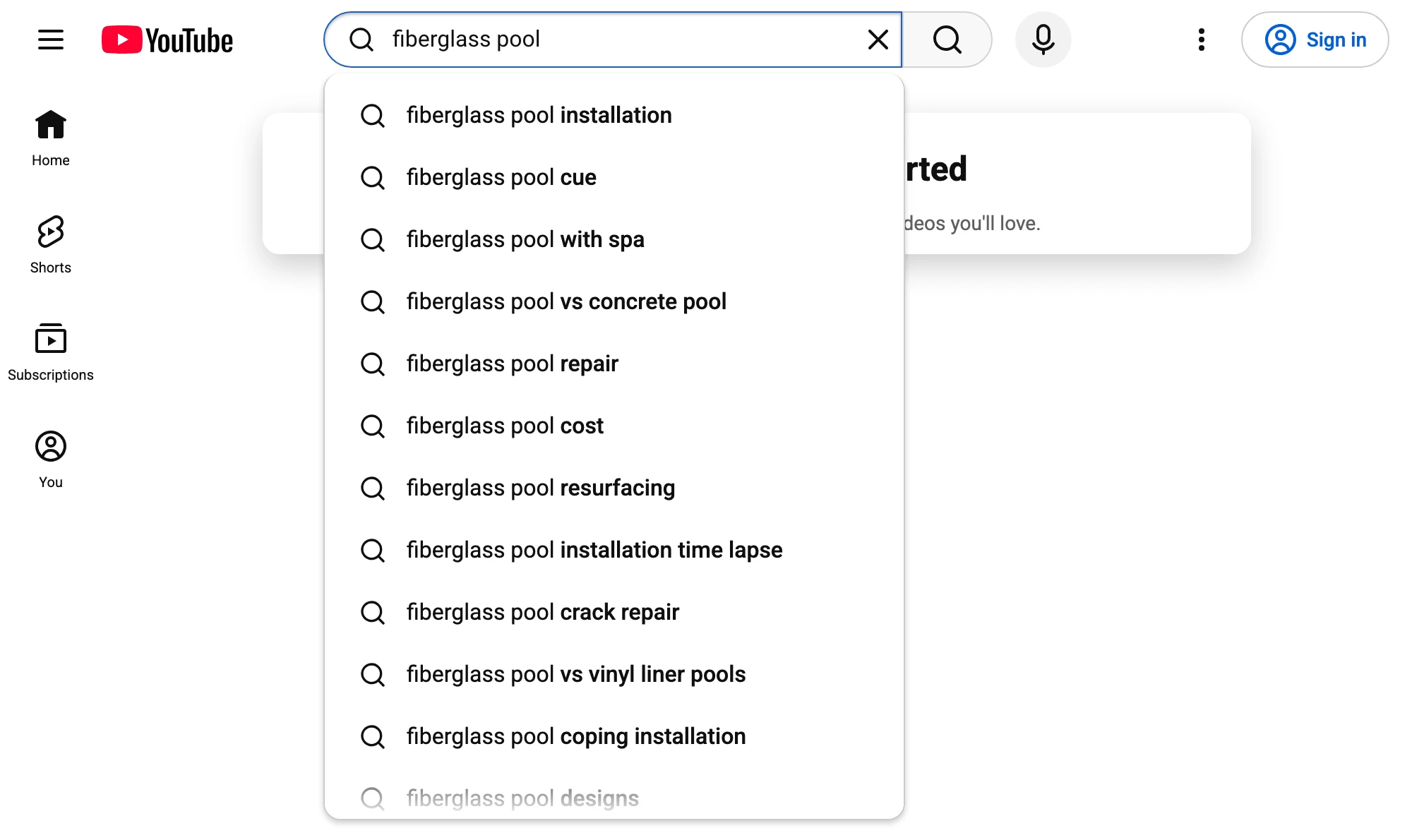
Look at that list from a pool builder's point of view. "Fiberglass pool cost", "fiberglass pool vs concrete pool", "fiberglass pool vs vinyl liner pools", "fiberglass pool with spa". Each one is a person comparing options before they spend a lot of money. That's a video list, and it took ten seconds.
A few things to know so you read them properly:
- Use a fresh private window. YouTube says predictions can include your own past searches and watch history, so the list in your normal browser is partly about you.
- No predictions is a signal. YouTube says one reason you might see none is that the search term isn't popular, or it's too new. Shorten the phrase and try again.
- Predictions have no numbers. They tell you people type it, not how many. More on volume below.
- Try the variations. Type the phrase with "vs", "cost", "how to" and your town or region, and note what comes up each time.
Check who already ranks for each keyword
Search the phrase and look at the first page of results before you decide anything. You're checking three things: how big the channels are, how old the videos are, and whether the videos actually answer the question.
Here's a phrase an accountant might want: "when should I switch my LLC to an S corp". The results are full of big tax channels. Karlton Dennis has 1.14 million subscribers, and his "When to Switch from an LLC to an S-Corporation" has over 523,000 views. A new accountant's channel will struggle there.
But the same search also turned up SimplifyLLC, with 3,850 subscribers. Its "How to Change an LLC to an S-Corp (Step-by-Step)" got 10,272 views, 19.9× its channel's normal. Same topic, but it answers the next question: not "should I?" but "how do I?". That's the narrower phrase a small channel can win.

An outlier is a video that got far more views than its channel normally gets. Divide its views by the channel's normal and you get its multiplier. When a small channel has an outlier in the results for your keyword, that's the best free evidence you'll find that the search can be won.
Even crowded formats can work. "Marriage green card interview questions" has videos listing 52, 70 and 199 questions. Orelmy Diaz, an immigration attorney with 103 subscribers, posted "52 Marriage Green Card Questions You MUST Know (Don't Get Denied!)" in August 2026. It got 7,095 views, 26.6× the channel's normal. For a law firm, 7,000 views from couples preparing for that interview is a lot of potential clients.
Find the outliers in the search results
The search results show you who ranks. Outliers show you which of those videos is actually beating its channel, which is the part search predictions can't tell you.
Take "how much does an inground pool cost". River Pools Twin Cities has 530 subscribers. Its "Inground Fiberglass Pool Pricing in 2025" is a seven-minute walk through price ranges for each pool model, what's included and what isn't. It got 51,607 views, 18.7× its channel's normal of 2,758.

There's no pitch in it, and no call to action. It just answers the price question plainly, and it's exactly what someone types after deciding they want a pool. The same search found River Pools Virginia, with 723 subscribers, at 8.0× its normal with "Your Guide for 2026 Inground Pool Pricing in Virginia". Adding your region to a price keyword is one of the simplest ways to narrow it.
Doing this by hand means opening each channel and working out its normal from its recent videos. It's slow, which is why I built PreFilm's video ideas around it: it finds the outliers in and around your niche and turns them into ideas for what you sell. There's more on spotting proven topics in how to find YouTube video ideas that are already proven.
Get ideas from searches that already worked
Find my winning videosRead the comments for your next keyword
The comments under a ranking video are free keyword research. They're the questions the video didn't answer, written in your buyers' own words.
Under River Pools Twin Cities' pricing video, viewers asked how much just the fibreglass shell costs without installation, whether permits are needed, whether heating is included with the spa models, and whether any of the pools are beach entry. Every one of those is a phrase a buyer types.
So I checked a few of them with PreFilm's keyword check, which runs through the PreFilm MCP and costs 5 credits. Its numbers are Google's monthly searches, because YouTube doesn't publish its own. Here's what came back:
| Phrase from the comments | Google searches a month | What the top YouTube results looked like |
|---|---|---|
| beach entry fiberglass pool | 555 | Top three results all over four years old |
| do you need a permit for an inground pool | 10 | Top result had 87 views |
| fiberglass pool shell only price | 0 | Not checked |
"Beach entry fiberglass pool" is the one I'd film. People search for it, and the top three videos are between 53 and 84 months old. "Shell only price" has no Google searches at all, but two commenters asked for it. That's still worth a short section in the next pricing video, even if it isn't worth its own.
Does YouTube show search volume?
No. YouTube doesn't publish how many times a phrase is searched on YouTube, so every "YouTube search volume" number you see is either an estimate or Google's number. vidIQ's own keyword tools page says "all volume data is estimated".
There are three free ways to get a feel for demand anyway.
Google Trends, set to YouTube Search. Open Google Trends, type your phrase, and change the "Web Search" filter to YouTube Search. You get interest over time from YouTube searches, not Google's. Google's Trends FAQ explains that the numbers are relative, scaled from 0 to 100, and that low-volume terms show as 0. Here's fiberglass pool on YouTube Search in the US over the past five years.
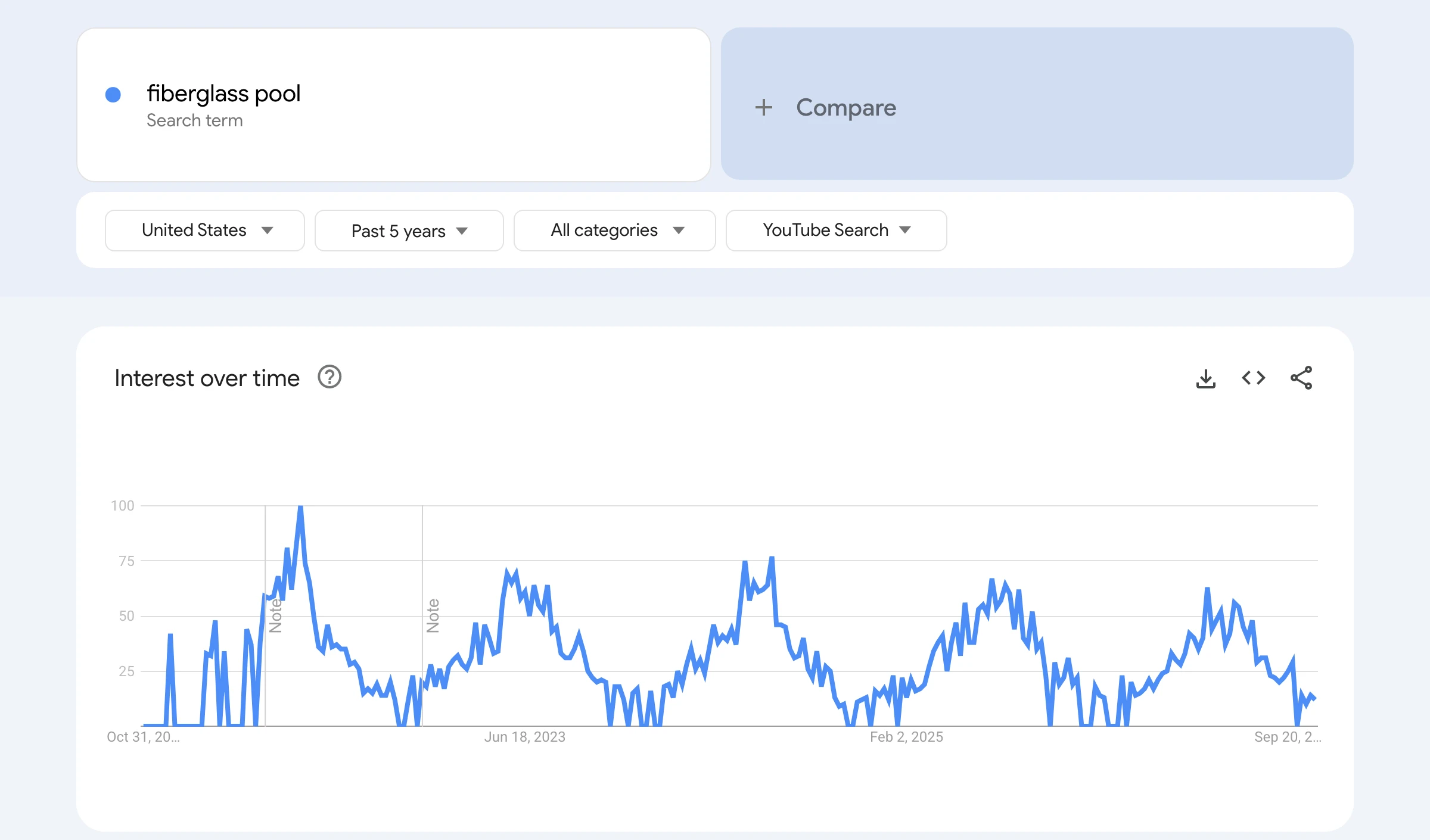
That chart is the most useful thing Trends does for a business. Pool searches on YouTube climb every spring and fall away every winter. So a pool builder should publish pricing videos in late winter, ready for the climb, not in July when the peak has passed.
Google's monthly searches. A tool like Keywords Everywhere shows Google search volume. It's a decent sign that people care about a topic, but it's not YouTube volume, and it can be misleading for small, specific phrases. "Inground pool cost virginia" shows 10 Google searches a month. River Pools Virginia's pricing video has 12,088 views. Not all of those came from that exact search, but a tiny Google number clearly didn't mean nobody wanted the video.
The results themselves. If small channels rank with recent videos that have decent views, there's demand. If the top results are years old with a few hundred views, either nobody's searching or nobody's served the search well. Outliers tell you which.
Use YouTube Studio's Trends tab and search terms report
If you already have a channel, YouTube Studio has free keyword data that no outside tool can see.
The Trends tab sits under Analytics. YouTube says it shows the top searches from your audience over the last 28 days, breakout videos from similar creators, and an audience interest level for searches that ranges from very low to very high. It also shows content gaps, which YouTube describes as searches where viewers "can't find enough quality search results". Some of its insights are limited to certain countries, languages and devices, and YouTube says an updated YouTube Studio started rolling out in July 2026, so the tab may look different on your channel.
The Inspiration tab, YouTube's AI idea generator, is on its way out. YouTube's Help page says that starting in August 2026 it's gradually deprecating the tab, and it points creators to Ask Studio for brainstorming instead.
Then check what's already working for you. In each video's Reach tab, the YouTube search terms report shows what viewers searched before they found it. If a video is getting found for a phrase you never targeted, that phrase deserves its own video. There's more on reading your traffic sources in the YouTube algorithm in 2026.
When is vidIQ keyword research worth paying for?
vidIQ is worth paying for when you're doing this every week and the manual checks are eating your time. Free methods give you the phrases and the evidence. A tool gives you speed and an estimate of volume in one place.
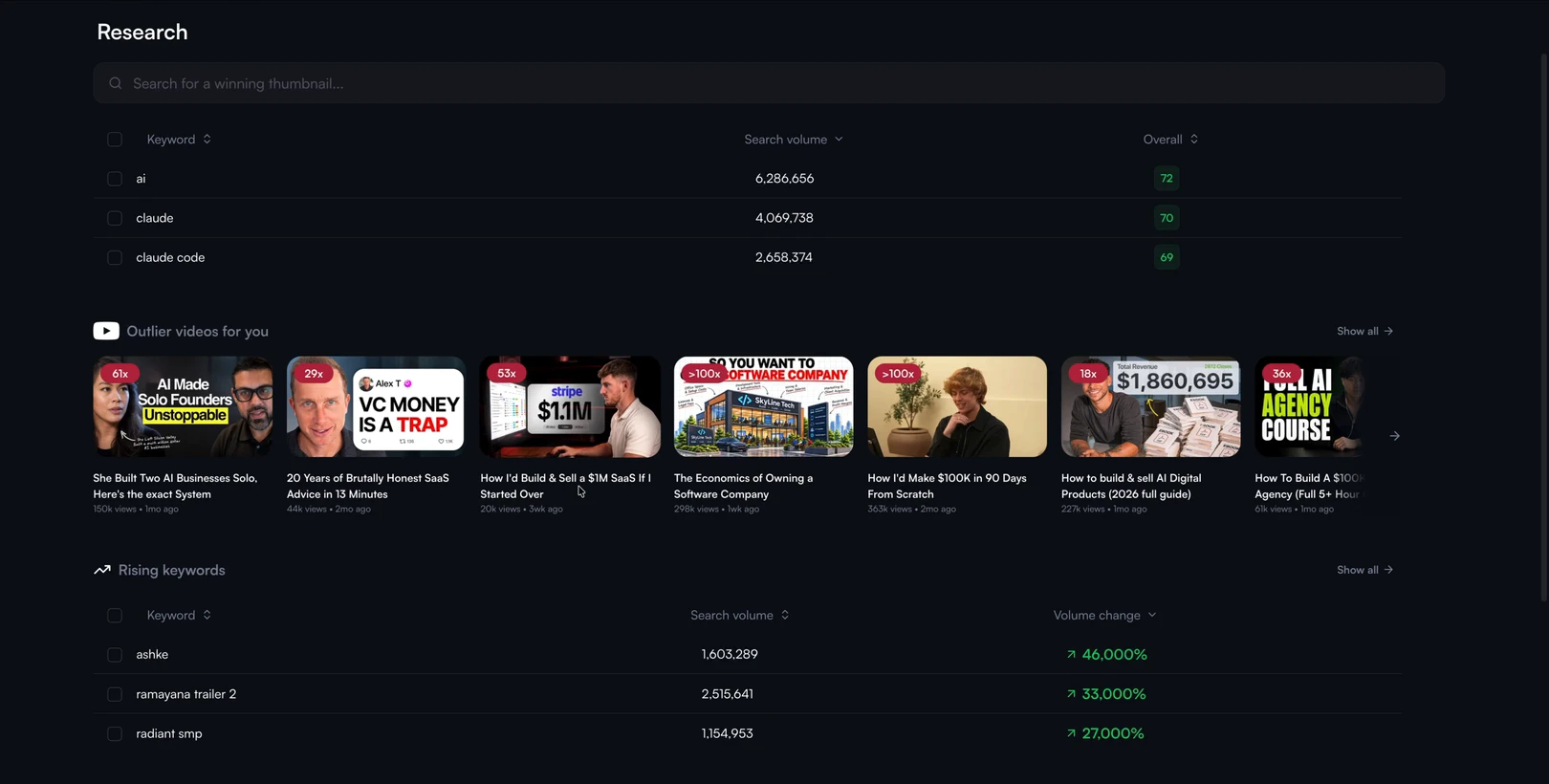
I like vidIQ. In my video on the best YouTube growth tools, I said its keyword suggestions and its outlier research are the parts I like most. It suggests keywords and then finds outlier videos for them, and the ones it found for me were very relevant to what I do. The catch is that its Research page is a little bit hidden and complicated to get around, and it doesn't really understand your offer. It'll find videos that get views, but you have to work out which ones get customers.
It also has a free plan. Its keyword tools page says the free version includes basic search volume and competition data, and paid plans add things like personalised keyword ideas.
The difference with PreFilm is the starting point. It reads what you sell and who buys it, then finds the searches and outliers around that. If you'd rather work from search terms first, there's a step-by-step in YouTube SEO in 2026 on putting the keyword into your title and description once you've picked it.
Start with ten buyer questions, run them through YouTube search, and film the one where a small channel has already beaten its normal. That's YouTube keyword research without spending anything. If you want the outlier side done for you, see how PreFilm finds video ideas or compare the plans.
Stop guessing what to film.
PreFilm finds the videos your buyers already watch and writes the script in your voice. $1 for 7 days.
Find my winning videosQuestions
Questions.
How do I do keyword research for YouTube?
Start with the questions your buyers ask before they pay you, then type each one into YouTube and note the search predictions. Look at who ranks for each phrase, pick the ones where small channels beat their normal, and read the comments for follow-up questions. Check seasonality in Google Trends set to YouTube Search.
Can I do YouTube keyword research for free?
Yes, you can do YouTube keyword research for free. YouTube's search predictions, the search results themselves, the comments under ranking videos, Google Trends and YouTube Studio's Trends tab all cost nothing. What free methods don't give you is an exact monthly search count, and paid tools only estimate that number anyway.
Does YouTube show search volume?
No. YouTube doesn't publish how many times a phrase is searched on YouTube. Google Trends set to YouTube Search shows relative interest on a scale of 0 to 100, and YouTube Studio's Trends tab rates audience interest from very low to very high. Keyword tools either estimate YouTube volume or show Google's monthly searches.
Is vidIQ free?
vidIQ has a free plan, and its keyword tools page says it offers free keyword research with basic search volume and competition data. The free plan comes with 150 AI credits a month. Paid plans add more, such as personalised keyword ideas. Check vidIQ's plans page for the current price, because it can vary by location.
How many keywords should I target per video?
Target one main phrase per video, the exact question the video answers, and put it near the start of the title and in the first lines of the description. Close variations will come naturally when you explain the topic properly. Two videos chasing the same phrase on one channel just compete with each other.
Is YouTube keyword research worth it for a new channel?
Yes, because search doesn't care how many subscribers you have. A new channel should pick narrow phrases where small channels already rank. If you haven't published yet, start with PreFilm's free tools and blog. PreFilm itself works best once you've published a few videos and it has something of yours to learn from.