Guides · 10 min read
How to get more views on YouTube
If you want to know how to get more views on YouTube, start by finding which number is broken: impressions, click-through rate or retention. Then fix the topic first, because a video nobody wants won't be saved by a better thumbnail.
There's nothing worse than checking a video 20 hours after posting and seeing 20 views. One of mine got 102 views in about four months. The same channel later got 97,150 views in 28 days. So this isn't another list of 25 tips. It's how to work out why your videos stall, with my own numbers and real videos from financial planners, dentists, consultants and lawyers.
Why am I not getting views on YouTube?
You're not getting views on YouTube because one of three things is broken: YouTube isn't showing your video, people see it and don't click, or they click and leave. All three show up in YouTube Studio, on the Reach and Engagement tabs of each video's analytics.
Here's how to read them.
| What you see | What it means | What to fix |
|---|---|---|
| Very few impressions | YouTube can't find people who want this video | The topic |
| Plenty of impressions, low click-through rate | People see it and scroll past | The title and thumbnail |
| Good click-through rate, viewers leave in the first 30 seconds | The video doesn't deliver what the title promised | The opening |
| Views only from Channel pages and notifications | Only your existing subscribers are watching | The topic, then the packaging |
An impression is when YouTube shows your thumbnail to someone. The click-through rate is the share of those impressions that turned into a view. Retention is how much of the video people actually watch, and YouTube shows it as a graph in audience retention.
Then open the traffic sources report. If your views come from Browse features, YouTube search or Suggested videos, YouTube is putting the video in front of new people. If almost everything comes from Channel pages and notifications, it isn't.
Check those numbers across your last five videos, not just one. A single flop is noise. The same weak number on five videos in a row is a pattern, and that's the thing to fix.
What my 102-view video got wrong
My 102-view video had a topic and title nobody was looking for. YouTube Studio compares every video to your channel's typical performance, and this one sat below it for the whole 120 days, ending 78 views less than usual.
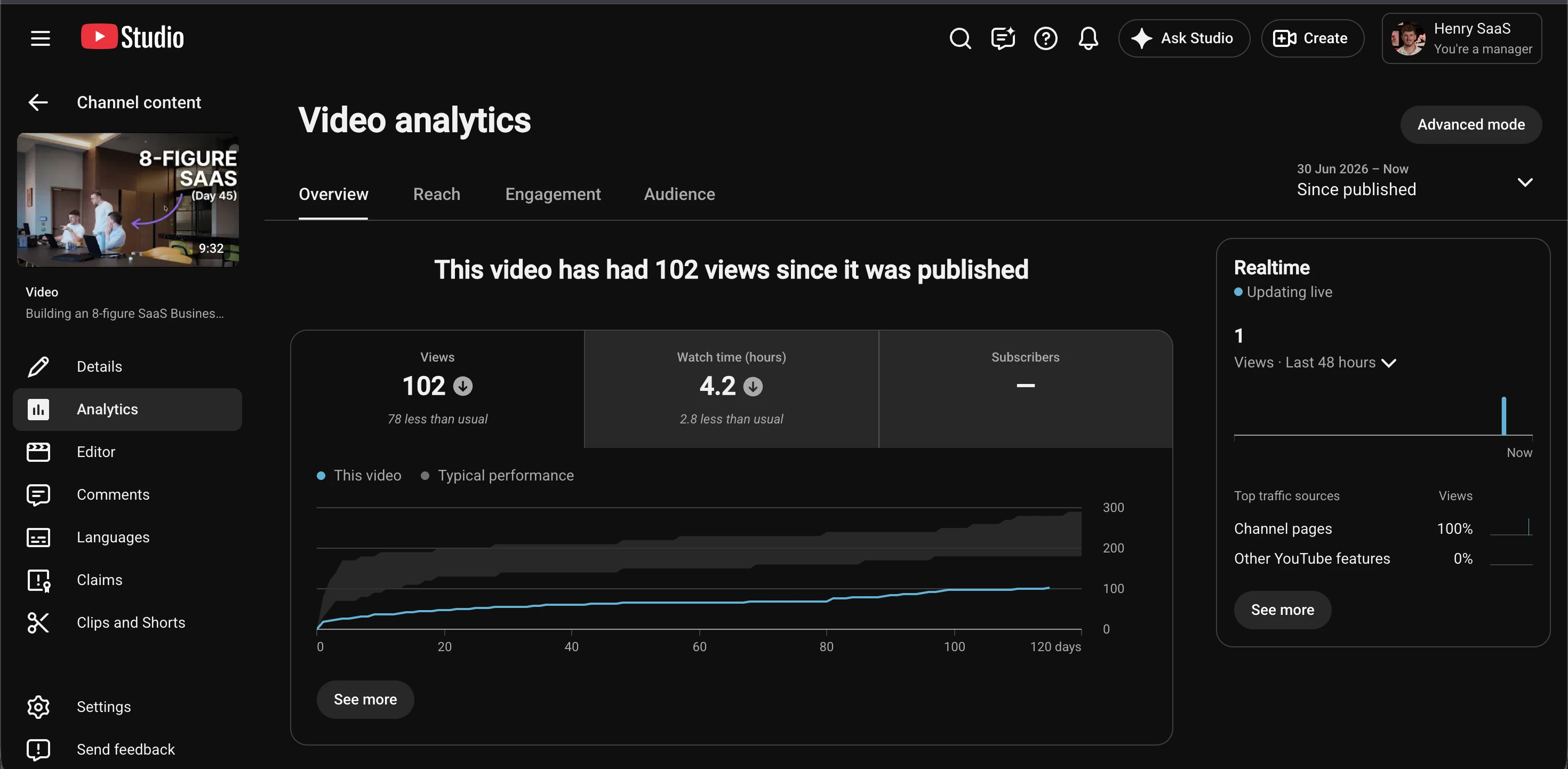
The title was "Building an 8-figure SaaS Business (Day 45)". I ran it through Roast, PreFilm's title and thumbnail checker, which judges a title against what's working in your niche. The verdict was "Reframe it", and its reason was blunt: the title "gives no result or person it is for, so it reads as a bare vlog update."
That's the problem in one line. "Day 45" means something to me. It means nothing to someone scrolling YouTube who has never heard of me. There was no question being answered and no outcome on offer, so YouTube had nobody to show it to.
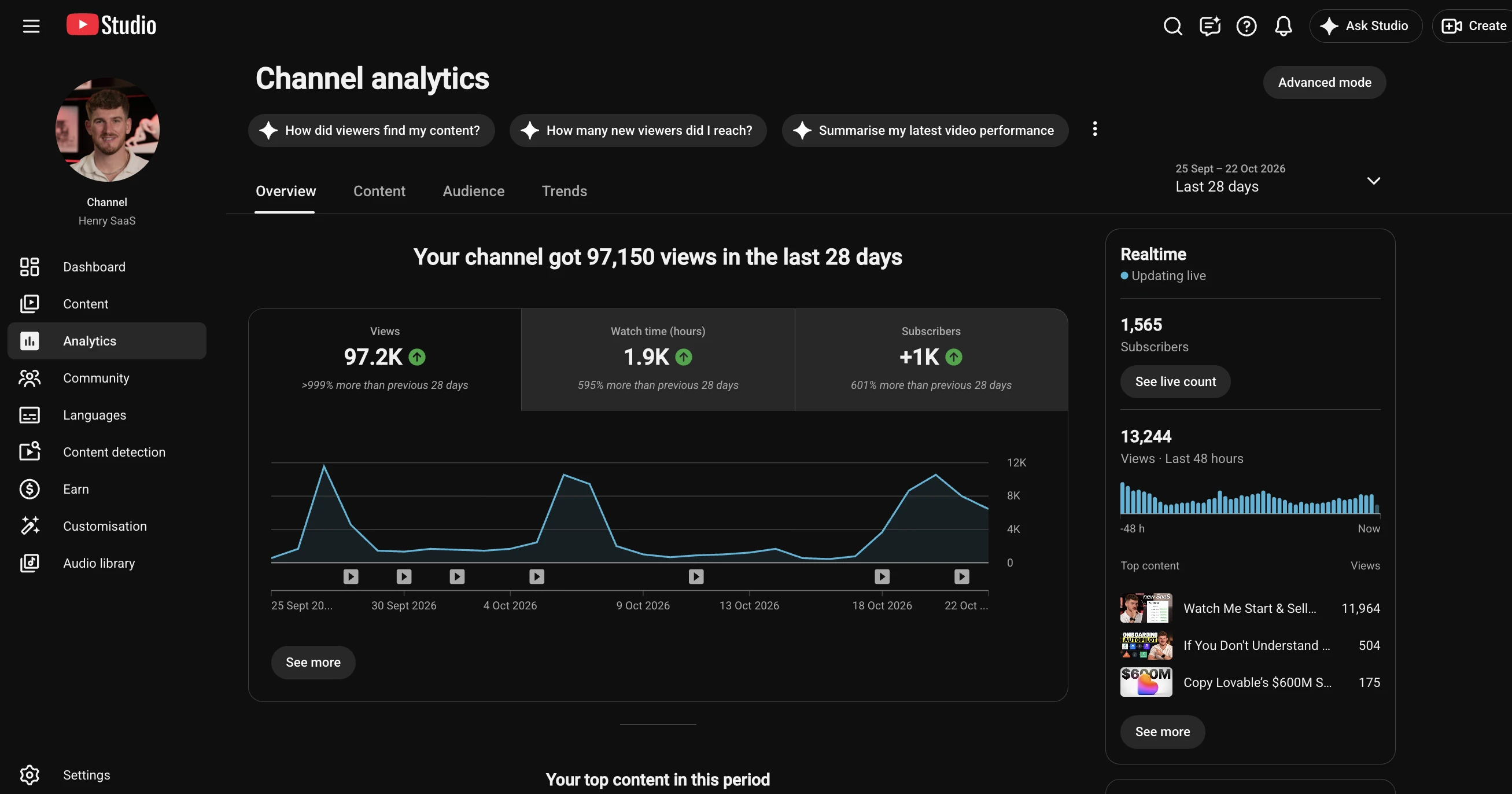
Now look at the same channel from 25 September to 22 October 2026: 97,150 views in 28 days, more than ten times the 28 days before, with 1,565 subscribers. The channel was still small, so its size can't explain the difference. The videos can.
Find the videos your buyers already watch
Find my winning videosHow to get more views on YouTube: fix the topic first
The fastest way to get more views on YouTube is to pick topics that have already pulled in far more viewers than usual somewhere in your niche. An outlier is a video that got far more views than its channel normally gets. Divide its views by the channel's normal and you get its multiplier.
Outliers prove the idea did the work, not the size of the channel. Here are real ones from business channels, found with PreFilm:
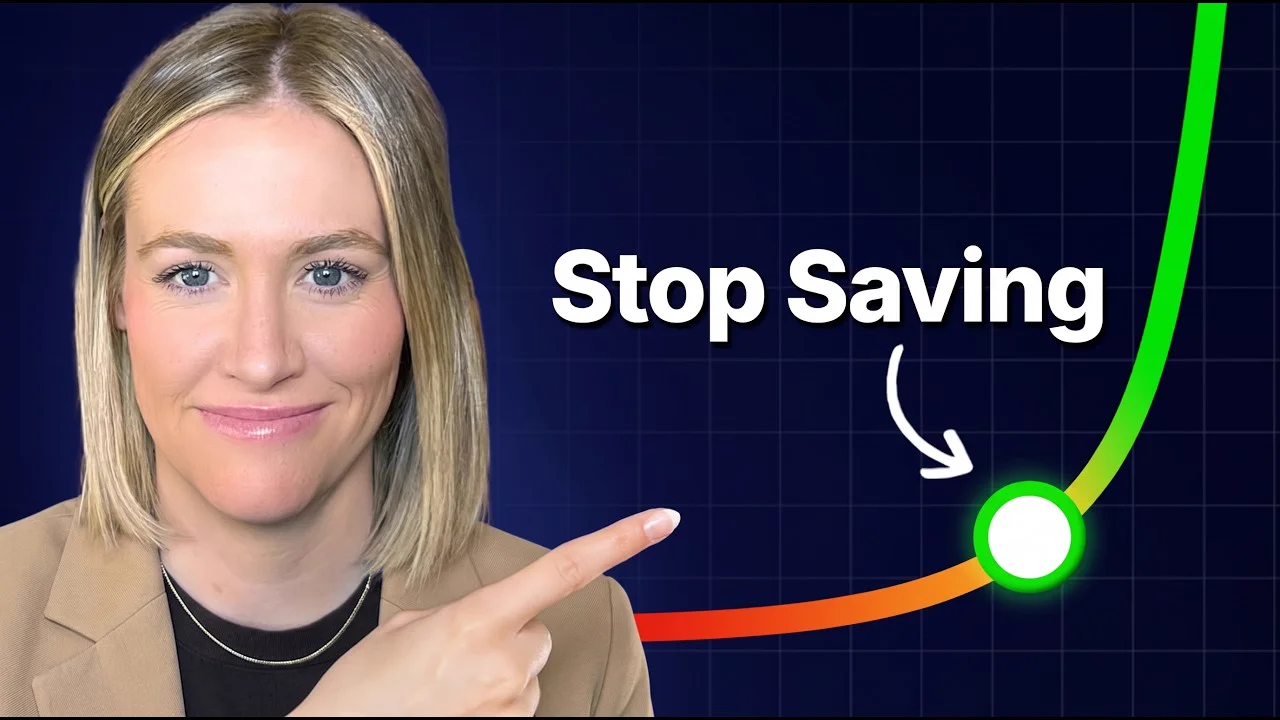
- Financial planning. Lena Armuth, CFP® posted "Stop Saving For Retirement? Here's When it's Finally Safe". It got 239,420 views against a channel normal of 7,450. That's 32.1×, on a channel with 5,140 subscribers.
- Dentistry. Dr. Brett Langston answered a question patients ask before they book: "Can You Get Tooth Extraction, Bone Graft & Implant in One Visit?" It got 38,778 views, 43.9× his normal.
- Consulting. Laura Meyer has 2,830 subscribers. "How and Where to Get Your First Consulting Client (Fast!)" got 11,808 views, 27.3× her normal.
- A very small channel. Ana & Klas have 54 subscribers, and "How to Get 3 Consulting Clients in 30 Days" got 876 views. That's small, but it's 14.4× what their videos normally get.
Notice what these have in common. Every one answers a question the creator's buyers are already asking: when can I stop saving, can I get this done in one visit, how do I get my first client. None of them is "an update from my business".
Here's how to find topics like these for your own channel:
- List the channels your buyers watch. Competitors, but also adjacent channels. If you sell to dentists, include practice management and dental marketing channels.
- Find each channel's normal. Look at its last 10 to 20 long videos and note what a typical one gets. Ignore the subscriber count.
- Look for videos at 3× or more. Anything well above the normal is a topic that pulled in people the channel doesn't usually reach.
- Rewrite it for your buyers. Keep the question it answers and change the subject to what you sell. "How to get your first consulting client" becomes "How to get your first bookkeeping client" if bookkeepers are who you serve.
- Check it hasn't been done to death. If the same angle has appeared on five channels in the last month, find a different one.
Doing this by hand works, but it's slow. That's why I built PreFilm's video ideas: it finds the outliers in and around your niche and turns them into ideas for what you sell, each with the video it came from. There's a longer walkthrough in how to find YouTube video ideas that are already proven.
Make videos people are searching for
Search videos are the most reliable way to get views on a small channel, because they get found by people looking for an answer, whatever size your channel is. A video that answers a search can keep picking up views for years.
Aimee the Attorney is a good example. Her channel has 1,220 subscribers. In 2019 she posted "Personal Injury Cases: The Process", a plain explainer of how injury lawsuits work. It passed 14,900 views, 29.7× her channel's normal. It's not clever. It answers the exact question someone types into YouTube after an accident.
That's how I picked videos for my last company. I chose them from search demand and proven formats before filming. My Google Search Console tutorial passed 61,000 views and was still climbing 858 days after I published it, and videos like that were part of getting that company to $100K a month with $0 spent on paid ads.
To find searches worth answering, type your topic into YouTube and look at the search predictions that drop down. Those are real phrases people type. Then put the phrase, or something very close to it, in your title. There's more on this in YouTube SEO in 2026.
Check your next title before you film it
Roast my next titleFix the title and thumbnail if nobody clicks
If impressions are healthy but nobody clicks, the title and thumbnail are the problem. YouTube says half of all channels and videos have an impressions click-through rate between 2% and 10%, and new videos or videos with fewer than 100 views can swing much wider. So compare a video to your own channel's other videos, not to a number you saw on Twitter.

Look at Dr. Langston's thumbnail. It asks the patient's question in four words, and the title answers it. That's what a good title and thumbnail do together: the thumbnail grabs attention and the title tells the viewer exactly what they'll get.
A few rules I'd follow:
- Say who it's for or what they get. "Day 45" says neither. "How to Get Your First Consulting Client" says both.
- Use the words your buyers use. Lena's title says "stop saving for retirement", the phrase a saver would use, not industry jargon.
- Keep the thumbnail to a few words. It should add to the title, not repeat it.
- Test, don't guess. A/B testing in YouTube Studio lets you try up to three titles and thumbnails on one video, and shows everyone the version with the most watch time.
You can also check a title before you film. That's what Roast is for, and it's what caught the problem with my Day 45 title. For thumbnail patterns that work, see YouTube thumbnail ideas taken from outlier videos.
Keep them watching past the first 30 seconds
If people click but leave early, the opening isn't delivering what the title promised. The fix is to restate the viewer's question in the first sentence and get to the answer quickly.
Lena Armuth's video opens with the exact question from her title: "How do you know when you can finally stop saving for retirement?" Then she says what not knowing costs people and promises the answer. She's into the method by 1:28, and apart from one line near the start, her pitch to book a call comes at 11:38 of a 12-minute video, after she has delivered.
Open your audience retention graph and look at the first 30 seconds. A steep drop there usually means one of these:
- The opening talks about you instead of the viewer's problem.
- The video takes too long to get to what the title promised.
- The thumbnail promised something the video doesn't show.
The comments help here too. On Lena's video, several viewers asked for a version about early retirement. That's a follow-up video, handed to her by the people who just watched. Read the comments under your best videos and you'll find the same.
What to do with a video that's already stalled
A stalled video isn't always finished. If the topic was right, a clearer title and thumbnail give it a second chance. Here's what I'd do, in this order:
- Check the basics. Make sure it's public and it finished processing.
- Rewrite the title. Put the question it answers, in your buyers' words, at the start.
- Change the thumbnail, or test three. Run an A/B test and let watch time pick the winner.
- Link to it from your best video. Add an end screen on your most-watched video pointing to the stalled one, so viewers who already like you find it.
- Make the follow-up. If the topic was right but the video wasn't, film it again with a better opening. Proven topics deserve a second go.
If the topic itself was wrong, don't spend more time on it. Move on and pick the next one from evidence.
What doesn't get you more views
Most advice on how to increase YouTube views is about things that barely matter for a business channel. These are the ones I'd ignore:
- Buying views. YouTube's fake engagement policy bans services that artificially inflate views, and channels that break it can be removed. And fake viewers will never buy anything from you.
- Obsessing over posting time. At most it changes how fast the first views come in. It doesn't change whether the video is worth watching.
- Sharing it everywhere. Posting a link in a Facebook group gets a few clicks, but unless the group is full of your buyers, those viewers rarely stay.
- Asking for subscribers. Subscribers don't make a video get found. A video people want does.
To be honest, for a business it isn't views that matter most anyway. A video with 2,000 views from the right buyers is worth more than 200,000 from people who'll never hire you. For more on how YouTube decides who sees what, read how the YouTube algorithm picks videos.
Pick your next video from a topic that's already worked for your buyers, give it a title that says who it's for, and get to the point in the first 30 seconds. Then check impressions, click-through rate and retention, and fix the weakest one. If you want the research done for you, see what PreFilm does or compare the plans.
Stop guessing what to film.
PreFilm finds the videos your buyers already watch and writes the script in your voice. $1 for 7 days.
Find my winning videosQuestions
Questions.
Why am I not getting views on YouTube?
You're not getting views on YouTube because one of three things is broken. YouTube isn't showing the video, people see it but don't click, or they click and leave early. Open YouTube Studio and check impressions, click-through rate and audience retention for your last few videos. The weakest number tells you what to fix.
Why does my YouTube video get no views?
A video gets no views when YouTube can't find anyone who wants it. First check it's public and finished processing. Then look at impressions in YouTube Studio. If impressions are tiny, the topic is the problem, so pick an idea your buyers already search for or one that has beaten its channel's normal.
How do I get more views on YouTube with 0 subscribers?
Make videos that answer questions people already search for, because search doesn't care how many subscribers you have. Small channels get outliers all the time. A consulting channel with 54 subscribers got 876 views on one video, 14.4 times its normal. Pick a proven topic, make it specific to your buyers, and publish consistently.
How do I get more views on YouTube for free?
The free ways to get more views on YouTube are better topics, clearer titles and thumbnails, and stronger openings. Study videos beating their channel's normal in your niche, check YouTube search predictions for what people type, and use YouTube Studio's built-in test to try up to three titles and thumbnails. None of it costs money.
What is a good click-through rate on YouTube?
YouTube says half of all channels and videos have a click-through rate between 2% and 10%, so that's a normal range. New videos and videos with fewer than 100 views can swing much wider. Compare a video's click-through rate to your own channel's other videos rather than to someone else's number.
Should I buy YouTube views?
No. Bought views come from people who will never become customers, and they can get your channel in trouble. YouTube's fake engagement policy bans services that artificially inflate views, and channels that break it can be removed. Even if nothing happens, fake viewers teach YouTube to show your videos to the wrong people.
Does the time you post on YouTube matter?
The time you post on YouTube matters far less than the video itself. It can change how fast the first views arrive, but a search video keeps getting found for months or years whatever hour it went live. Pick a regular time your viewers are awake and spend the effort on the topic and the title instead.