Comparison · 8 min read
The best YouTube Chrome extension for every job
The best YouTube Chrome extension depends on the job you need doing. For analytics inside YouTube Studio, use vidIQ. For outlier research and previewing thumbnails, use 1of10. For bulk edits, TubeBuddy. To see which videos beat their channel's normal and what each one is selling, use PreFilm's.
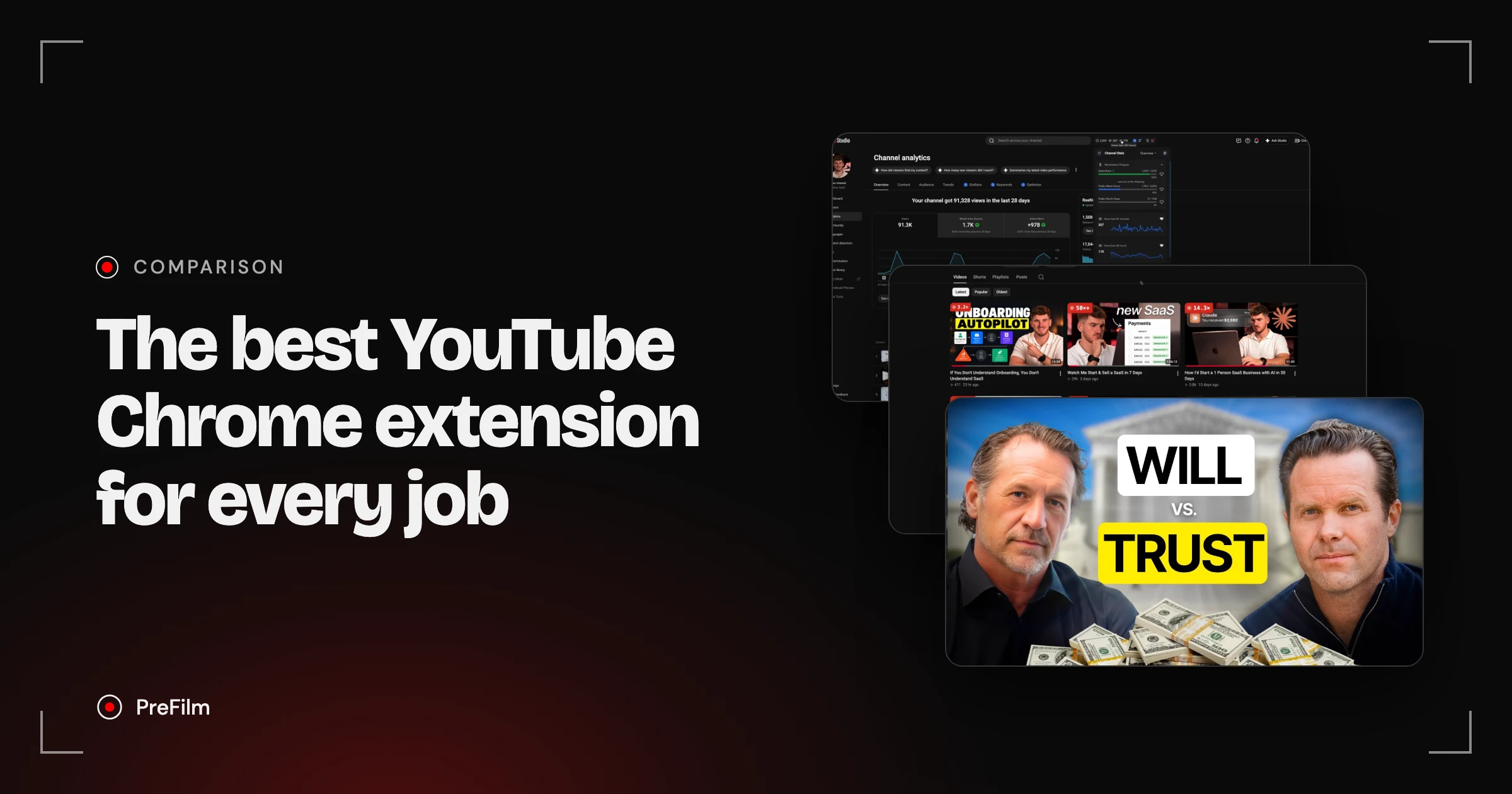
Most lists of the best YouTube Chrome extensions mix ad blockers, downloaders and dark modes with creator tools, and rank them on views. I'm Henry Purchase, and I use YouTube to get customers, not views. I've tested vidIQ, 1of10 and PreFilm on my own channel on camera, and I built PreFilm, so weigh what I say about it with that in mind. Every user count below is what each extension's Chrome Web Store listing showed on 2 November 2026.
The best YouTube Chrome extension for each job
Here's the short version. Each one is free to install, and the user counts come straight from the Chrome Web Store.
| Job | Extension | Chrome Web Store users (2 Nov 2026) | Free to use? |
|---|---|---|---|
| Analytics inside YouTube Studio | vidIQ Vision for YouTube | 4,000,000 | Free plan, paid plans add more |
| Outlier research and thumbnail previews | 1of10.com - Optimization Tool For Youtube | 30,000 | Outlier scores and rankings are free |
| Outliers plus what a video is selling | PreFilm - Growth Tool for YouTube | Listed October 2026 | Badge free; offer read and transcript for customers |
| Bulk edits and channel management | TubeBuddy for YouTube | 1,000,000 | Free plan, paid licences |
| Search volume in YouTube search | Keywords Everywhere | 1,000,000 | Freemium; volumes need credits |
| Watching research videos faster | Enhancer for YouTube | 1,000,000 | Yes |
| Skipping sponsor reads | SponsorBlock | 2,000,000 | Yes, open source |
Analytics inside YouTube Studio: vidIQ
vidIQ is the best YouTube Chrome extension for analytics, because it adds the data YouTube Studio doesn't give you. I put vidIQ second in my growth tools video, and the extension is a big reason why. To be honest, I think "the analytics YouTube Studio gives you are quite poor", and there are things I want to know that I just can't get from YouTube Studio on its own.
Once it's installed, open your channel analytics. You'll see vidIQ's own tabs next to YouTube's: Outliers, Keywords and Optimize. Its Channel Stats panel shows your progress towards monetisation and your views over the last 60 minutes and 48 hours.
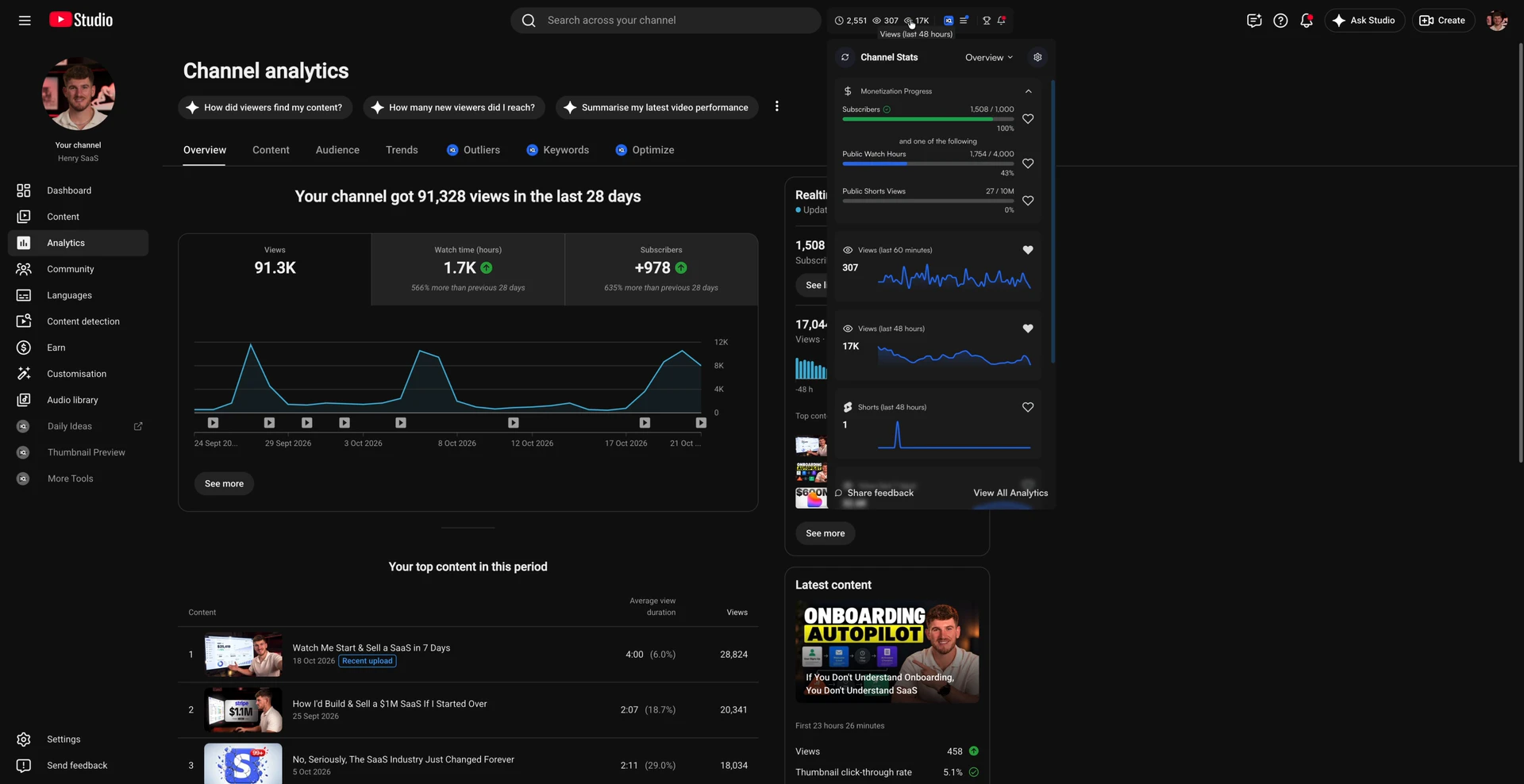
On YouTube itself, it adds views per hour (VPH), an outlier score and engaged views under every video. Engaged views was something I'd never seen until vidIQ showed it. In my words from the video, "their Chrome extension is definitely above the rest", and vidIQ's listing shows 4,000,000 users. In the video I said "four million people use the Chrome extension, which is absolutely insane", and the listing still says the same.
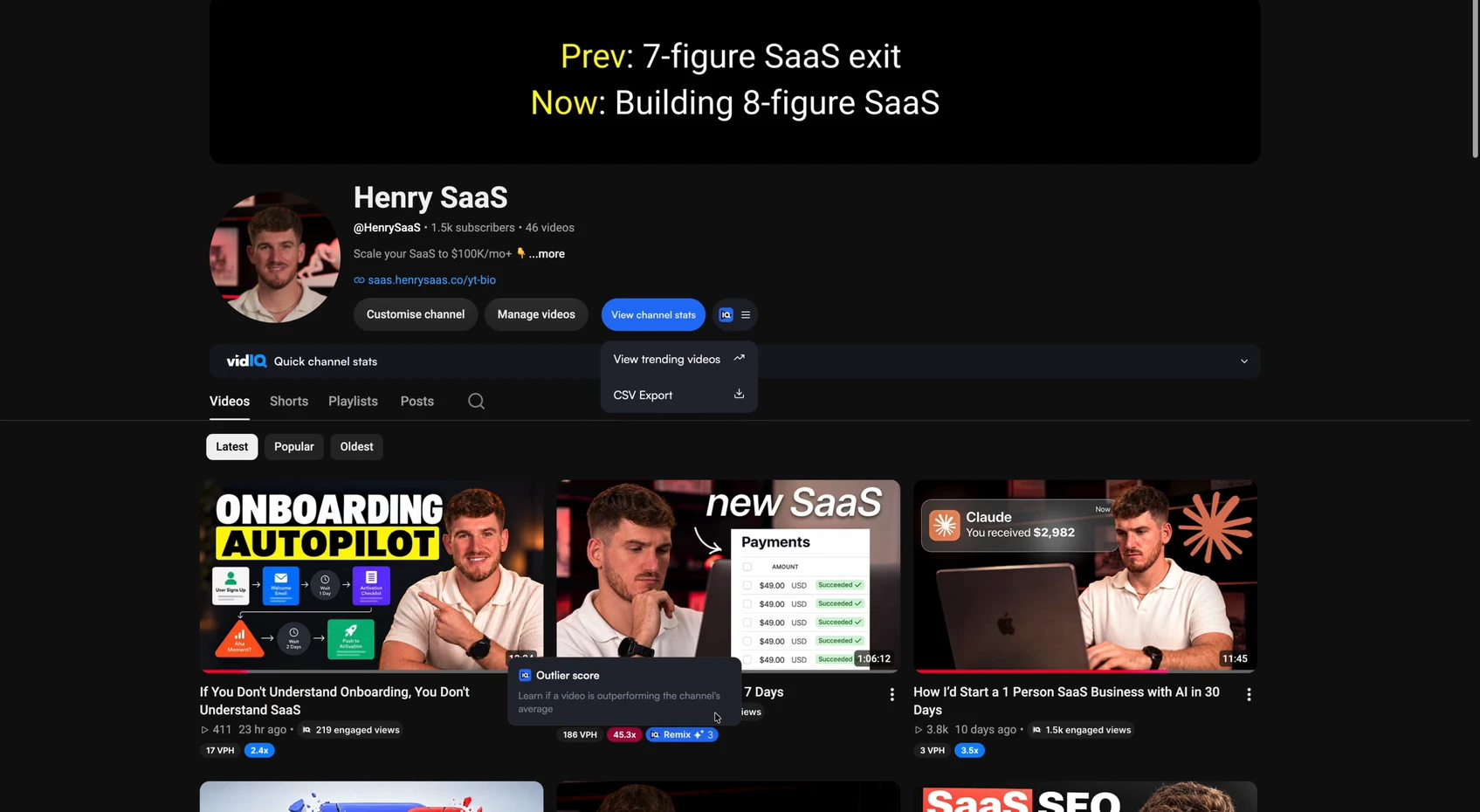
What I don't like: vidIQ doesn't really understand your offer. Its ideas are good, but I'm not sure they lead to new business. It has a free plan, and its paid plans run on AI credits, which add up if you use it a lot. Prices are on the vidIQ plans page, and vidIQ says local pricing may vary. I go deeper on it in my vidIQ review.
Find the videos your buyers already watch
Find my winning videosOutlier research and thumbnail previews: 1of10
1of10 has the best YouTube Chrome extension for outlier research while you browse. An outlier is a video that got far more views than its channel normally gets, and 1of10's extension scores every video against that normal. In my vidIQ alternatives video I said "where I do really think 1of10 wins is their Chrome extension".
The feature I like most is the thumbnail previewer. You drop your thumbnail and title onto your real YouTube homepage and see how they look next to the videos you'd be competing with. Packaging (your title and thumbnail) is one of the most important things on YouTube, so seeing it in place before you publish is really useful.
The 1of10 extension listed 30,000 users on the Chrome Web Store, and on any video it also lets you:
- bookmark the video to your 1of10 library
- track the channel and get told when it posts a hit
- find similar videos with similar titles or thumbnails
- download the thumbnail
- generate ideas from it, using AI credits
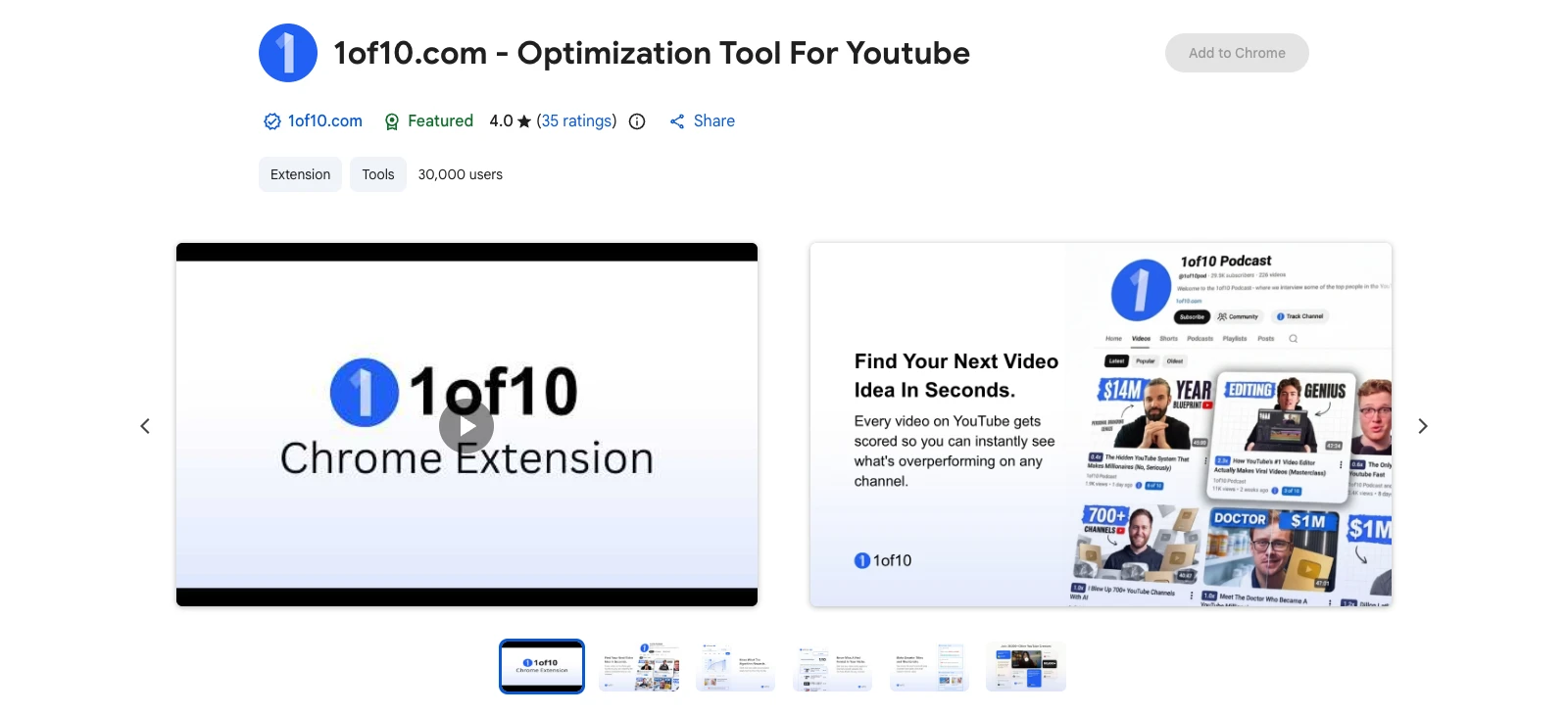
Two things to know. When I used it, some thumbnails still hadn't generated minutes later, so it was "a little bit buggy". And the outliers aren't tied to your business, so you do more of the work turning them into ideas. The outlier scores and rankings are free, and unlimited similar videos need a paid plan.
Outliers and what a video is selling: PreFilm
PreFilm's extension marks every long-form YouTube video with how far it beat its own channel's normal, and for PreFilm customers it reads what that video is selling. On the Chrome Web Store it's called "PreFilm - Growth Tool for YouTube". On this site I call it the PreFilm outlier badge, PreFilm's Chrome extension.
A red 14.3x badge means that video got 14.3 times the views its channel usually gets. Hover the badge for the numbers behind it, download the thumbnail, or open the video in PreFilm. On a channel's Videos tab, the numbers are worked out from the page itself. On a channel PreFilm doesn't know yet, you press Check and your own browser reads that channel's page.
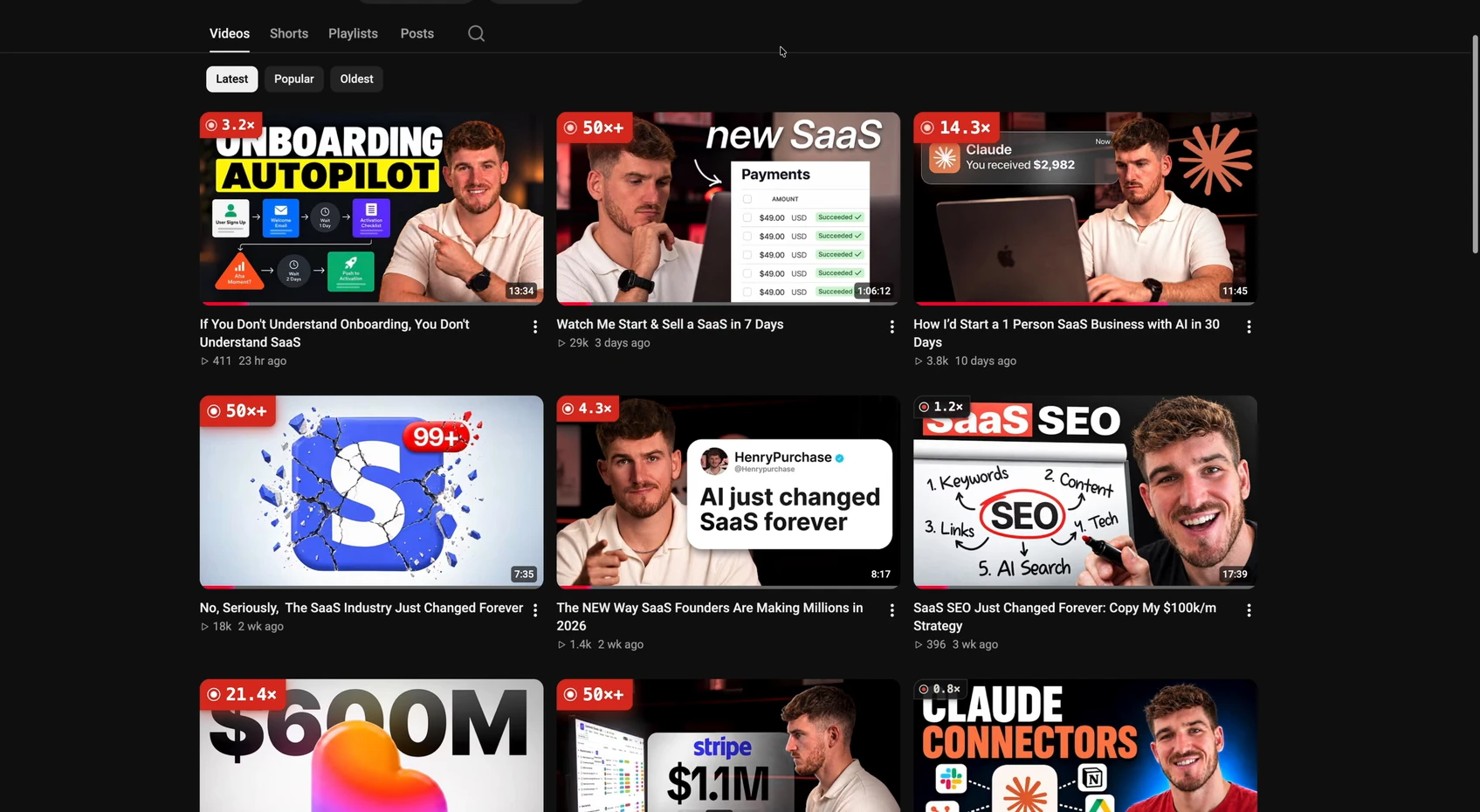
The part I find most interesting is the offer read. When I'm researching competitors, I want to know what they're selling, not just what kind of videos they make. PreFilm customers get three more actions in the badge's card: save the video to their research, read the offer it pushes, and copy the transcript. The badge itself is free for everyone and doesn't need an account.
Here's the kind of video a badge should make you stop on. When I searched "estate planning attorney" in PreFilm's outlier search, the top result was Mark J Kohler's "Will vs Trust in 10 Minutes or Less (Attorneys Explain)". It got 261,278 views, 32.6 times his channel's normal. That's a question estate planning clients ask before they book, and any law firm could answer it from its own cases.

Now the honest limits:
- Long-form only. It doesn't mark Shorts.
- It's new. It went on the Chrome Web Store in October 2026, so it has a fraction of vidIQ's users.
- The extras need a plan. The offer read and the transcript are for PreFilm customers, from $1 for 7 days.
- PreFilm suits people who've already published. If you're brand new to YouTube, start with our free tools and the blog.
See which videos beat their channel's normal
Find my winning videosBulk edits and channel management: TubeBuddy
TubeBuddy is the YouTube Chrome extension for managing a channel at scale. Its listing describes bulk processing tools that make edits across many videos at once, card templates and end screens, plus keyword tools and competitor tag comparisons. That's useful if you're changing the link in 200 video descriptions after a rebrand.
TubeBuddy has a free plan. Read the small print if you're a business: TubeBuddy says its Pro, Star and Legend licences aren't available to businesses, which go to Enterprise. Its title and thumbnail tests are on Legend, but YouTube now has free A/B testing built into YouTube Studio for up to three titles or thumbnails, so try that first. I compared the two big extensions in vidIQ vs TubeBuddy.
Search volume in YouTube search: Keywords Everywhere
Keywords Everywhere adds search data to YouTube's own search box. Its listing covers YouTube search insights, video insights and tags on the free version, and monthly search volume, cost per click and trend data on the paid version, which runs on credits.
This is the job a lot of business owners skip. A video that answers a search keeps getting found for years. Type what your buyers ask into YouTube, check the volume, and see which phrasing people actually use. I walk through the free way to do this in YouTube keyword research without vidIQ.
YouTube extensions for watching research faster
Two viewer extensions save real time when you're studying other people's videos.
- Enhancer for YouTube. Its listing says you can set playback speed anywhere from 0.07x to 16x, set a default quality, loop a section and hide recommendations or comments. Watching a 30-minute competitor video at 2.5x and looping the opening is a quick way to study a hook.
- SponsorBlock. It skips sponsor reads, intros, outros and subscribe reminders, using start and end times other viewers submit. It's open source, and the listing shows 2,000,000 users. Just remember that a sponsor read on a competitor's video tells you who pays to reach their audience, so watch it once.
How to choose YouTube extensions without slowing Chrome down
Pick YouTube extensions by the job you do every week, not by how many features they list. Every extension you add runs on the pages you visit, so fewer is better. Here's how I'd choose:
- Write down the jobs. Most business owners need two: research (what's working in your niche) and analytics (how your own videos are doing).
- Install from the Chrome Web Store only. Check the developer, the user count, the last update date and the privacy section on the listing.
- Test it on one competitor. Open a competitor's Videos tab and see whether it flags the videos you'd expect.
- Check it on your own channel. Make sure it shows something YouTube Studio doesn't.
- Remove what you don't use. If you haven't opened it in a month, uninstall it.
Which YouTube Chrome extensions should a business owner install?
For most business owners, two YouTube Chrome extensions are enough:
- vidIQ if you want better analytics inside YouTube Studio.
- 1of10 if you already know YouTube and want the deepest outlier research and the thumbnail previewer.
- PreFilm if you want to see which videos beat their channel's normal and what those channels are selling, so the ideas point at your offer.
- TubeBuddy if you manage a big back catalogue.
Whatever you install, the extension only shows you what's working. Turning it into a video your buyers will watch is still the job. If you want the full picture of the tools behind it, read my ranking of the best YouTube tools for business owners, or compare PreFilm's plans.
Stop guessing what to film.
PreFilm finds the videos your buyers already watch and writes the script in your voice. $1 for 7 days.
Find my winning videosQuestions
Questions.
What is the best YouTube Chrome extension?
The best YouTube Chrome extension depends on the job. vidIQ is best for analytics inside YouTube Studio, 1of10 for outlier research and thumbnail previews, TubeBuddy for bulk edits, and PreFilm for seeing which videos beat their channel's normal and what they sell. Most business owners only need two of them.
What is the best free YouTube Chrome extension?
The best free YouTube Chrome extension for research is 1of10's, because its outlier scores and video rankings are free. vidIQ's extension also has a free plan and adds analytics to YouTube Studio. PreFilm's multiplier badge is free for everyone too, without an account. Paid plans add the extra actions.
Are YouTube extensions safe?
YouTube extensions are safe when you install them from the Chrome Web Store, from a developer you can identify, and check what they ask to access. Every listing shows the developer, the user count, the last update and a privacy section. Avoid extensions that haven't been updated in years or ask for access to every site.
Is the vidIQ extension free?
Yes, the vidIQ extension is free to install, and vidIQ has a free plan that includes core tools and 150 AI credits a month. Paid plans add more credits, competitor tracking, trend alerts and deeper analytics. vidIQ says local pricing may vary, so check the plans page from where you are.
Does the PreFilm extension work on YouTube Shorts?
No, PreFilm's extension only marks long-form YouTube videos. Each badge shows how many times more views a video got than its channel normally gets. If most of your research happens on Shorts, vidIQ or 1of10 will cover more of what you see on YouTube.
Do I need a paid YouTube Chrome extension to grow a channel?
No, you don't need a paid YouTube Chrome extension to grow a channel. YouTube Studio, YouTube search and the free plans of vidIQ, 1of10 and PreFilm's badge cover the basics. Paid plans save time on research, but only once you've published a few videos and know who you're making them for.