Guides · 9 min read
What a YouTube outlier is and how to find one
A YouTube outlier is a video that got far more views than its own channel normally gets. Divide its views by the channel's normal and you get its multiplier: a video at 10× did ten times what that channel usually does, which tells you the idea did the work, not the size of the channel.
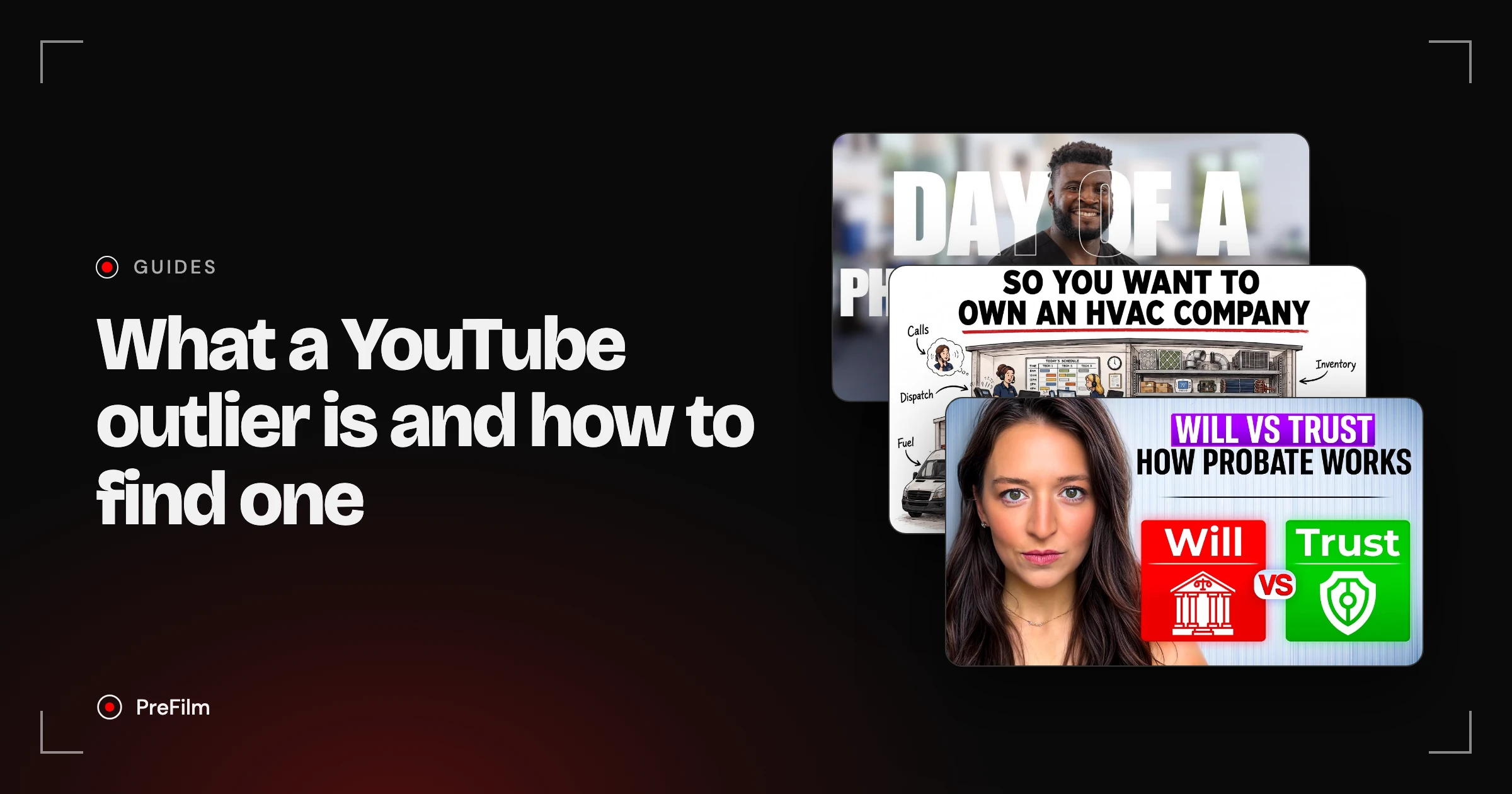
That part is simple. What most guides skip is how the "normal" is worked out, because every tool does it differently, and when the multiplier lies. I built PreFilm around outliers, so this is how I read them, with real outlier videos from physical therapists, HVAC companies and estate planning lawyers, and my own channel's numbers.
What is a YouTube outlier?
An outlier is a video that beat its own channel's normal by a wide margin. It's judged against the channel it came from, not against YouTube as a whole, which is why a video with a few thousand views can be a bigger outlier than one with half a million.
Here's a real example. Dr. Odell Miller has 4,690 subscribers. His video "Day in the Life As a Physical Therapy Clinic Owner" got 8,505 views. It's a modest number for YouTube, and it's 48.1 times what his videos normally get.

Now compare it with Erin Talks Money, a personal finance channel with 445,000 subscribers. "Estate Planning Explained: Wills vs Trusts" got 463,985 views. That's about 55 times more views than Dr. Miller's video, but it was only 4.4 times Erin's normal.
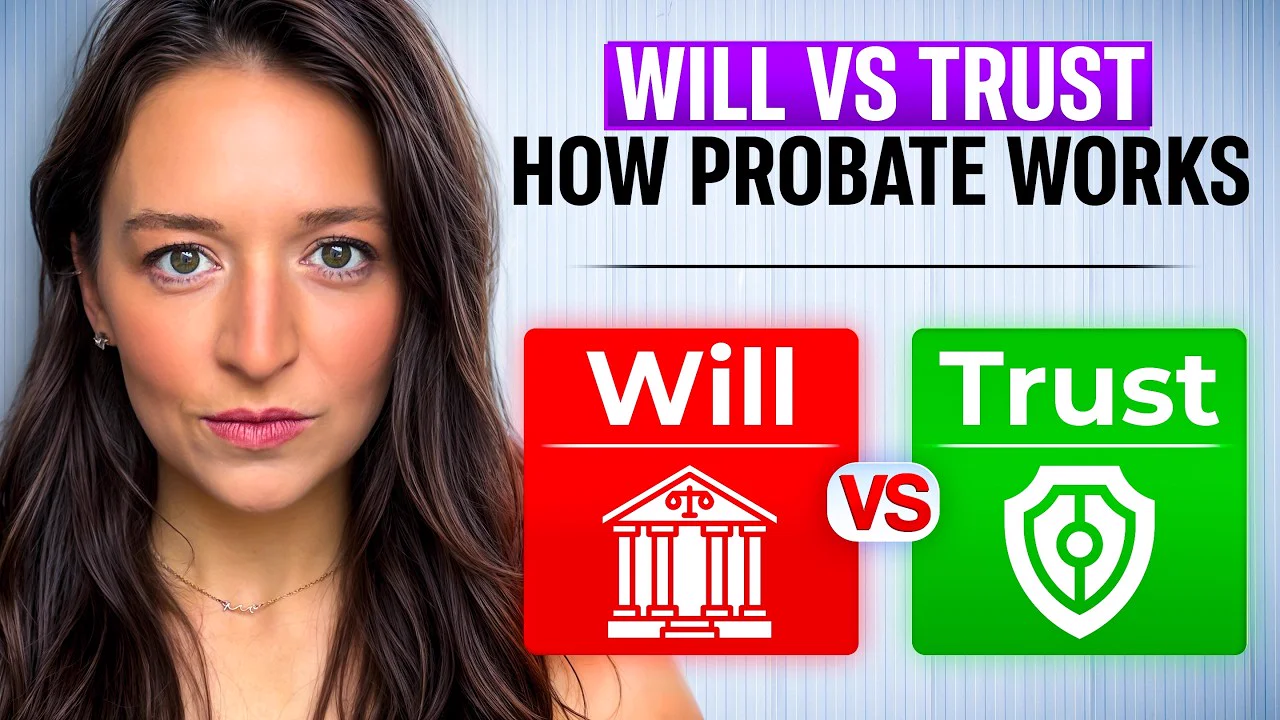
Both are outliers. But if you only looked at view counts, you'd study Erin's video and never find Dr. Miller's, and his is the stronger signal that the topic itself pulled people in.
How do tools measure a channel's "normal"?
Every outlier score, the number a tool gives a video for how far it beat its channel, is the video's views divided by a baseline. The tools just disagree on the baseline. Some use the channel's average, some use a set number of recent videos, and some adjust for how old the video is.
Here's what each one says, checked on their own sites in November 2026:
| Tool | What it compares a video with | Source |
|---|---|---|
| PreFilm | The channel's latest 30 long-form uploads; videos under 14 days old are marked early | The PreFilm extension's panel, and PreFilm's outlier search |
| ViewStats | The average of the channel's last 10 videos at that time | ViewStats help centre |
| vidIQ | The channel's average views within a similar timeframe; the score also uses views and velocity | vidIQ help, vidIQ Outliers |
| 1of10 | The channel's average views | 1of10 homepage outliers |
| TubeLab | Each channel's last 100 videos, using a z-score | TubeLab pricing FAQ |
| OutlierKit | The channel's average views over recent uploads | OutlierKit on outlier scores |
A few things are worth knowing about these.
- Average or median changes the answer. One huge video drags a channel's average up, which makes every other video look worse. A median (the middle video) ignores that one hit.
- How many videos matters. TubeLab's 100 videos can stretch back years on a channel that posts weekly. ViewStats' last 10 reflect what the channel is doing now.
- Age matters most of all. A video posted yesterday hasn't had time to collect views, so comparing it with videos that have had months will make it look like a flop. vidIQ deals with this by comparing within a similar timeframe. PreFilm flags anything under 14 days old as early.
YouTube itself is testing outlier multipliers too. Tubefilter reported in August 2026 that an experimental tab in YouTube Studio, shown to a small number of users, rates videos against a creator's other content. For your own videos, YouTube Studio already compares each one with your typical performance in its overview reports.
Find the videos your buyers already watch
Find my winning videosWhy multipliers mislead on small channels and new videos
A multiplier is only as good as the baseline under it. On a channel whose videos normally get a few hundred views, a few thousand extra views produces a huge number. On a video that's three days old, the number is still moving.
My own channel shows both problems at once. Here's my Videos tab with PreFilm's extension switched on.
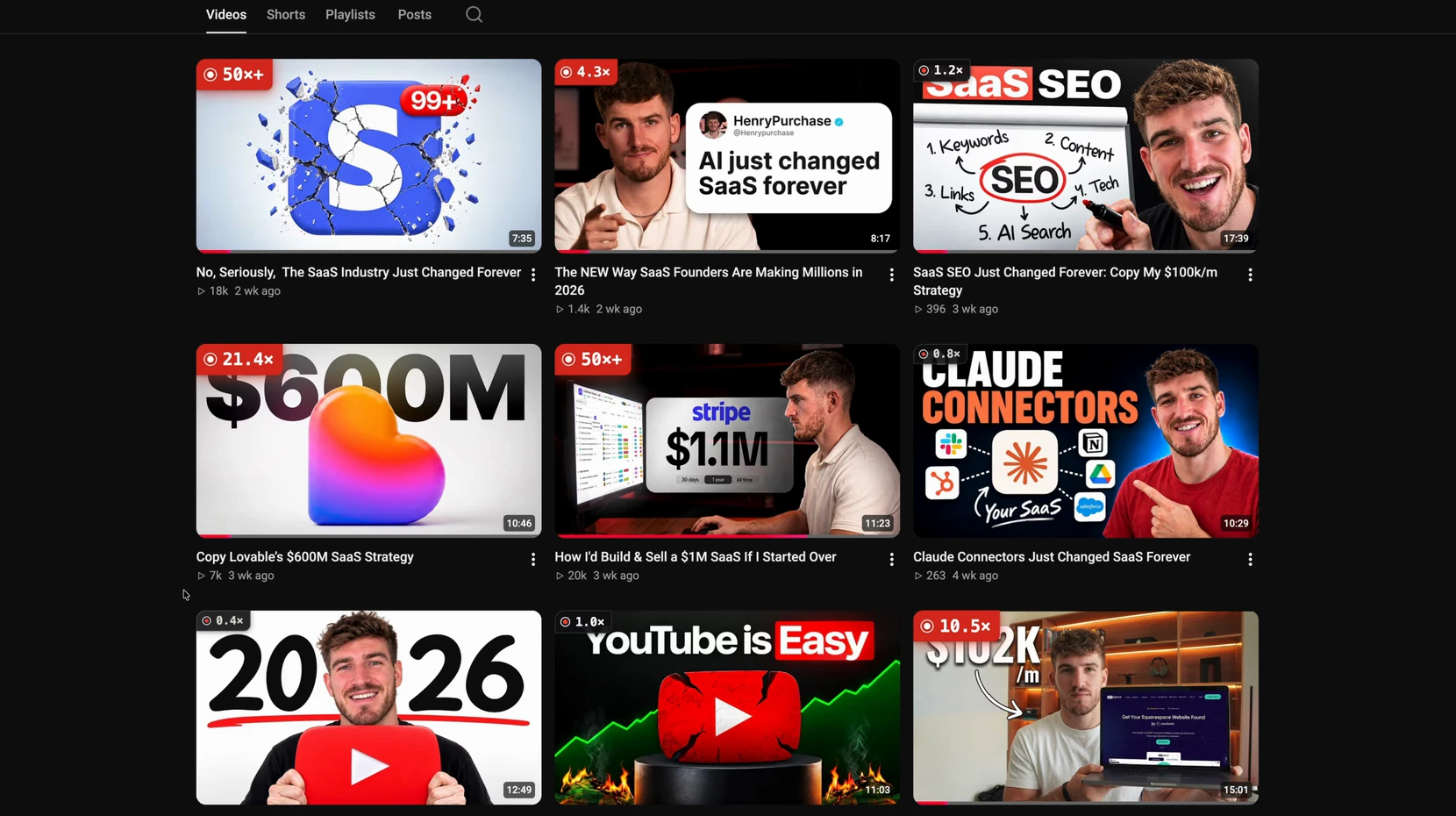
When I hovered over one badge in the same recording, the panel said the channel's normal was 327 views, "worked out from the channel's latest 30 long-form uploads", and marked the video "early, still collecting views". With a normal of 327, a video with 263 views shows as 0.8×, and my 18K and 20K videos both show as 50×+. They did well, but a 50× on a 1,500-subscriber channel is not the same evidence as a 50× on a channel that normally gets 50,000 views.
Here's how that plays out on other small channels, all from PreFilm's outlier search:
- Very small, still useful. Laura Cowan, Esq. has 436 subscribers. "FREE TRAINING: Estate Planning Essentials For Lawyers" got 1,434 views, 11.8× her normal. The multiplier is real, but it rests on very few views.
- Small, and it held up. Mike Finance has 2,280 subscribers and a normal of 616 views. "The Economics of Owning an HVAC Company" got 20,670 views, 33.6×, and it was 91 days old when I checked. That's a multiplier I'd trust.
- Too early to tell. 8-Figure HVAC Brands, a podcast with 97 subscribers, posted "How This HVAC Owner Went From Solo Tech to Scaling Toward $3M". It was 8 days old with 717 views at 3.6×. PreFilm marked it early, because "its multiple can still move".


So before you trust a multiplier, check three things:
- The raw views. If the video has a few hundred views, a big multiplier is a weak signal.
- The age. Under two weeks, wait. Over a month, the number has mostly settled.
- Whether it's a one-off. One outlier can be luck. The same kind of video beating its normal on several channels is a pattern.
How to find outliers on YouTube for free
You can find outliers by hand with nothing but YouTube. It's slow, but it's how I'd start if you've never done it.
- List the channels your buyers watch. Your competitors, but also the channels next to your niche. If you sell to clinic owners, include practice management and healthcare marketing channels.
- Work out each channel's normal. Open the channel's Videos tab and look at its last 10 to 30 long videos. Ignore Shorts. Take the middle view count, not the average, so one hit doesn't skew it.
- Sort by Popular. Divide each top video's views by the normal you just found.
- Mark anything at 3× or more. Then check it against the three rules above: raw views, age and whether the pattern shows up elsewhere.
- Note the format, not just the title. Write down what kind of video it is (a day in the life, a breakdown, a comparison), because that's the part you'll reuse.
You'll learn your niche doing it. One catch: the Popular sort shows the biggest videos of all time, so you'll mostly find outliers from years ago. For recent ones, stay on Latest and scan down.
Let PreFilm find the outliers for you
Find my niche's outliersYouTube outlier finder tools
A YouTube outlier finder does the dividing for you, across far more channels than you could check by hand. Most of the well-known ones have a free plan or a free extension.
- 1of10. I'd call 1of10 "the pioneer of this whole 1-of-10 concept", i.e. finding the best outliers for a particular channel. It's a strong research toolkit, and its Chrome extension is "super valuable for finding outliers". My one complaint is that its home feed of outliers isn't personalised to my business, so you do the work of turning them into ideas. There's more in PreFilm vs 1of10.
- vidIQ. vidIQ's outliers search lets you filter by outlier score, views per hour, channel size and date, and its free plan shows up to 6 videos per search. I like its outlier research a lot.
- ViewStats. Its Outliers tool is on the Pro plan and searches by idea, niche or channel.
- TubeLab. I like its "New viral videos from small channels", though its niche finder is built for faceless and views-first channels.
- OutlierKit. Built for coaches, consultants and experts, starting from a channel your clients already watch.
- PreFilm. The PreFilm outlier badge, PreFilm's Chrome extension, puts a multiplier on every long-form video as you browse YouTube. PreFilm's video ideas go further: they find the outliers in and around your niche and turn them into ideas for what you sell. There's a wider comparison in the best YouTube Chrome extension for every job.
The problem I have with most of these tools is age. They'll happily show you an outlier from two years ago, and as I said in my vidIQ alternatives video, by then "that format might have been rinsed over and over again". A great outlier that 20 other channels have already copied isn't a great idea any more.
One more thing: PreFilm works best once you've published a few videos. If you're brand new, start with the free YouTube tools and the guides on the PreFilm blog, and do the manual method above.
How to use an outlier without copying it
Keep the outlier's format and change its subject to what you sell. The format is the shape of the video: a day in the life, an economics breakdown, a comparison. The subject is what it's about. Formats travel between niches. Subjects don't.
Look at the day-in-the-life format in PreFilm's outlier searches for three different businesses:
| Video | Niche | Multiplier |
|---|---|---|
| Day in the Life As a Physical Therapy Clinic Owner | Physical therapy | 48.1× |
| Estate Planning Attorney: Day In The Life (American Estate Planning Series) | Law | 16.2× |
| A Day in the Life of an HVAC Business Owner (Brian Barraza) | HVAC | 7.3× |
Same format, three subjects, three outliers. If you run an accounting firm, a day in the life of a tax adviser in January is the same shape with your subject in it.
The comments often hand you the next subject too. Under Mike Finance's HVAC economics video, viewers asked for the same breakdown for an electrical business and for plumbing. That's the format asking to be reused.
Then check how many times it's been done since. In the estate planning search, three of the twelve outliers were wills vs trusts explainers, from 2023 (Toby Mathis, 3.3×) to 2026 (Erin, 4.4×). That format still works, but plenty of channels have done it, so you'd need a sharper angle than "wills vs trusts" to stand out.
That count is the number I care about most. Every PreFilm idea shows the video it came from, how far it beat its channel's normal, when the format first appeared and how many times it's been done since. If you'd rather do it yourself, search the format on YouTube, filter by upload date and count the recent versions before you film. You'll find more on turning outliers into ideas in how to find YouTube video ideas that are already proven, and on reusing their packaging in YouTube thumbnail ideas taken from outlier videos and YouTube hooks taken from outlier videos.
An outlier tells you an idea worked for one channel, against that channel's own normal. Check the baseline, the views and the age before you trust the multiplier, then keep the format and make the subject yours. If you want PreFilm to do the finding for you, compare the plans.
Stop guessing what to film.
PreFilm finds the videos your buyers already watch and writes the script in your voice. $1 for 7 days.
Find my winning videosQuestions
Questions.
What is an outlier on YouTube?
An outlier on YouTube is a video that got far more views than its own channel normally gets. Divide the video's views by the channel's normal and you get its multiplier. A video at 10 times its channel's normal is an outlier whatever the view count, because it shows the idea pulled in viewers the channel doesn't usually reach.
What is a good outlier score on YouTube?
Anything above about 3 times the channel's normal is worth a look, and 10 times or more is a strong signal. Treat the number with care on channels with only a few hundred views per video, and on videos under two weeks old, because small baselines and early views make the multiplier swing much more than it should.
How do you find outliers on YouTube for free?
Open a channel's Videos tab, note the views on its last 10 to 30 long videos and take the middle number as its normal. Then sort by Popular and divide each top video's views by that normal. Anything at 3 times or more is an outlier. Free browser extensions, including PreFilm's, show the multiplier for you.
Is a YouTube outlier the same as a viral video?
No. A viral video is one with a huge view count, while a YouTube outlier is judged against its own channel. A video with 8,505 views can be an outlier at 48 times its channel's normal, and a video with 463,985 views can be only 4.4 times its channel's normal on a bigger channel.
Can small channels get outliers?
Yes, and they're often the most useful ones, because the idea did the work rather than the audience. A finance channel with 2,280 subscribers got 20,670 views on one video, 33.6 times its normal of 616. Just check the raw views and the video's age before trusting a big multiplier on a very small channel.
Should you copy a YouTube outlier?
You should copy its format, not its video. Keep the shape that worked, such as a day in the life or an economics breakdown, and change the subject to what you sell. Then check how many times the format has been done since, because one that has been copied over and over is usually too late.