The best Social Blade alternative for YouTube stats is ViewStats, followed by vidIQ's free stats pages, Playboard and NoxInfluencer. Most people searching for a Social Blade alternative just want subscriber counts, view history, estimated earnings and rankings, so the stats trackers come first in this list.
Creators who want free YouTube channel and video stats, plus outlier, thumbnail and competitor research on Pro.
Varies by location
Yes
2. vidIQ
Creators who want AI-powered ideas, optimization, thumbnails and coaching to get more views and subscribers on YouTube.
$19/mo (Boost), or $16.58/mo billed annually ($199/yr)
Yes
3. Playboard
Anyone who wants YouTube channel rankings, Super Chat and live-stream stats, and channel analysis reports.
$29/mo (Basic)
Yes
4. NoxInfluencer
Brands and agencies who want creator stats, rankings and influencer discovery across YouTube, TikTok, Instagram and Twitch.
$49/mo (AI Startup Starter, limited quota); full plans from $1,499 per quarter (Business)
Not stated on their site
5. TubeBuddy
Individual creators who want SEO, A/B testing, content strategy and bulk productivity tools for managing a YouTube channel.
Varies by location
Yes
6. 1of10
Creators who want to find outlier videos and generate data-backed ideas, titles and thumbnails.
$19/mo (Basic), or $15/mo billed annually ($180/yr)
Yes
7. PreFilm
Business owners who want YouTube videos that bring in customers, with ideas, evidence and scripts built around what they sell.
$49/mo (Creator)
Not included
Prices checked 2 November 2026 on each tool's own site.
The tools, ranked
#1
ViewStats
Best for
Creators who want free YouTube channel and video stats, plus outlier, thumbnail and competitor research on Pro.
Starting price
Varies by location
What it does well
The closest free match for Social Blade on YouTube. Channelytics shows any channel's subscribers, views, estimated revenue and ranks, with projections, similar channels, top lists and channel comparisons, all without an account. The free Chrome extension adds outlier scores and view charts on YouTube.
Where it falls short
YouTube only, so no TikTok, Instagram or Twitch. The research tools (outliers, thumbnail search, alerts, competitors) need Pro, its price varies by location, and its site lists no script writer or Claude and ChatGPT access.
Creators who want AI-powered ideas, optimization, thumbnails and coaching to get more views and subscribers on YouTube.
Starting price
$19/mo (Boost), or $16.58/mo billed annually ($199/yr)
What it does well
Free YouTube stats pages for any channel, with subscribers, views, estimated ad revenue and the latest video's outlier score. Its Chrome extension puts stats on every channel you visit and gives far more detail inside YouTube Studio than YouTube's own analytics. Its MCP works on every plan.
Where it falls short
Built to get you more views and subscribers, so it doesn't understand your offer. The AI tools and the MCP run on AI credits, and those add up quickly once you use them properly.
Anyone who wants YouTube channel rankings, Super Chat and live-stream stats, and channel analysis reports.
Starting price
$29/mo (Basic)
What it does well
Ranks over 25 million YouTube channels by country and category, and tracks Super Chat, live viewers and growth, which Social Blade doesn't. A channel page shows subscriber rank, average views, like and comment rates and similar channels without signing in.
Where it falls short
YouTube only. The free plan allows five channel reports a day, longer history needs Business+ at $199 a month, and nothing on its site helps you decide what to make.
Brands and agencies who want creator stats, rankings and influencer discovery across YouTube, TikTok, Instagram and Twitch.
Starting price
$49/mo (AI Startup Starter, limited quota); full plans from $1,499 per quarter (Business)
What it does well
The broadest stats coverage after Social Blade: rankings and free tools across YouTube, TikTok, Instagram and Twitch, plus influencer search, audience data and outreach for brands running creator campaigns.
Where it falls short
Built for brands, not creators. A YouTube channel's basic data now sits behind a log-in, its own FAQ says some predicted metrics can be 10% or 20% off, and the full plans start at $1,499 a quarter.
Individual creators who want SEO, A/B testing, content strategy and bulk productivity tools for managing a YouTube channel.
Starting price
Varies by location
What it does well
Channelytics, in its free Chrome extension, shows views, subscribers and 30-day growth on any competitor's channel page while you browse YouTube. The rest of the toolkit covers keyword research, thumbnail tests and bulk channel management.
Where it falls short
No public stats website, history or earnings estimates like Social Blade's. Pro and Legend are for individual creators, prices vary by location, and its site mentions no outlier research or MCP.
Creators who want to find outlier videos and generate data-backed ideas, titles and thumbnails.
Starting price
$19/mo (Basic), or $15/mo billed annually ($180/yr)
What it does well
Where you go once stats aren't enough. Its free Chrome extension shows outlier scores, video rankings and views over time on YouTube, and the idea generator gave me some very good ideas. The free plan includes 60 AI credits a month, and research tools never use credits.
Where it falls short
Not a stats tracker, and the outliers on its home screen weren't tailored to my niche, so you work out how to apply them. The thumbnail generator was poor, and MCP access starts on Pro at $89 a month.
Business owners who want YouTube videos that bring in customers, with ideas, evidence and scripts built around what they sell.
Starting price
$49/mo (Creator)
What it does well
Built to get business owners more customers from YouTube: it tells you what to film, not how a channel is trending. It reads what you sell and who buys it, finds the videos beating their channel's normal in and around your niche, and shows what each one sells. Its YouTube MCP for Claude and ChatGPT is on every plan.
Where it falls short
Not a stats tracker: no public channel pages, rankings or earnings estimates. It's new, it works best once you've published a few videos, and there's no free plan: $1 for 7 days, then $49 a month.
Further down are two tools for a different question: not how a channel is doing, but what you should film next. I'm Henry Purchase and I built one of them, PreFilm. It isn't a stats tracker, so it sits last here. It's for business owners who want customers from YouTube rather than a subscriber graph. Every price below was checked on each tool's own site on 2 November 2026.
What do people use Social Blade for?
People use Social Blade to look up any creator's public stats: subscribers, views, growth over time, estimated earnings and rankings. Its homepage says it tracks daily statistics and growth for creators across five platforms: YouTube, TikTok, Twitch, Facebook and Instagram.
And it's free for most of that. A paid membership starts at $5.99 a month (Bronze) and removes the ads, then adds up to three or more years of daily history, extra charts and YouTube report cards on the higher plans.
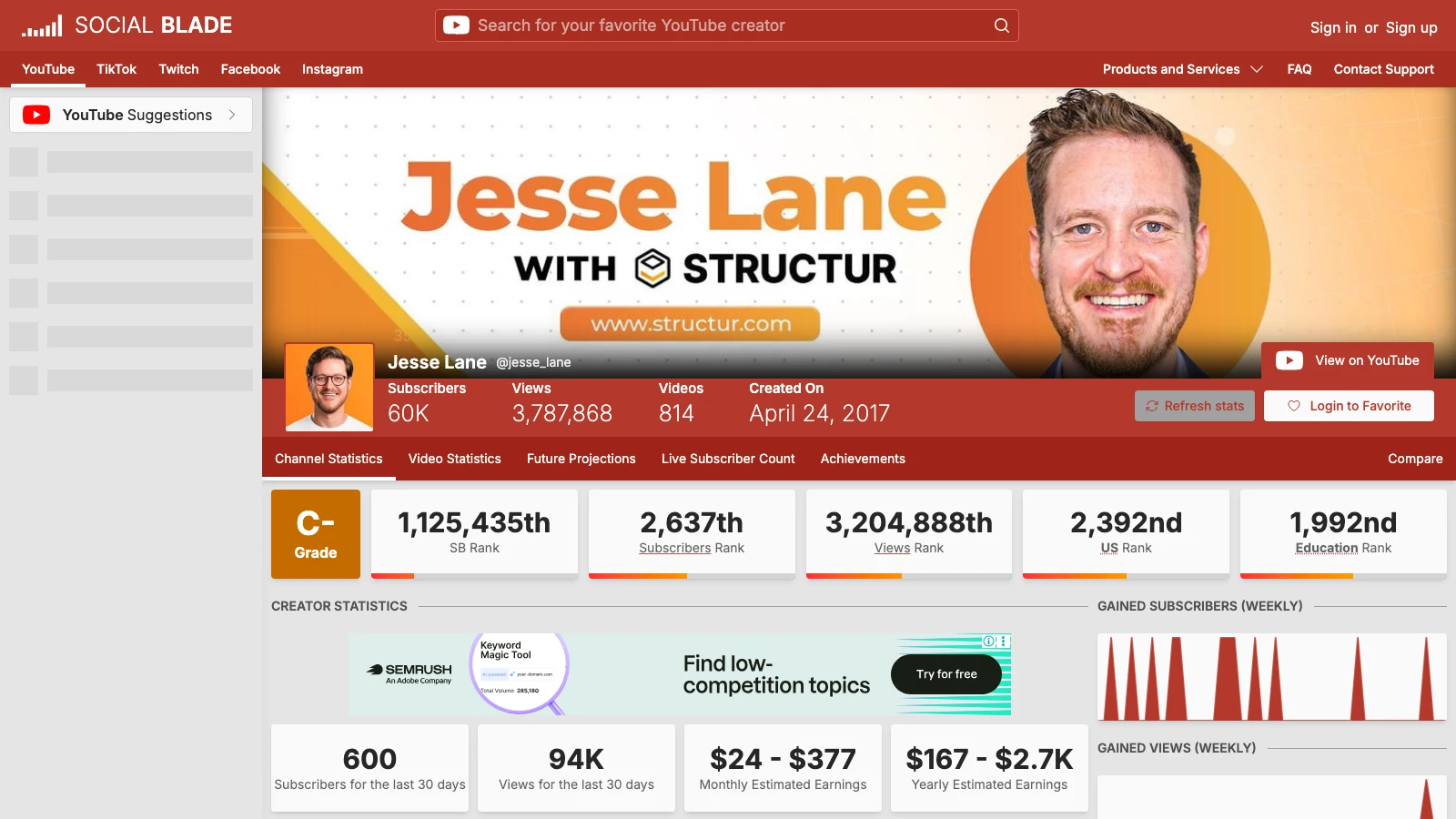
Here's what that looks like for Jesse Lane, a construction business channel with 60,000 subscribers. On 2 November 2026, Social Blade showed 94K views and 600 new subscribers in 30 days, estimated earnings of $24 to $377 a month and a spike in the weekly views chart.
That's the gap with every stats tool, including Social Blade. It tells you a channel is growing. It doesn't tell you which video did it, or what that video was selling.
I ranked them on how well they do Social Blade's job first, then how far they go beyond it. Five things decided the order:
Free channel stats. Can you look up any channel's subscribers, views and growth without paying?
History and estimates. Does it show growth over time and an earnings range, like Social Blade does?
Platforms. Social Blade covers five. Most alternatives cover YouTube only.
Price. That means the plan you'd actually need, not the cheapest one on the page.
What it tells you to do next. Stats show what happened. The tools lower down also help you decide what to make.
1. ViewStats: the closest free Social Blade alternative
ViewStats is the closest match for Social Blade on YouTube, and it's free for the stats. Its FAQ says it was co-founded by MrBeast, and its data comes from YouTube's public API.
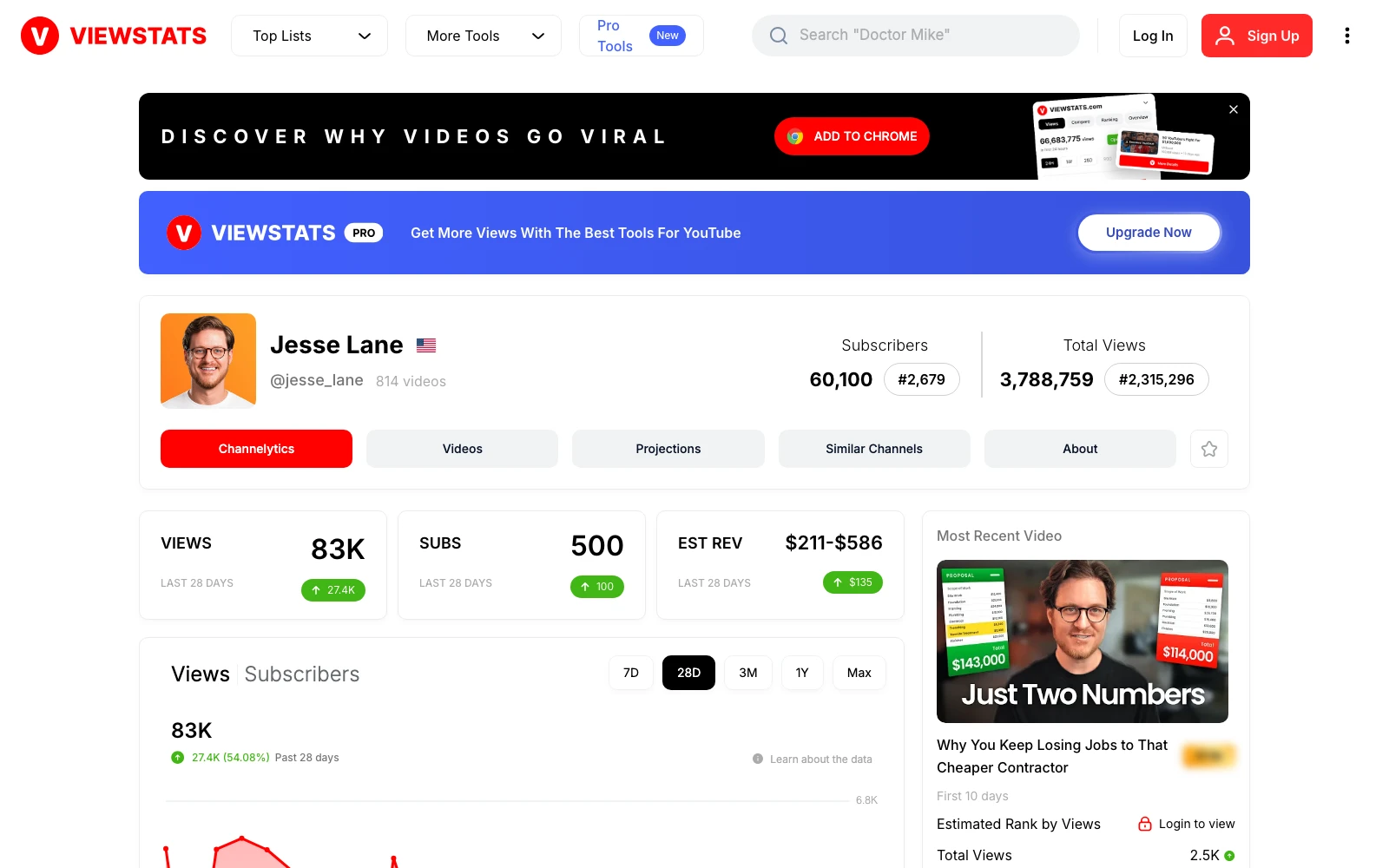
Its Channelytics page shows any channel's subscribers, views, estimated revenue and rankings, with tabs for projections, similar channels and the channel's videos. There are also free top lists, a channel comparison tool and a free Chrome extension that adds outlier scores and view charts on YouTube itself. For Jesse Lane on 2 November 2026, it showed 83K views and 500 subscribers in 28 days and estimated revenue of $211 to $586, with no account needed.
ViewStats Pro showed as $49.99 a month from the UAE, and its prices vary by location. Pro adds outlier search, thumbnail search, alerts and competitor tracking. The Business plan starts at $249 a month. The catch is that ViewStats is YouTube only, so if you also track TikTok or Twitch creators, it won't replace Social Blade completely. I compared it with my own tool in PreFilm vs ViewStats.
2. vidIQ: free stats pages and the best analytics extension
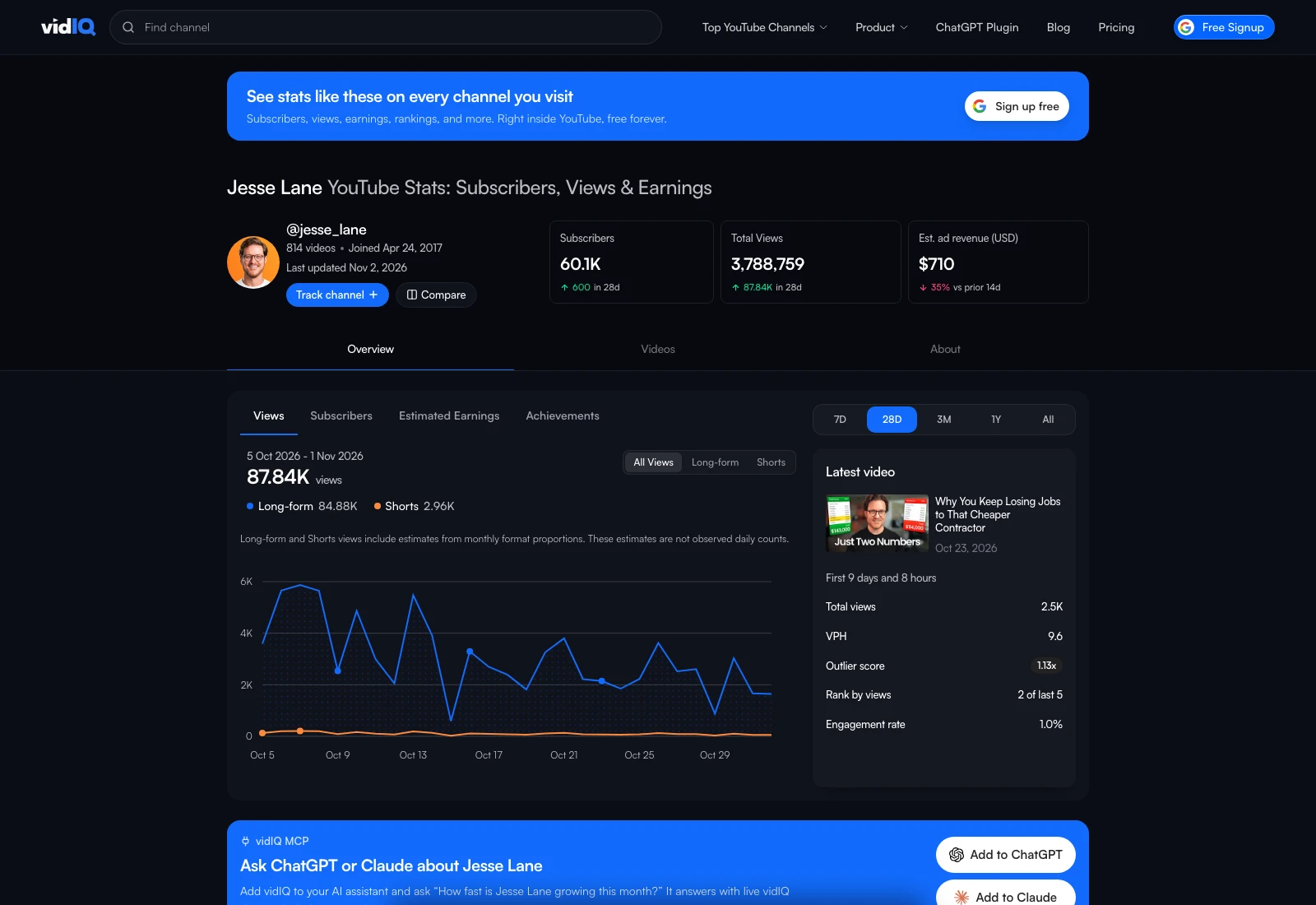
vidIQ is best known as a YouTube growth tool, but it also has free stats pages for any channel. They show subscribers, total views, estimated ad revenue and the latest video's outlier score, and you don't need an account to see them. When I checked Jesse Lane's on 2 November 2026, it also split out long-form and Shorts views.
Where vidIQ really wins is its Chrome extension, which has 4,000,000 users on the Chrome Web Store. It puts stats on every channel you visit, and inside YouTube Studio it gives you far more detail than YouTube's own analytics, which I think are quite poor. For analytics in YouTube, it's the best tool on the market.
What I don't like: vidIQ's promise is more views and subscribers, and it doesn't understand your offer. It starts free, with Boost at $19 a month, but the AI tools and its MCP run on AI credits, and those can rack up quickly. My full take is in PreFilm vs vidIQ, and if vidIQ is the tool you're trying to replace, read my vidIQ alternatives for business owners.
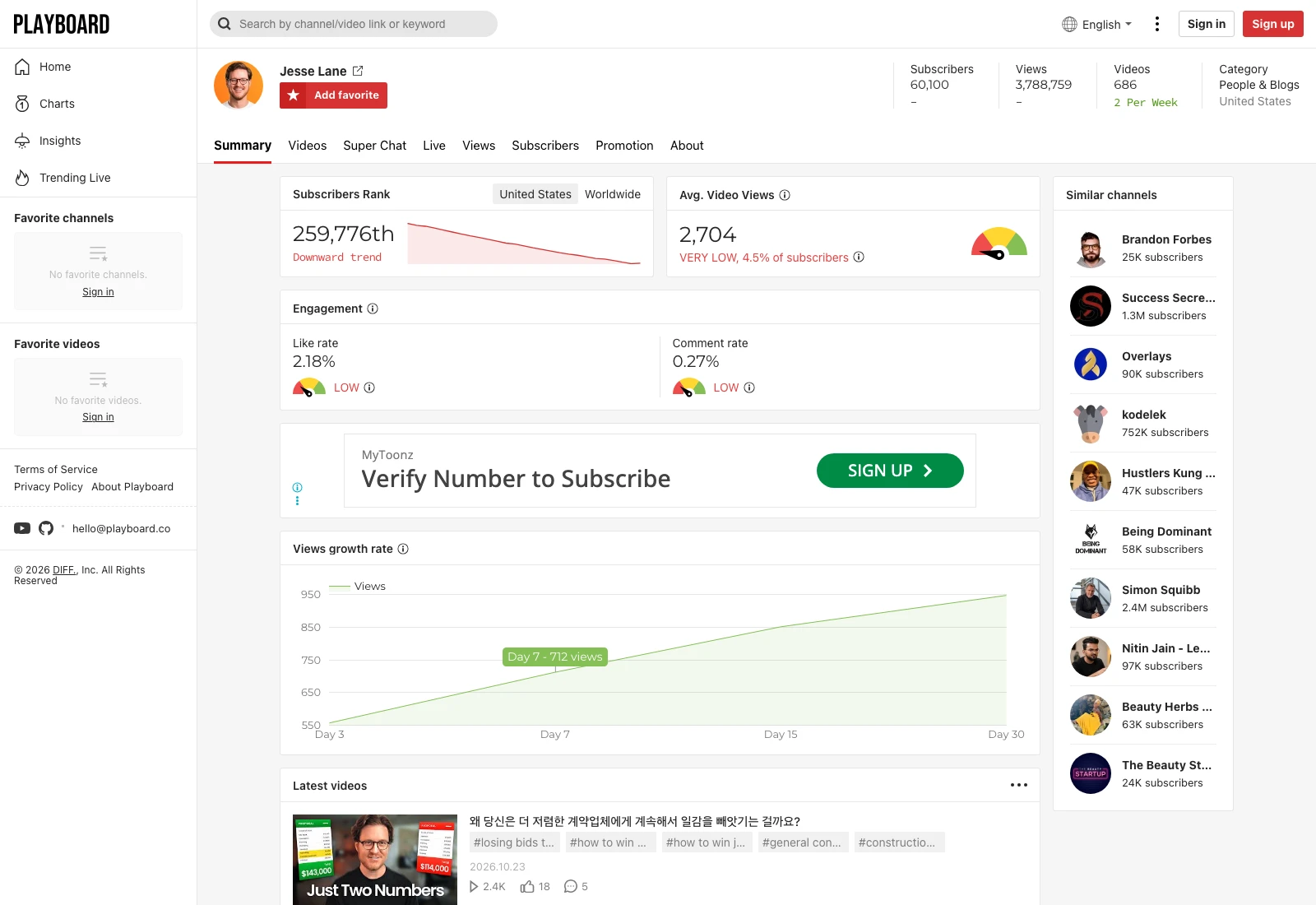
Playboard is the pick if rankings are what you used Social Blade for. It says it covers 25.9 million YouTube channels, with daily and weekly charts by country and category, and it tracks things Social Blade doesn't, like Super Chat income and live viewers.
A channel page shows subscribers, views, subscriber rank, average views per video, like and comment rates, growth and similar channels, without signing in. On 2 November 2026, Jesse Lane's showed average views of 2,704 per video, which Playboard rates very low at 4.5% of subscribers.
The free plan gives you five channel reports a day and a year of subscriber and view trends. Basic is $29 a month for 150 channel reports, and two years of history needs Business+ at $199 a month. It's YouTube only.
4. NoxInfluencer: the multi-platform pick for brands
NoxInfluencer is the closest to Social Blade on coverage. It ranks creators on YouTube, TikTok, Instagram and Twitch, and has free tools like a YouTuber earnings calculator, a channel comparison and a live subscriber count.
But it's built for brands running influencer campaigns, not for creators checking a channel. When I checked a YouTube channel's page on 2 November 2026, the basic data was locked behind a log-in. Its own pricing FAQ says some predicted metrics can be 10% or 20% off the real numbers. Its smallest plan, AI Startup, is $49 a month with limited features, and the full Business plan is $1,499 a quarter.
So it's a strong choice if you're a brand vetting creators across platforms. If you just want to check YouTube channels, ViewStats or vidIQ is quicker and free.
5. TubeBuddy: channel stats while you browse
TubeBuddy has no public stats website, but its free Chrome extension includes Channelytics, which shows views, subscribers and 30-day growth when you visit any channel on YouTube. That covers the quick competitor check most people open Social Blade for.
The rest of TubeBuddy is a channel management toolkit: keyword research, thumbnail tests and bulk editing. Its Pro and Legend plans are for individual creators, and the prices vary by location. There's more in PreFilm vs TubeBuddy.
6. 1of10: when you want outliers, not just stats
1of10 isn't a stats tracker, but it's where I'd go once stats aren't enough. Instead of a channel's totals, it shows which videos beat their channel's normal, and those are the ones worth studying.
Its Chrome extension is the valuable part for finding outliers: it adds outlier scores, video rankings and views over time on YouTube. 1of10 pioneered the outlier idea, and its idea generator gave me some very good ideas. The outliers on its home screen weren't relevant to my business, though, so you do the work of applying them, and its thumbnail generator wasn't great and cost credits.
There's a free plan with 60 AI credits a month, Basic is $19 a month, and MCP access for Claude and ChatGPT starts on Pro at $89 a month. I compared it in more detail in PreFilm vs 1of10.
7. PreFilm: for business owners who want to know what to film
PreFilm is last on this list because it doesn't track stats at all. There are no public channel pages, rankings or earnings estimates. What it does is answer the question that comes after Social Blade: which video should I make next to get customers?
Take Jesse Lane again. Social Blade showed his channel's totals and a spike in weekly views. A PreFilm outlier search on "home renovation contractor business" found his video "If I Started a Construction Company Today With $10,000": 27,284 views, 12.5 times his channel's normal of 2,185.
Then a breakdown of that video showed what it sells. Jesse pitches Structur, his construction management software, at 2:36, with a free sign-up, and mentions his paid coaching programme as something to buy only once you're scaling. That's what a business owner needs to know: the format that worked, and how it turned viewers into leads. No stats page shows you that.
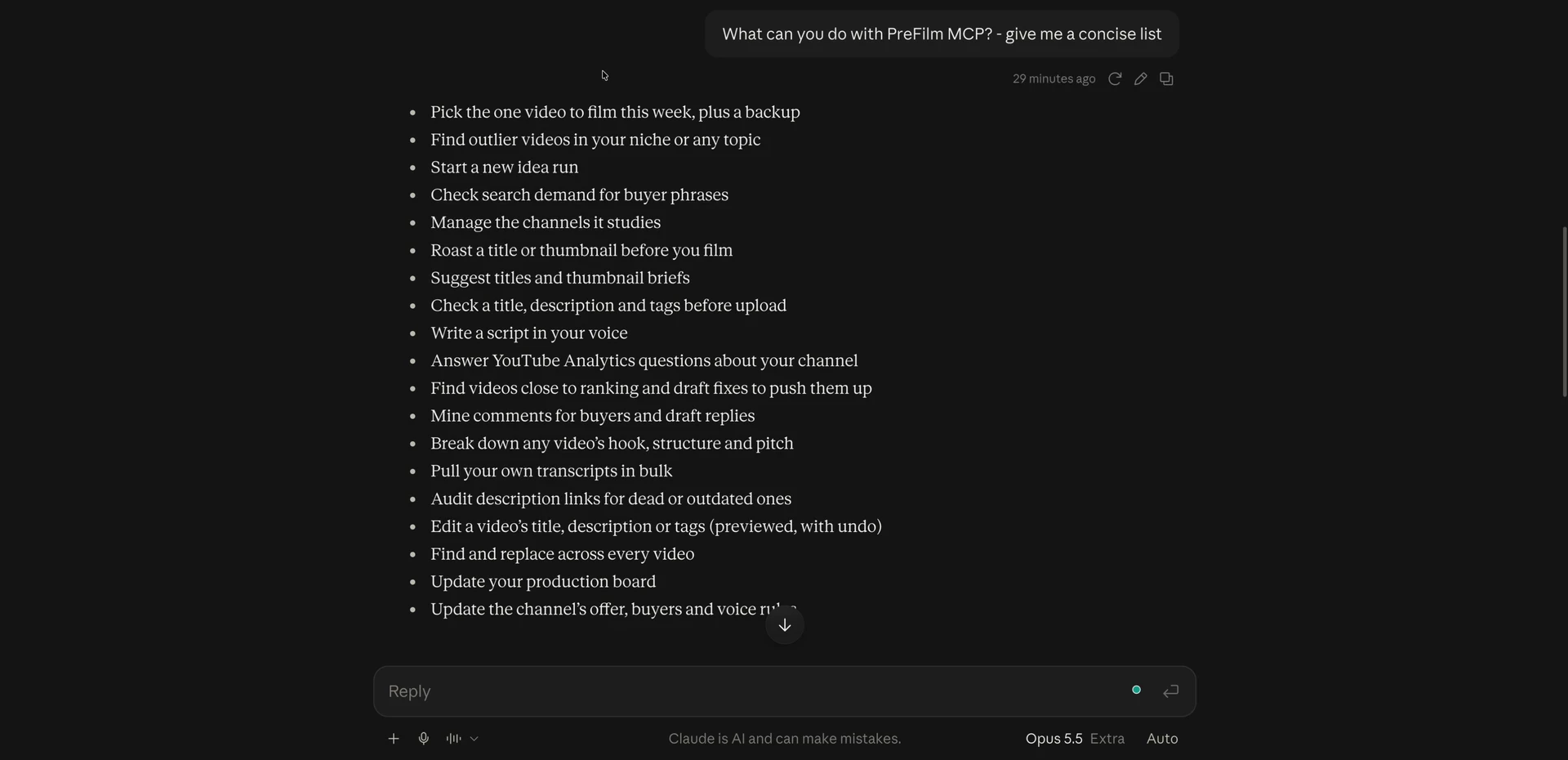
PreFilm is built to get business owners more customers from YouTube, and it does this for your own niche. It reads your website, what you sell and who buys it, then turns the outliers in and around your niche into video ideas, each with the video it came from and how far it beat that channel's normal. I use its YouTube MCP from Claude every day. When I asked Claude what it can do in my growth tools screen recording, the list started with picking the one video to film.
What I don't like: it's new, and I do most of my own work through the MCP rather than the dashboard. It's also not the cheapest. There's no free plan; monthly plans start with $1 for 7 days, then Creator is $49 a month, and the pricing page has the rest. And if you're brand new to YouTube, it works best once you've published a few videos, so start with the free tools and the blog first.
Is Social Blade accurate?
Social Blade is accurate for public counts like subscribers and total views, but its earnings figures are rough estimates. Its FAQ on estimated earnings explains the maths: it takes a low RPM of $0.25 and a high RPM of $4.00, and multiplies them by the channel's daily views divided by 1,000. It also says this assumes every view is monetised, which is usually not the case.
Every tool uses its own model, which is why they disagree. Here's the same channel, on the same day:
Tool (2 Nov 2026)
Recent views
New subscribers
Estimated earnings
Social Blade
94K (30 days)
600 (30 days)
$24 to $377 a month
ViewStats
83K (28 days)
500 (28 days)
$211 to $586 (28 days)
vidIQ
87.84K (28 days)
600 (28 days)
$710 estimated ad revenue
The views and subscribers roughly agree, because they all come from YouTube's public numbers. The earnings don't, so treat any of them as a guess. For your own channel, YouTube Studio has the real figures.
Other tools people suggest
A few more names come up in other Social Blade alternatives lists:
YouTube Studio is the only place with your own channel's real numbers, including revenue. It can't show you anyone else's channel.
TubeLab studies your channel and competitors during setup, and its feed of new viral videos from small channels is good. Its Niche Finder is aimed at faceless channels, and the useful features need Pro. See PreFilm vs TubeLab.
OutlierKit is outlier and competitor research aimed at coaches, consultants and experts, from $49 a month. See PreFilm vs OutlierKit.
Which Social Blade alternative should you choose?
Pick the one that matches the question you keep opening Social Blade to answer:
How is this YouTube channel doing? Use ViewStats, or vidIQ's stats pages. Both are free.
Who's top in my country or category? Use Playboard.
How is this creator doing on TikTok and Instagram too? Use NoxInfluencer, or keep Social Blade.
What's working for my competitors right now? Use TubeBuddy's or vidIQ's extension while you browse.
What should I film next? Use 1of10 if you know YouTube well, or PreFilm if you want ideas built around what your business sells.
ViewStats is the best Social Blade alternative for YouTube stats, because its free Channelytics pages show subscribers, views, estimated revenue, rankings and projections for any channel. vidIQ's free stats pages come second. If you need TikTok, Instagram and Twitch too, NoxInfluencer covers all four, although its channel data needs an account.
Is there a free alternative to Social Blade?
Yes. ViewStats and vidIQ both have free YouTube stats pages for any channel, with subscribers, views and estimated earnings, and neither needs an account to look one up. Playboard's free plan allows five channel reports a day, and TubeBuddy's free Chrome extension shows a channel's 30-day growth while you browse.
What are some sites like Social Blade for YouTube?
The closest sites like Social Blade for YouTube are ViewStats, vidIQ's YouTube stats pages, Playboard and NoxInfluencer. All four show channel stats and rankings. ViewStats and vidIQ are the easiest to use for free, Playboard adds Super Chat and live stats, and NoxInfluencer adds TikTok, Instagram and Twitch.
Is Social Blade accurate?
Social Blade is accurate for public numbers like subscribers and total views, which come from YouTube, but its earnings are rough estimates. Its own FAQ says the earnings range assumes every view is monetised, which is usually not the case. For your own channel, YouTube Studio has the real figures.
Is Social Blade free?
Yes, Social Blade is free to use for public stats, top lists and recent daily figures, with a free account if you want one. Paid membership starts at $5.99 a month for Bronze, removes ads and adds longer daily history, more charts and YouTube report cards.
How does Social Blade estimate YouTube earnings?
Social Blade multiplies a channel's daily views, divided by 1,000, by a low RPM of $0.25 and a high RPM of $4.00, which it calls average worldwide figures. That gives the earnings range on every channel page. It assumes every view is monetised, so treat it as a rough guide.
Is ViewStats better than Social Blade?
ViewStats is better than Social Blade for YouTube research, because its free pages show the same core stats plus similar channels and comparisons, and Pro adds outlier and thumbnail search. Social Blade is better if you also track TikTok, Twitch, Facebook or Instagram, because ViewStats covers YouTube only.