The best TubeBuddy alternative for most creators is vidIQ, because it does the same keyword research, SEO scoring and analytics inside YouTube. For A/B tests and bulk edits, YouTube Studio now covers the basics for free, and Thumbnail Test goes further on testing. The rest of this list covers packaging, competitor research and deciding what to film.
Creators who want AI-powered ideas, optimization, thumbnails and coaching to get more views and subscribers on YouTube.
$19/mo (Boost), or $16.58/mo billed annually ($199/yr)
Yes
2. YouTube Studio
Any creator who wants free A/B tests of titles and thumbnails, bulk changes to video settings and their own channel's analytics, straight from YouTube.
Free
Yes
3. Thumbnail Test
Creators who want unlimited A/B tests of titles, thumbnails or both, rotated daily or hourly, with more than YouTube's three options.
$29/mo (Basic), or $24/mo billed yearly
Not included
4. 1of10
Creators who want to find outlier videos and generate data-backed ideas, titles and thumbnails.
$19/mo (Basic), or $15/mo billed annually ($180/yr)
Yes
5. TubeLab
Creators who want to find unsaturated niches and outlier videos, then turn them into ideas and scripts.
$29/mo (Starter), or $24/mo billed yearly; prices vary by location
Not included
6. ViewStats
Creators who want free YouTube channel and video stats, plus outlier, thumbnail and competitor research on Pro.
Varies by location
Yes
7. PreFilm
Business owners who want YouTube videos that bring in customers, with ideas, evidence and scripts built around what they sell.
$49/mo (Creator)
Not included
Prices checked 2 November 2026 on each tool's own site.
The tools, ranked
#1
vidIQ
Best for
Creators who want AI-powered ideas, optimization, thumbnails and coaching to get more views and subscribers on YouTube.
Starting price
$19/mo (Boost), or $16.58/mo billed annually ($199/yr)
What it does well
The closest like-for-like swap. Its extension works inside YouTube, its keyword tools show search volume, competition and related keywords, and Optimize scores your titles, thumbnails and SEO from 0 to 100. Inside YouTube Studio it gives far more detailed analytics than YouTube's own, and its MCP works on every plan.
Where it falls short
No A/B testing and no bulk editing: its own TubeBuddy page points you to YouTube Studio's test instead. It's built for views and subscribers and doesn't understand your offer, and the AI tools and MCP run on AI credits, which add up quickly.
Any creator who wants free A/B tests of titles and thumbnails, bulk changes to video settings and their own channel's analytics, straight from YouTube.
Starting price
Free
What it does well
Free, and already on your channel. A/B testing compares up to three titles, three thumbnails or both and picks the winner by watch time. Bulk changes edit the title, description, tags, category, visibility, comments and more across every video you tick.
Where it falls short
Tests run on computers only, need advanced features turned on and can't test Shorts, Scheduled Lives or Premieres. There's no find and replace in bulk edits, and no keyword scoring or competitor tools.
Creators who want unlimited A/B tests of titles, thumbnails or both, rotated daily or hourly, with more than YouTube's three options.
Starting price
$29/mo (Basic), or $24/mo billed yearly
What it does well
Built for one job: unlimited A/B tests of titles, thumbnails or both, swapped daily or hourly, with more options than YouTube's three. Pro and Business cover up to three and ten channels, with team seats, API access and Zapier.
Where it falls short
Testing only, so no keyword research, SEO scoring or bulk edits. You read the click-through rate and views and pick the winner yourself. No free plan, though there's a 14-day money-back guarantee. PreFilm has a 30-day money-back guarantee on your first payment.
Creators who want to find outlier videos and generate data-backed ideas, titles and thumbnails.
Starting price
$19/mo (Basic), or $15/mo billed annually ($180/yr)
What it does well
Packaging help TubeBuddy doesn't have. The Chrome extension's thumbnail previewer shows your title and thumbnail on the YouTube homepage next to real videos, and Optimize finds videos whose packaging is holding them back and writes new titles and thumbnails. Its idea generator gave me some very good ideas.
Where it falls short
No SEO scoring or bulk edits. The outliers on its home screen weren't tailored to my niche, the thumbnail generator was poor and spends credits, and new packages still hadn't appeared five minutes later when I tested it. MCP access starts on Pro at $89 a month.
Creators who want to find unsaturated niches and outlier videos, then turn them into ideas and scripts.
Starting price
$29/mo (Starter), or $24/mo billed yearly; prices vary by location
What it does well
A Rank Tracker on every plan, with 50 tracked keywords on Starter, plus the best channel setup I've tested: it studies your channel and your competitors before recommending anything. Its feed of new viral videos from small channels is good, and MCP access is on Starter.
Where it falls short
Built for views and faceless channels, so the Niche Finder won't help most businesses, and the home-screen ideas weren't great. The Scriptwriter, Niche Reports and Trend Reports need Pro, and there's no free plan or free trial.
Creators who want free YouTube channel and video stats, plus outlier, thumbnail and competitor research on Pro.
Starting price
Varies by location
What it does well
The competitor side of TubeBuddy, for free. Channelytics shows any channel's subscribers, views, estimated revenue and rankings without an account. Pro adds outlier search, thumbnail search, alerts, competitor tracking and Ideation, which previews a title and thumbnail package.
Where it falls short
Its site lists no keyword research, A/B tests or bulk edits, and no Claude or ChatGPT access. The research tools need Pro, which showed as $49.99 a month from the UAE, and its prices vary by location.
Business owners who want YouTube videos that bring in customers, with ideas, evidence and scripts built around what they sell.
Starting price
$49/mo (Creator)
What it does well
Built to get business owners more customers from YouTube, starting with what to film. It reads what you sell and who buys it, finds the videos beating their channel's normal in and around your niche, and turns them into ideas with the evidence behind each one. Roast checks a title before you film, and the YouTube MCP for Claude and ChatGPT is on every plan.
Where it falls short
It doesn't do TubeBuddy's core jobs: no keyword scoring, A/B tests, tag tools or bulk edits. It's new, it works best once you've published a few videos, and there's no free plan: $1 for 7 days, then $49 a month.
I'm Henry Purchase, and I use YouTube to get leads and booked sales calls for my business, not views. TubeBuddy wasn't one of the tools I tested in my YouTube tool videos, so what I say about it comes from its own site. I did test vidIQ, 1of10 and TubeLab on my own channels, and their sections include what I liked and didn't. I also built PreFilm, which comes seventh here because it does a different job from TubeBuddy. Every price below was checked on each tool's own site on 2 November 2026.
Why look for a TubeBuddy alternative?
Most people look for a TubeBuddy alternative because the tools they want sit on its higher plan, because their channel counts as a business under its licence rules, or because they need help with what to film rather than how to tag it.
TubeBuddy is a YouTube SEO and channel management toolkit that works inside YouTube through a browser extension. It has a free plan and two paid creator plans, Pro and Legend, and the price it shows depends on where you visit from. These are the reasons I see most often for leaving:
The tools people buy it for are on Legend. A/B tests, the Title Generator, competitor alerts and Bulk Find, Replace & Append aren't on Pro. Even on Legend, the bulk end screen and cards editors are limited to five uses a year.
Businesses get pointed to Enterprise. TubeBuddy's pricing page says Pro and Legend aren't for businesses with more than one channel on TubeBuddy, 50,000 or more subscribers, three or more channel managers or 50 or more employees.
The extension's ratings are mixed. On 2 November 2026, its Chrome Web Store listing showed 1,000,000 users and 3.5 stars from 8.5K ratings.
No scripts and no AI assistant access. I found no script writer and no MCP on TubeBuddy's site, so you can't plan videos with it from Claude or ChatGPT.
None of that makes TubeBuddy a bad tool. My full TubeBuddy review covers what it does well, and there's a straight comparison with my own tool in PreFilm vs TubeBuddy.
I ranked them by how well they do the jobs people pay TubeBuddy for, then by how far they help a business beyond that. Five questions decided the order:
SEO and keyword research. Can it score your titles, tags and descriptions, and show what people search for?
Title and thumbnail tests. Can it A/B test packaging on a live video?
Bulk edits. Can it change text or settings across many videos at once?
Inside YouTube. Does it work where you already work, through an extension or YouTube Studio?
What to film. Does it help you pick videos that bring in customers, not just views?
The first four are TubeBuddy's home ground, so the tools that do them rank first. The fifth is the one I care about most as a business owner, and it's where the tools lower down come in.
1. vidIQ: the closest all-round TubeBuddy alternative
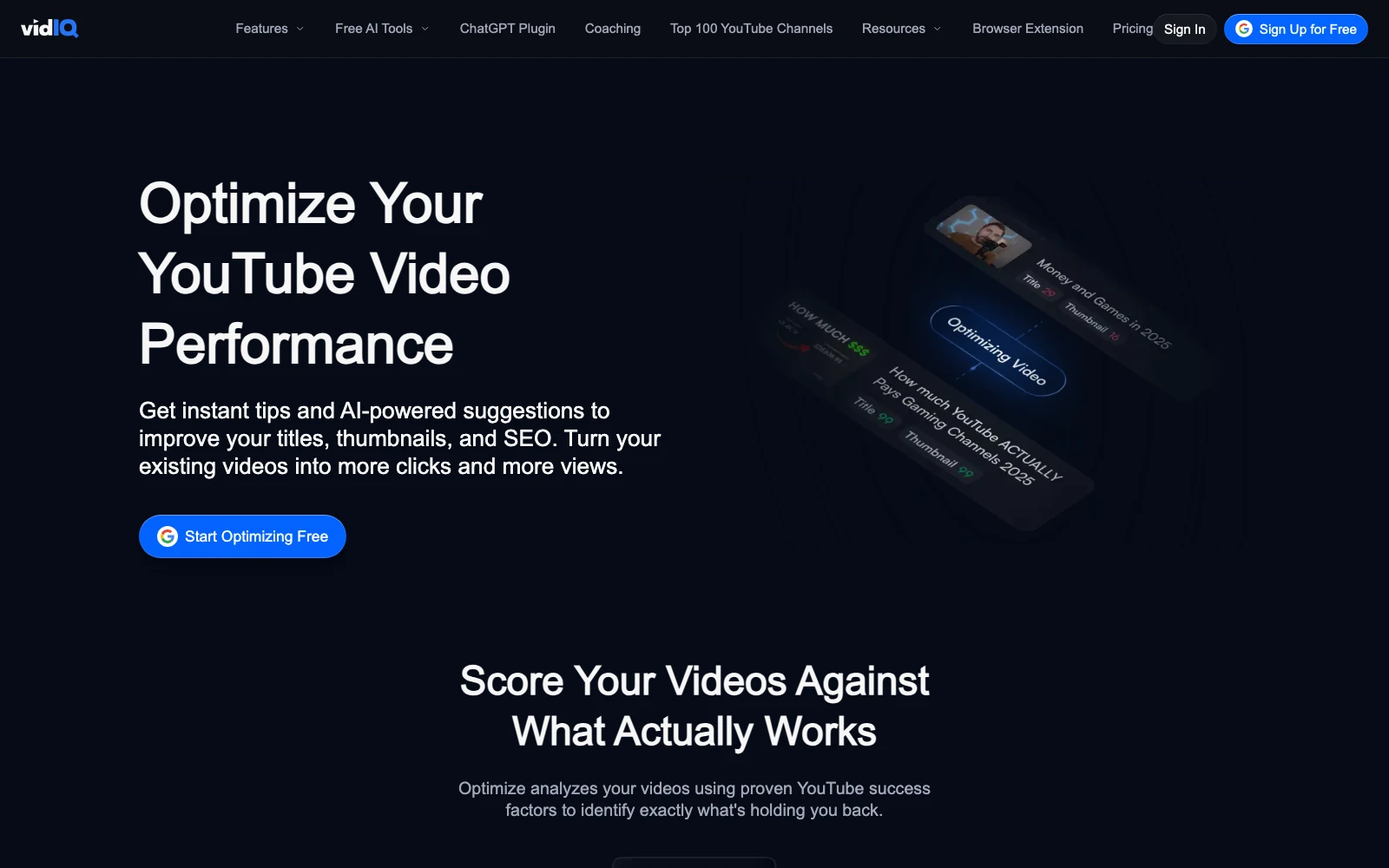
vidIQ is the closest like-for-like swap for TubeBuddy. It works inside YouTube through a browser extension, it has keyword research with search volume and competition, and its Optimize tool scores your titles, thumbnails and SEO.
vidIQ's Optimize page, when I checked on 2 November 2026, said each element is scored from 0 to 100, with suggested tags, description help and a preview of your video in the home feed and search results. You review each change before it goes to YouTube. The free plan scores one video, and Boost scores every video. Its keyword tools show search volume, a competition score and related keywords, and the extension's Keyword Inspector shows the same on YouTube itself.
Where vidIQ really wins is analytics. Its Chrome extension has 4,000,000 users, and inside YouTube Studio it gives you far more detail than YouTube's own analytics, which I think are quite poor. I also like its outlier research, its keyword suggestions and the quick actions that remix a title.
What it doesn't do is TubeBuddy's testing and bulk work. vidIQ's own TubeBuddy alternatives page says it has no dedicated A/B testing tool, points you to YouTube Studio's instead, and focuses on research rather than bulk editing. Its promise is more views and subscribers, and it doesn't understand your offer. There's a free plan with 150 AI credits a month, then Boost at $19 a month, but the AI tools and the MCP run on credits, and those add up quickly once you use them properly.
YouTube Studio is the free TubeBuddy alternative you already have, and it now covers two of TubeBuddy's paid jobs: A/B tests and bulk edits.
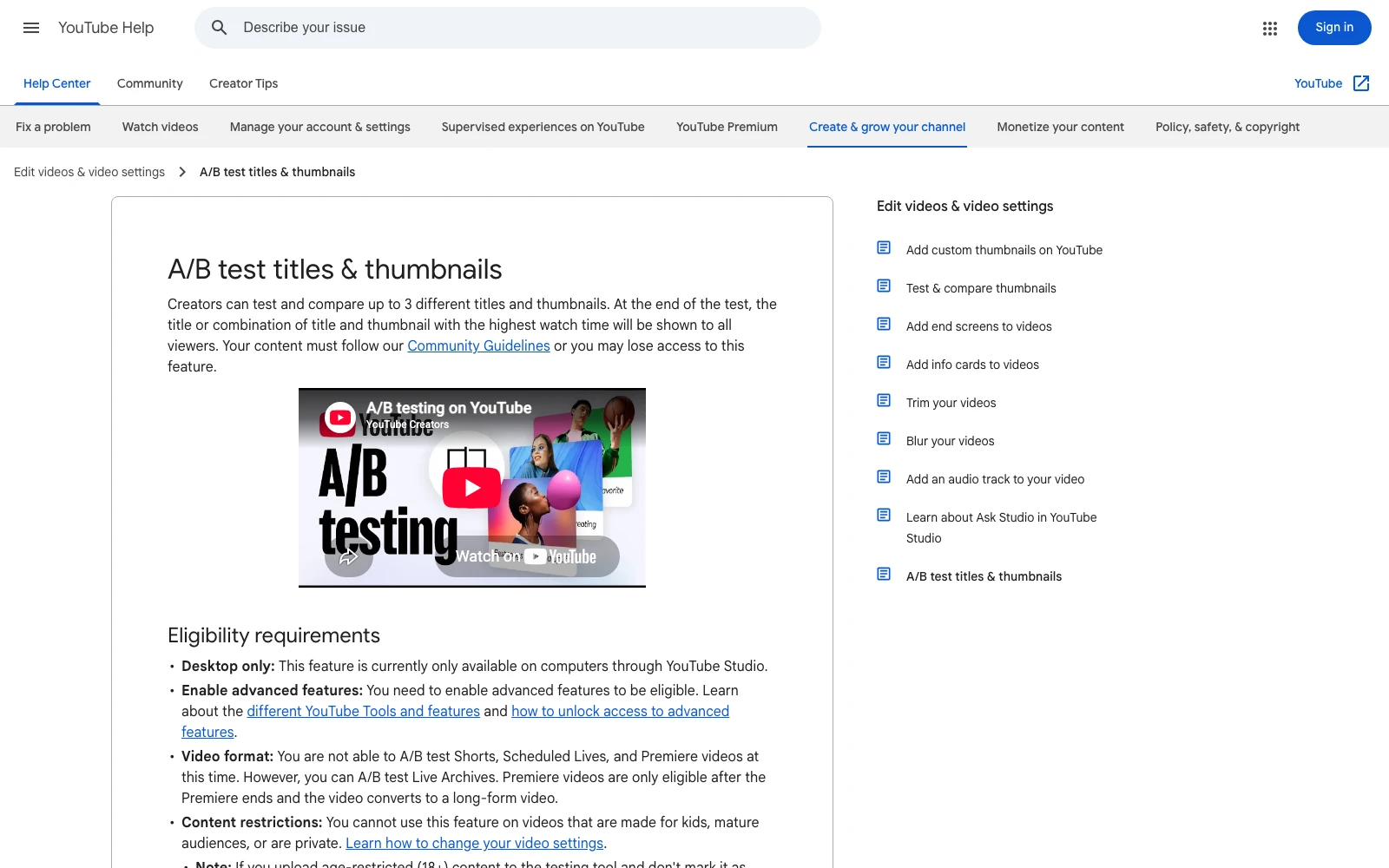
YouTube's A/B testing lets you test up to three titles, three thumbnails or both on one video. At the end, the version with the highest watch time is shown to everyone. It only works on a computer, you need advanced features turned on, and it can't test Shorts, Scheduled Lives or Premieres. A test takes anything from a few days to two weeks.
That's a different measure from TubeBuddy's, which picks its winner by click-through rate and can also test descriptions and tags. The two can disagree, so decide which number you care about before you test.
For bulk edits, YouTube's bulk changes let you tick videos in Content and change the title, description, tags, category, visibility, comments and more across all of them at once. What it doesn't have is find and replace. You set a new value for every video you've ticked, rather than swapping one old link inside each description.
So if you mostly used TubeBuddy for title and thumbnail tests and the odd bulk change, you may not need to pay for anything.
Thumbnail Test is the pick if A/B testing was the main reason you paid for TubeBuddy. It does one job, testing titles, thumbnails or both on a live video, and every plan has unlimited tests.
It swaps your thumbnail or title to the next version every day at midnight, or every hour, then shows you click-through rate, views and other stats so you can choose the winner. Unlike YouTube's own test, you're not limited to three versions.
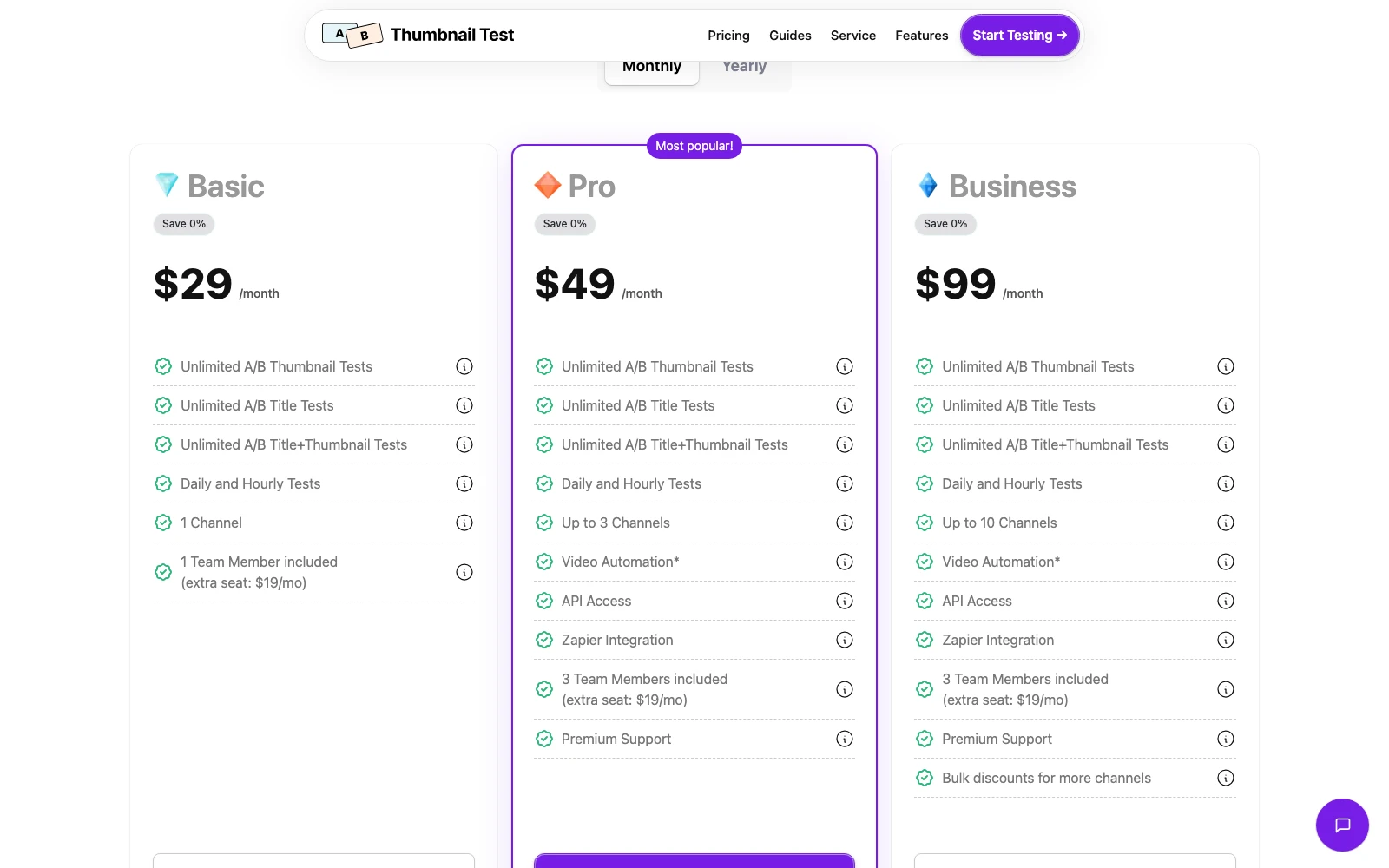
On its pricing page, checked on 2 November 2026, Basic is $29 a month for one channel, or $24 a month billed yearly. Pro is $49 a month for up to three channels and Business is $99 for up to ten, which is worth knowing if your business has more than one channel. There's no free plan, but there's a 14-day money-back guarantee, and channels under 10,000 subscribers can apply for Basic at 40% less. PreFilm has a 30-day money-back guarantee on your first payment.
The catch is scope. It doesn't do keyword research, SEO scoring or bulk edits, so you'd pair it with vidIQ or YouTube Studio.
4. 1of10: packaging and outliers
1of10 is the next step if you want help with packaging (your title and thumbnail) rather than tags. It doesn't do SEO scoring or bulk edits, but two of its tools cover ground TubeBuddy users care about.
The first is its Chrome extension. My favourite part is the thumbnail previewer, which shows how your title and thumbnail would look on the YouTube homepage next to real videos. The second is Optimize, 1of10's video repackaging tool, which finds the videos on your channel whose title or thumbnail is holding them back and generates new packaging. I really like the concept, although when I tested it, the new packages still hadn't appeared five minutes later.
1of10 pioneered the outlier idea, and its idea generator gave me some very good ideas for my second channel. The outliers on its home screen weren't relevant to my business, though, so you work out how to apply them yourself, and its thumbnail generator wasn't great and cost credits. Its own promise is the fastest way to get more views on YouTube.
There's a free plan with 60 AI credits a month, Basic is $19 a month, and MCP access for Claude and ChatGPT starts on Pro at $89 a month. There's more detail in PreFilm vs 1of10.
5. TubeLab: rank tracking and a setup that learns your channel
TubeLab earns its place for a TubeBuddy user with its Rank Tracker, which comes with every plan and tracks 50 keywords on Starter. That's the SEO side of TubeBuddy that most outlier tools skip.
What I liked most in testing was its channel setup. It fetches your channel, asks for your competitors and gets to know your content before it recommends anything, which 1of10 doesn't do. Its list of new viral videos from small channels is good too, because an outlier from two years ago has often been copied over and over.
The downsides: its homepage sells YouTube views, the Niche Finder is for faceless channels, and the ideas on my account home weren't great. The Scriptwriter, Niche Reports and Trend Reports need Pro. Starter shows $29 a month on its US pricing, prices vary by location, and MCP access is included from Starter. There's no free plan or free trial. I compared it in PreFilm vs TubeLab.
6. ViewStats: competitor research and packaging previews
ViewStats covers the competitor side of TubeBuddy. Its free Channelytics pages show any channel's subscribers, views, estimated revenue and rankings, much like TubeBuddy's Channelytics, and you don't need an account.
ViewStats Pro adds outlier search, thumbnail search, alerts, competitor tracking against your own channel and Ideation, which previews a title and thumbnail package. Its FAQ says it was co-founded by MrBeast. Pro showed as $49.99 a month from the UAE, and its prices vary by location.
Its site lists no keyword research, A/B tests or bulk edits, and I found no Claude or ChatGPT access. There's a fuller comparison in PreFilm vs ViewStats.
7. PreFilm: for business owners deciding what to film
PreFilm is last because it doesn't do TubeBuddy's main jobs: there's no keyword scoring, no A/B testing and no tag tools. What it does is answer the question that comes before all of that: which video should you make to get customers?
A keyword tool tells you "how to plan a kitchen renovation" gets searched. The outlier tells you more: this format beat its channel by 30 times. A breakdown of the video added the business angle. Of the 89 comments PreFilm read, six asked her to recommend a contractor or company for the remodel, and her own offer is a house flipping programme, not remodelling. For a remodelling firm, that's a video your buyers already watch, with demand in the comments nobody is serving.
PreFilm is built to get business owners more customers from YouTube, and it does this for your own niche. It reads your website, what you sell and who buys it, then turns the outliers in and around your niche into video ideas, each with the video it came from and how far it beat that channel's normal. Roast, PreFilm's title and thumbnail checker, judges a title against what's working in your niche before you film, so it comes before an A/B test rather than replacing one. The Chrome extension shows how far each video beat its channel's normal, and the YouTube MCP is on every plan. To be honest, I'd rather do everything through the MCP than the dashboard.
What I don't like: it's new, and I do most of my own work through the MCP rather than the dashboard. There's no free plan; monthly plans start with $1 for 7 days, then Creator is $49 a month, and the pricing page has the rest. It also works best once you've published a few videos, so if you're brand new to YouTube, start with the free tools and the guides on the blog.
Which TubeBuddy alternative should you choose?
Choose by the TubeBuddy job you actually use. Here's how the seven cover them, from each tool's own site:
Tool
Keyword research and SEO
A/B tests
Bulk edits
Free plan
vidIQ
Keyword tools and Optimize scores
Not offered; points to YouTube's
Not offered
Yes
YouTube Studio
Your own analytics only
Up to 3 versions, judged by watch time
Yes, without find and replace
Free
Thumbnail Test
Not listed
Unlimited, daily or hourly
Not listed
No
1of10
No search volume, by design
Not listed; thumbnail previewer
Not listed
Yes
TubeLab
Rank Tracker on every plan
Not listed
Not listed
No
ViewStats
Not listed
Not listed; Ideation previews on Pro
Not listed
Yes
PreFilm
Search demand behind ideas
Not offered; Roast checks before filming
Not offered
No
And in plain terms:
You want TubeBuddy, but different: vidIQ.
You only need tests and bulk changes: YouTube Studio, free.
Testing titles and thumbnails is your main job: Thumbnail Test.
You want help with packaging and outliers: 1of10.
You want rank tracking and ideas from your own channel: TubeLab.
You want to watch competitors: ViewStats.
You run a business and need to know what to film: PreFilm, alongside one of the tools above.
OutlierKit is outlier and competitor research aimed at coaches, consultants and experts, with titles ranked against breakout videos. See PreFilm vs OutlierKit.
Morningfame and Tubics still appear on older lists, but neither site loaded when I checked on 2 November 2026.
Spotter Studio has shut down. Public access ended on 31 October 2025, according to Tubefilter, so ignore any list that still recommends it.
Whichever you pick, remember what these tools do: they make the videos you've chosen easier to find, test and manage. I don't judge my channels on views, I judge them on customers, so I decide what to film first. My guide to YouTube video ideas that are already proven shows how.
Stop guessing what to film.
PreFilm finds the videos your buyers already watch and writes the script in your voice. $1 for 7 days.
vidIQ is the best TubeBuddy alternative for most creators, because it covers the same keyword research, SEO scoring and analytics inside YouTube. It has no A/B tests or bulk editing, so pair it with YouTube Studio's free tools, or with Thumbnail Test if testing titles and thumbnails is the main thing you used TubeBuddy for.
Is there a free TubeBuddy alternative?
Yes. YouTube Studio is free and now has A/B testing for up to three titles and thumbnails, plus bulk changes to titles, descriptions and tags. vidIQ has a free plan with keyword research and one video scored by Optimize, and ViewStats shows any channel's stats for free without an account.
Is vidIQ better than TubeBuddy?
vidIQ is better than TubeBuddy for research and analytics, with outlier research, keyword tools and far more detail inside YouTube Studio. TubeBuddy is better for A/B tests and bulk editing, which vidIQ doesn't offer. If you mostly research new videos, pick vidIQ. If you manage a large back catalogue, TubeBuddy fits better.
Which TubeBuddy alternative has A/B testing?
YouTube Studio and Thumbnail Test both have A/B testing for titles and thumbnails. YouTube's free test compares up to three versions and picks the winner by watch time. Thumbnail Test runs unlimited tests with more versions, swapped daily or hourly, from $29 a month, and leaves you to pick the winner from its stats.
Can YouTube Studio replace TubeBuddy?
YouTube Studio can replace TubeBuddy for basic A/B tests and bulk edits, and it has your channel's real analytics for free. It can't replace TubeBuddy's keyword research, SEO scoring, competitor tools or find and replace across descriptions, so most creators add vidIQ or another research tool alongside it.
What are TubeBuddy's main competitors?
TubeBuddy's main competitors are vidIQ for SEO and analytics, YouTube Studio's own free tools, and Thumbnail Test for A/B testing. Outlier tools such as 1of10, TubeLab and ViewStats compete on research and packaging, and PreFilm on deciding what a business should film. Spotter Studio, once on these lists, has shut down.
Which TubeBuddy alternative is best for a business channel?
For a business channel, use vidIQ or YouTube Studio for SEO and testing, then a tool that starts from what you sell to decide what to film. PreFilm is built for that second job, getting business owners customers from YouTube: it reads your offer and finds the videos your buyers watch. It works best once you've published a few.