The best ViewStats alternative for free channel stats is Social Blade, followed by vidIQ's free stats pages, Playboard and NoxInfluencer. If you used ViewStats Pro for outlier and thumbnail research, 1of10 is the closest match. Most people searching for a ViewStats alternative just want subscriber counts, views and revenue estimates, so the stats trackers come first.
Anyone who wants free public stats, growth history and top lists for YouTube channels and other creators.
$5.99/mo (Bronze), or $5.00/mo billed annually ($59.99/yr)
Yes
2. vidIQ
Creators who want AI-powered ideas, optimization, thumbnails and coaching to get more views and subscribers on YouTube.
$19/mo (Boost), or $16.58/mo billed annually ($199/yr)
Yes
3. Playboard
Anyone who wants YouTube channel rankings, Super Chat and live-stream stats, and channel analysis reports.
$29/mo (Basic)
Yes
4. NoxInfluencer
Brands and agencies who want creator stats, rankings and influencer discovery across YouTube, TikTok, Instagram and Twitch.
$49/mo (AI Startup Starter, limited quota); full plans from $1,499 per quarter (Business)
Not stated on their site
5. 1of10
Creators who want to find outlier videos and generate data-backed ideas, titles and thumbnails.
$19/mo (Basic), or $15/mo billed annually ($180/yr)
Yes
6. PreFilm
Business owners who want YouTube videos that bring in customers, with ideas, evidence and scripts built around what they sell.
$49/mo (Creator)
Not included
7. TubeLab
Creators who want to find unsaturated niches and outlier videos, then turn them into ideas and scripts.
$29/mo (Starter), or $24/mo billed yearly; prices vary by location
Not included
Prices checked 2 November 2026 on each tool's own site.
The tools, ranked
#1
Social Blade
Best for
Anyone who wants free public stats, growth history and top lists for YouTube channels and other creators.
Starting price
$5.99/mo (Bronze), or $5.00/mo billed annually ($59.99/yr)
What it does well
The most common free swap for ViewStats' channel pages. Any channel's subscribers, views, ranks, 30-day growth, future projections and an earnings range, with no account. It also covers TikTok, Twitch, Facebook and Instagram, which ViewStats doesn't.
Where it falls short
Stats only: no outlier search, thumbnail research or ideas. The free pages carry ads, longer history needs a paid membership, and its own FAQ says the earnings range assumes every view is monetised.
Creators who want AI-powered ideas, optimization, thumbnails and coaching to get more views and subscribers on YouTube.
Starting price
$19/mo (Boost), or $16.58/mo billed annually ($199/yr)
What it does well
Free stats pages for any channel with subscribers, views, estimated ad revenue and an outlier score for each top video. Its Chrome extension gives far more detail inside YouTube Studio than YouTube's own analytics, and the free plan includes outlier search.
Where it falls short
Built for more views and subscribers, so it doesn't understand your offer. The AI tools and its MCP run on AI credits, which add up quickly, and the free plan shows up to six videos per outlier search.
Anyone who wants YouTube channel rankings, Super Chat and live-stream stats, and channel analysis reports.
Starting price
$29/mo (Basic)
What it does well
The pick for rankings. It covers 25.9 million YouTube channels with daily and weekly charts by country and category, and tracks Super Chat and live viewers, which ViewStats' free site doesn't focus on.
Where it falls short
YouTube only, and logged-out channel lookups are limited. A free account gets five channel reports a day, longer history needs Business+ at $199 a month, and there's nothing for deciding what to film.
Brands and agencies who want creator stats, rankings and influencer discovery across YouTube, TikTok, Instagram and Twitch.
Starting price
$49/mo (AI Startup Starter, limited quota); full plans from $1,499 per quarter (Business)
What it does well
Stats and rankings across YouTube, TikTok, Instagram and Twitch, plus influencer search and outreach for brands vetting creators across platforms.
Where it falls short
Built for brands, not creators. A YouTube channel's basic data sits behind a log-in, its FAQ says some predicted metrics can be 10% or 20% off, and the full Business plan is $1,499 a quarter.
Creators who want to find outlier videos and generate data-backed ideas, titles and thumbnails.
Starting price
$19/mo (Basic), or $15/mo billed annually ($180/yr)
What it does well
The closest match for ViewStats Pro: outlier search, thumbnail search, competitor tracking and a free Chrome extension with outlier scores. Its idea generator gave me some very good ideas, and research tools never use credits.
Where it falls short
Not a stats tracker. The outliers on its home screen weren't relevant to my business, the thumbnail generator was poor and cost credits, and Claude and ChatGPT access starts on Pro at $89 a month.
Business owners who want YouTube videos that bring in customers, with ideas, evidence and scripts built around what they sell.
Starting price
$49/mo (Creator)
What it does well
Built to get business owners more customers from YouTube: it tells you what to film rather than how a channel is trending. It reads what you sell, finds the videos beating their channel's normal in and around your niche, shows what each one sells and writes scripts in your voice. Its YouTube MCP is on every plan.
Where it falls short
Not a stats tracker: no public channel pages, rankings or revenue estimates. It's new, it works best once you've published a few videos, and there's no free plan: $1 for 7 days, then $49 a month.
Creators who want to find unsaturated niches and outlier videos, then turn them into ideas and scripts.
Starting price
$29/mo (Starter), or $24/mo billed yearly; prices vary by location
What it does well
Cheaper outlier research with its MCP on every plan. Its setup studies your channel and your competitors, and its feed of new viral videos from small channels is good.
Where it falls short
No free plan or trial, and the ideas on its home screen weren't great for me. The Niche Finder is aimed at faceless channels, the script writer needs Pro, and prices vary by location.
I'm Henry Purchase and I built PreFilm, which is on this list at number six. It isn't a stats tracker, so it would be dishonest to rank it above the tools that are. It's for business owners who want to know which video to film next to win customers. I tested 1of10, TubeLab and vidIQ on my own channels for my tool videos, and every price below was checked on each tool's own site on 2 November 2026.
What do people use ViewStats for?
People use ViewStats to look up any YouTube channel's stats for free, and a smaller group pays for its research tools. ViewStats is a YouTube analytics platform; its FAQ says it was co-founded by MrBeast, and its data comes from YouTube's public API.
The free site covers Channelytics (subscribers, views, estimated revenue and rankings), projections, similar channels, top lists and a channel comparison. Pro adds Outliers, Thumbnail Search, Alerts, Collections and Competitors. Pro showed as $49.99 a month when checked from the UAE, its prices vary by location, and Business starts at $249 a month. I go through the whole thing in PreFilm vs ViewStats.
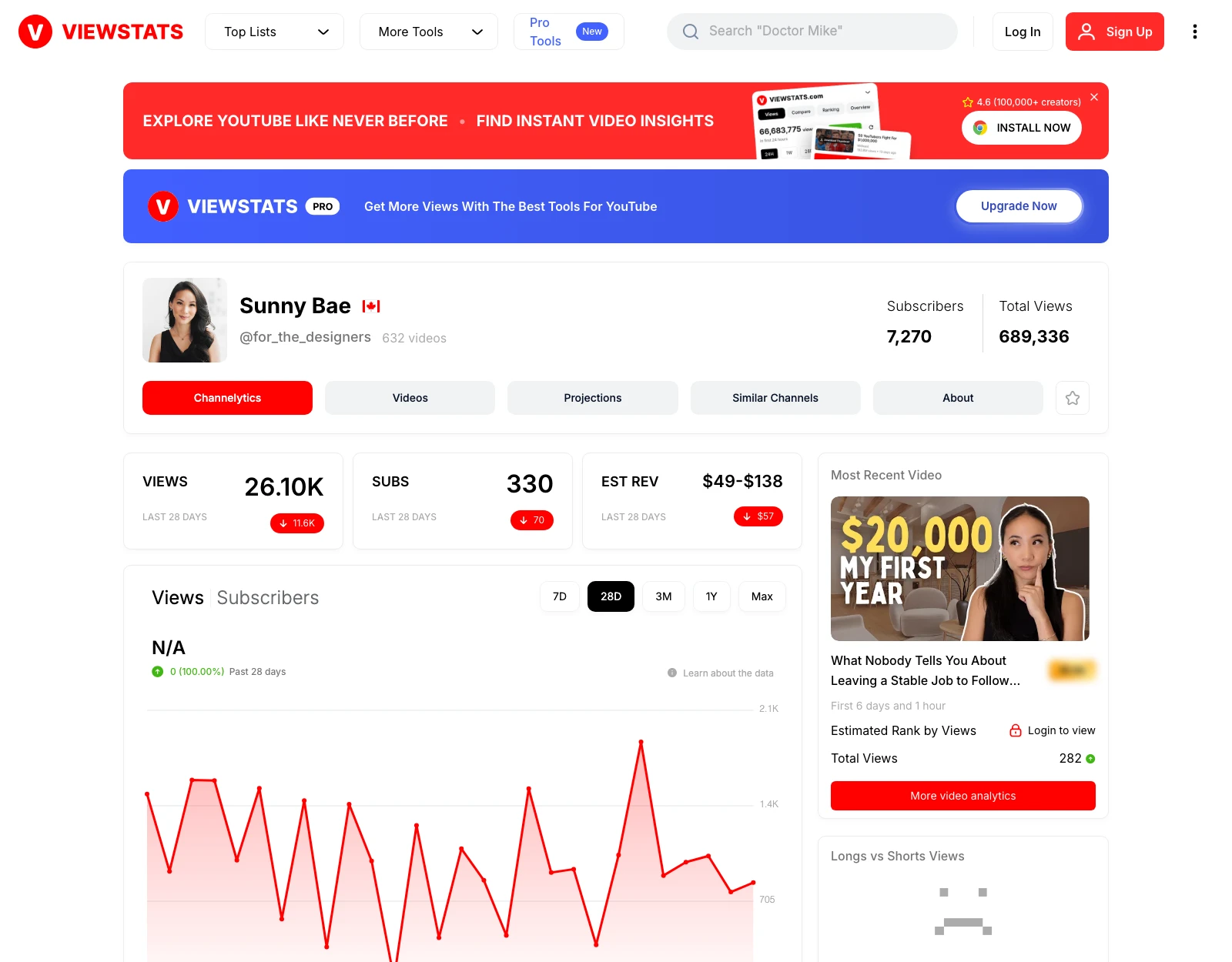
Here's ViewStats' free page, as it looked on 2 November 2026, for Sunny Bae, who runs an interior design coaching channel with 7,270 subscribers.
So the question is which job you're replacing. If it's the free stats, there are good free swaps. If it's Pro's research, the options are different tools entirely.
I ranked them on how well they replace what most people use ViewStats for, then on how far they go past it:
Free channel stats. Can you look up any channel's subscribers, views and growth without paying?
Estimates and history. Does it show views over time and a revenue range, like Channelytics?
Research. Does it find outliers (videos that got far more views than their channel normally gets) and thumbnails, like ViewStats Pro?
Price. That means the plan you'd actually need, not the cheapest one on the page.
What it tells you to do next. Stats describe the past. The tools lower down help you decide what to make.
1. Social Blade: the closest free swap for channel stats
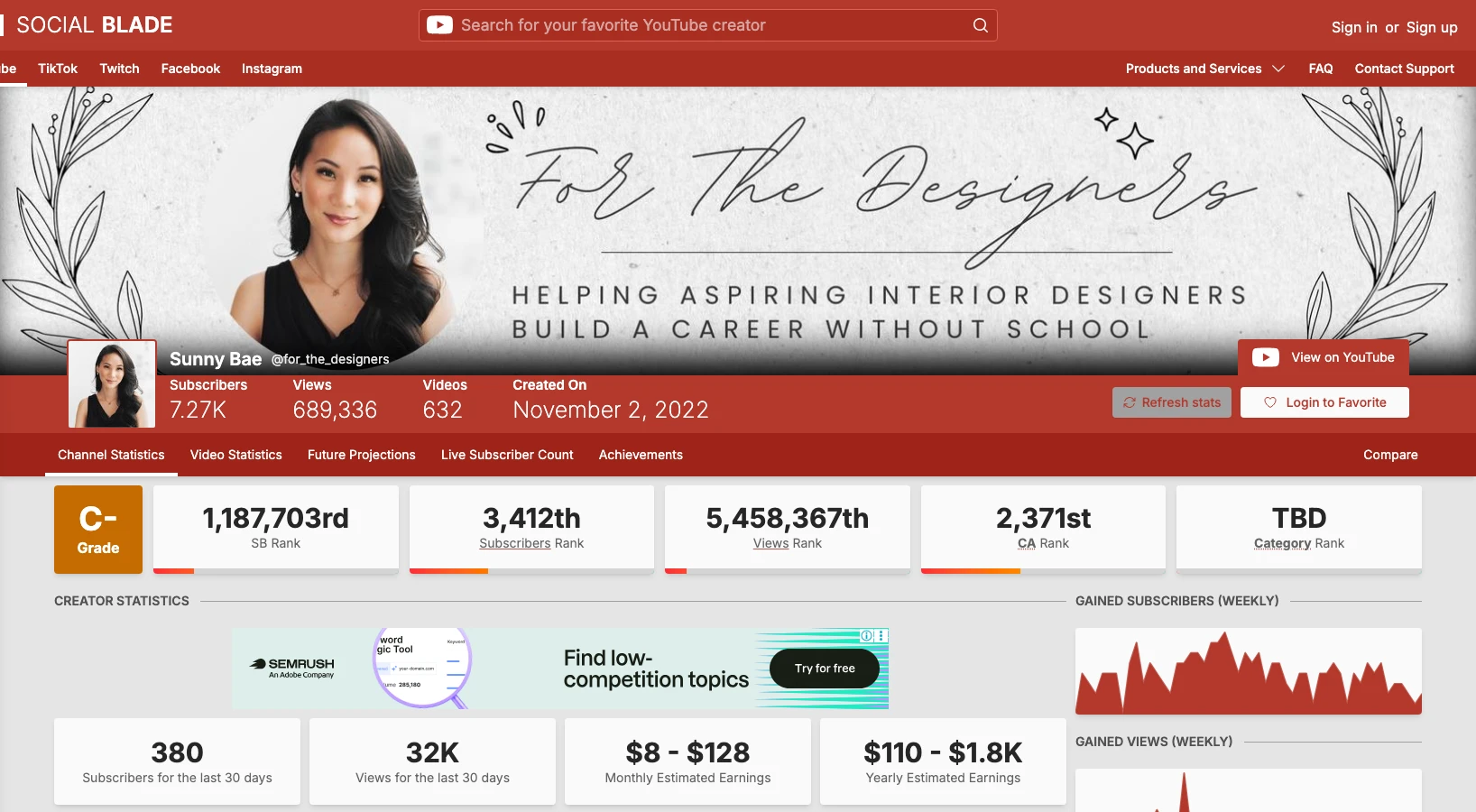
Social Blade is the tool most people move to from ViewStats' free site, and it's free for the stats. Search any channel and you get subscribers, total views, ranks, a grade, the last 30 days of growth and an estimated earnings range, with no sign-up. Here's Sunny Bae's channel on it, checked on 2 November 2026.
It beats ViewStats on one thing: platforms. Social Blade tracks creators on YouTube, TikTok, Twitch, Facebook and Instagram, while ViewStats is YouTube only. A paid membership starts at $5.99 a month (Bronze), which removes the ads and adds more daily history.
What it doesn't do is research. There's no outlier search, no thumbnail search and no ideas, so if you paid for ViewStats Pro, Social Blade only replaces the free half. My full Social Blade comparison is in the best Social Blade alternatives.
2. vidIQ: free stats pages plus outlier research
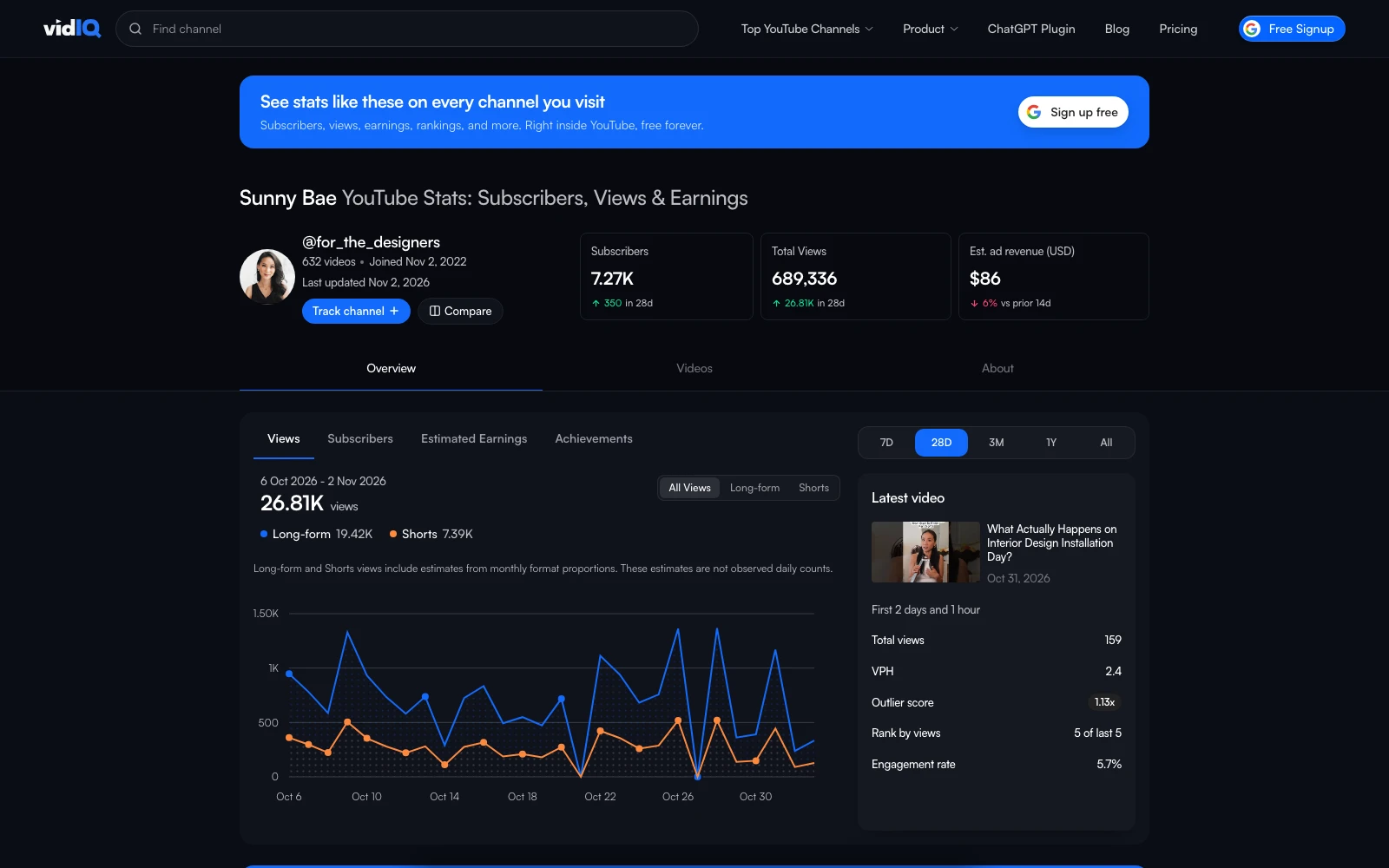
vidIQ covers both halves of ViewStats. Its free stats pages show any channel's subscribers, views, estimated ad revenue and the latest video's outlier score, and the top videos list scores every big video against the channel's normal. When I checked Sunny Bae's page on 2 November 2026, it gave her interior design business video an outlier score of 14.13x.
Then there's the vidIQ Chrome extension, with 4,000,000 users on the Chrome Web Store. Inside YouTube Studio it gives you far more detail than YouTube's own analytics, which I think are quite poor. For analytics in YouTube, it's the best tool on the market. I also like its outlier research and keyword suggestions, and the free plan shows up to six videos per outlier search.
What I don't like: vidIQ is built to get you more views and subscribers, and it doesn't understand your offer. It starts free, with Boost at $19 a month, but the AI tools and its MCP run on AI credits, and if you use them a lot you can rack up a bill. More in PreFilm vs vidIQ and my vidIQ alternatives for business owners.
Playboard is the one to use if you mostly opened ViewStats for its top lists. It says it covers 25.9 million YouTube channels, with daily and weekly charts by country and category, and it tracks Super Chat income and live viewers.
The catch is access. When I opened a channel page logged out on 2 November 2026, Playboard showed a limit of one channel report a day for logged-out visitors and asked me to sign in. Its plans page gives a free account five channel reports a day and a year of trends. Basic is $29 a month, and two years of history needs Business+ at $199 a month. Like ViewStats, it's YouTube only.
4. NoxInfluencer: stats across four platforms, for brands
NoxInfluencer ranks creators on YouTube, TikTok, Instagram and Twitch, and has free tools like an earnings calculator and a live subscriber count. If you're a brand checking creators before a campaign, it covers more than ViewStats does.
For everyone else it's a step back. A YouTube channel's basic data is behind a log-in, and its own FAQ says some predicted metrics can be 10% or 20% off the real numbers. Its AI Startup plan is $49 a month with limited features, and the full Business plan is $1,499 a quarter.
5. 1of10: the nearest match for ViewStats Pro
1of10 is where I'd go if ViewStats Pro is the part you're replacing. It has outlier search, thumbnail search and competitor tracking, and its Chrome extension adds outlier scores, video rankings and views over time on YouTube.
1of10 was the pioneer of the outlier idea, and the extension is genuinely useful for spotting what's winning. When I ran its idea generator for my channel, the ideas were very good. But with my channel connected, the outliers on its home screen had nothing to do with my business, so you do the work of applying them. The thumbnail generator wasn't great either, and it costs credits.
There's a free plan with 60 AI credits a month and five results per outlier search, and research tools never use credits. Basic is $19 a month, and Claude and ChatGPT access starts on Pro at $89 a month. See PreFilm vs 1of10.
6. PreFilm: for business owners deciding what to film
PreFilm is sixth because it doesn't track stats. There are no public channel pages, rankings or revenue estimates. It answers a different question: which video should I make next to bring in customers?
Sunny Bae's channel shows why that matters. ViewStats estimated $49 to $138 of revenue in 28 days, but her channel exists to sell coaching, so ad revenue tells you very little. A PreFilm outlier search on "interior designer business tips" found her video "How to Start an Interior Design Business (WITHOUT Experience)": 5,422 views, 14.6 times her channel's normal of 371.
A PreFilm breakdown of the video then showed what it sells. At 6:00 she offers a free call to work out how viewers should get clients, and the description links her Aspiring Interior Designer's Blueprint, which leads to an application form rather than a checkout. One viewer asked whether several $10K projects earn more than a few $30K ones, which is a video idea in itself. None of that is on a stats page.
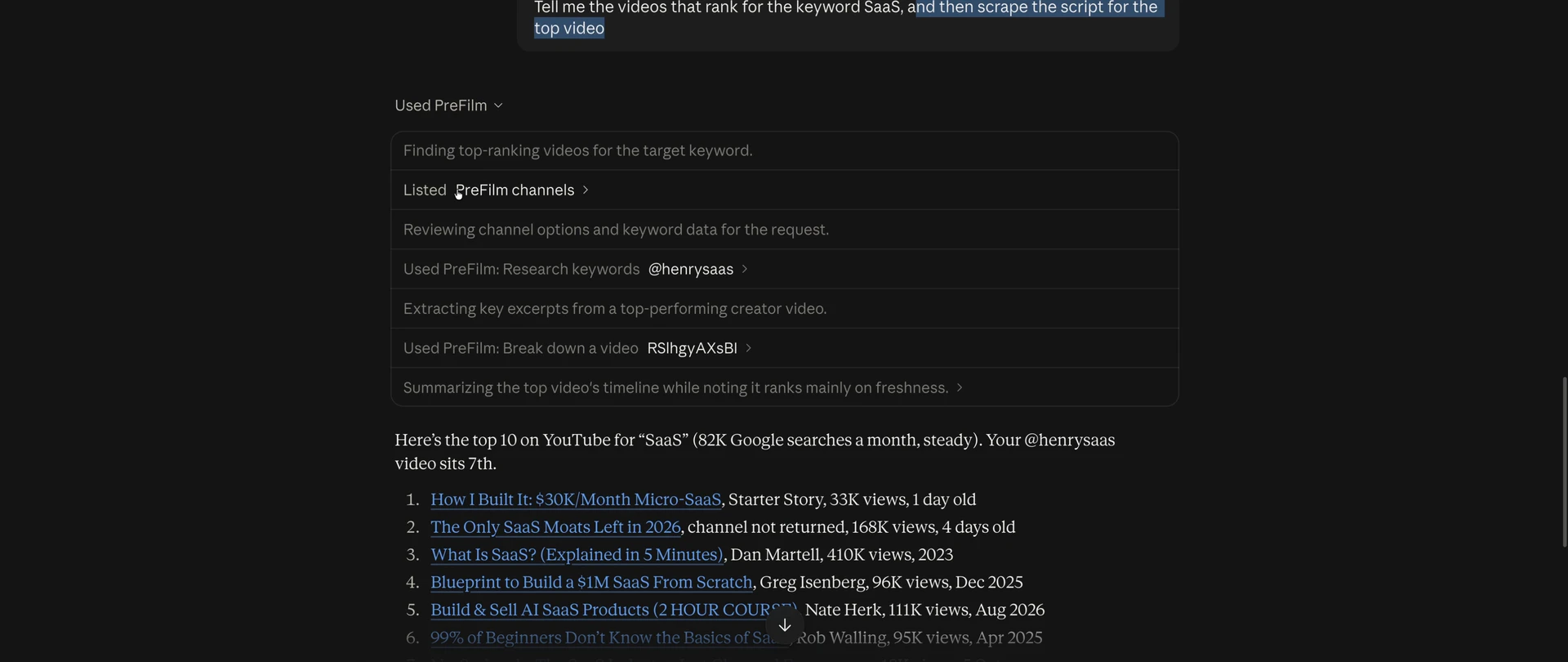
PreFilm is built to get business owners more customers from YouTube, and it does this for your niche. It reads your website, what you sell and who buys it, then turns outliers in and around your niche into video ideas, each with the video it came from and how far it beat that channel's normal. I use its YouTube MCP from Claude every day. In my growth tools recording, I asked Claude for the videos ranking for the keyword SaaS, and it used PreFilm to research the keyword, break down the top video and list the top 10.
What I don't like: it's new, and I do most of my own work through the MCP rather than the dashboard. It's not the cheapest either. There's no free plan; monthly plans start with $1 for 7 days, then Creator is $49 a month, with everything on the pricing page. And it works best once you've published a few videos, so if you're brand new, start with the free tools and the blog.
7. TubeLab: cheaper outlier research with an MCP
TubeLab is outlier and niche research with a script writer, and its homepage is all about getting views. Starter is $29 a month, prices vary by location, there's no free plan or trial, and its MCP for Claude and ChatGPT is included on every plan.
The setup is the best part. It analyses your channel and your competitors, which 1of10 doesn't, and it makes better recommendations because of it. I also like its feed of new viral videos from small channels. But the ideas on my account home weren't that great, and one of them was my own video. The Niche Finder is built for faceless channels chasing views, and the script writer and trend reports sat behind upgrades on my plan. See PreFilm vs TubeLab.
Is ViewStats accurate?
ViewStats is accurate for public numbers like subscribers and total views, but its revenue figures are estimates. Its help centre article on how estimated revenue is calculated says it combines a channel's CPM with its views and a few other factors, and says plainly that the results are estimates. Social Blade's earnings FAQ uses a low RPM of $0.25 and a high RPM of $4.00, and assumes every view is monetised.
Here's Sunny Bae's channel on all three, on the same day:
Tool (2 Nov 2026)
Recent views
New subscribers
Estimated revenue
ViewStats
26.10K (28 days)
330 (28 days)
$49 to $138 (28 days)
Social Blade
32K (30 days)
380 (30 days)
$8 to $128 a month
vidIQ
26.81K (28 days)
350 (28 days)
$86 estimated ad revenue
Views and subscribers land close together, because they come from YouTube's public numbers. The revenue doesn't, because each tool guesses differently. For your own channel, YouTube Analytics in YouTube Studio has the real figures, and it's free.
Other tools people suggest
These come up in other ViewStats alternative lists too:
OutlierKit is outlier and competitor research aimed at coaches, consultants and experts, from $49 a month, with its MCP on every paid plan and 30 free trial credits. I haven't tested it on camera. See PreFilm vs OutlierKit.
TubeBuddy has no public stats site, but Channelytics in its free extension shows any channel's views, subscribers and 30-day growth while you browse. See PreFilm vs TubeBuddy.
YouTube Studio is the only place with your own channel's real numbers. It can't show you anyone else's.
Which ViewStats alternative should you pick?
Pick the one that answers the question you kept opening ViewStats for:
How is this channel doing? Social Blade or vidIQ's stats pages, both free.
Who's top in my country or category? Playboard.
How is this creator doing on TikTok and Instagram too? Social Blade, or NoxInfluencer if you're a brand.
Which videos are beating their channel's normal? 1of10, or TubeLab if you want it cheaper.
What should I film next to get customers? PreFilm.
I don't judge my own channels on stats. I care about the customers YouTube brings in. If that's your goal too, my roundup of YouTube analytics tools covers which numbers are worth paying for.
Stop guessing what to film.
PreFilm finds the videos your buyers already watch and writes the script in your voice. $1 for 7 days.
Social Blade is the best ViewStats alternative for free channel stats, because it shows any channel's subscribers, views, ranks, growth and an earnings range without an account. vidIQ's free stats pages come second. If you used ViewStats Pro for outlier and thumbnail research, 1of10 is the closest match.
Is there a free ViewStats alternative?
Yes. Social Blade and vidIQ's YouTube stats pages are both free and need no account to look up a channel. Playboard gives a free account five channel reports a day, and the free plans from vidIQ and 1of10 include a limited outlier search, so you can try research tools without paying.
Is ViewStats free?
Yes, mostly. ViewStats' free site shows any channel's subscribers, views, estimated revenue, rankings, projections and similar channels, and its Chrome extension is free. The research tools, including Outliers, Thumbnail Search, Alerts and Competitors, need Pro, which showed as $49.99 a month from the UAE and varies by location.
Is ViewStats accurate?
ViewStats is accurate for public numbers like subscribers and total views, which come from YouTube's public API, but its revenue figures are estimates. Its help centre says revenue is worked out from a channel's CPM, its views and a few other factors. For your own channel, YouTube Studio has the real figures.
Who owns ViewStats?
ViewStats' own FAQ says it was co-founded by MrBeast, and its logo reads Powered by MrBeast. That's the only ownership detail it publishes on its site. PreFilm is a separate company with no connection to ViewStats or MrBeast, and this list uses only what each tool says on its own site.
How can I see YouTube analytics for other channels?
You can see YouTube analytics for other channels on free stats sites like Social Blade, ViewStats and vidIQ's stats pages, which show subscribers, views, growth and estimated earnings. Only the channel owner sees the real figures in YouTube Studio, so every outside number for views over time or revenue is an estimate.
Is there a free YouTube outlier tool?
Yes. vidIQ's free plan shows up to six videos per outlier search, 1of10's free plan shows five results per search, and ViewStats' free Chrome extension adds an outlier score to videos as you browse YouTube. PreFilm's outlier badge is free too: a multiplier on every long-form video, no account needed. For full outlier search with filters, every one of them asks you to pay.